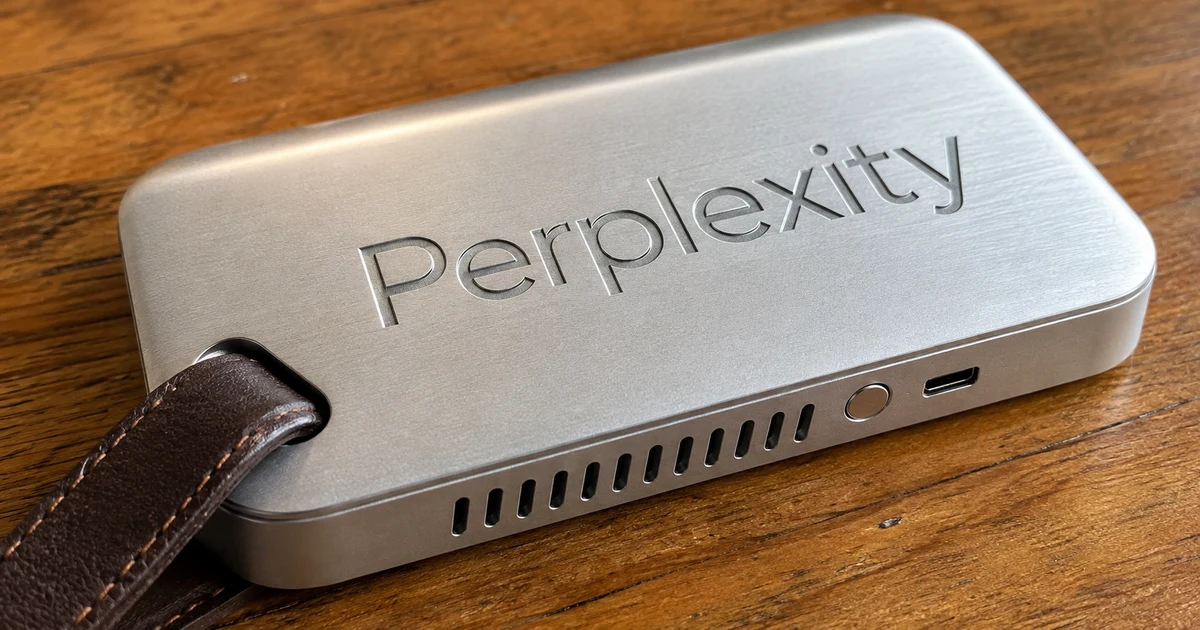
Portable ComputerはローカルAIエージェント
Portable Computerは、Perplexity ComputerをPC内で動作させるローカル版のエージェントです。Perplexity Computerは、複数の手順からなる作業を計画して実行します。また、Portable Computerは、NVIDIAのGPUで高速に動作するPC内のモデルを使って、データの分析や複数のファイルにまたがる情報の統合、繰り返しの作業をこなします。
機密情報はPCに残り、PCの中で終えた作業にPerplexity Computerのクレジットはかかりません。社外に出したくない資料を使う作業も、PCの中で終えることができます。Perplexityは8月25日の発表で、PC上で動作する部品を次の6つと述べています。
- オーケストレーター(作業全体を指揮する部品)
- プランナー(段取りを立てる部品)
- ツールルーター(利用する機能を選ぶ部品)
- スケジューラー(作業を実行するタイミングを定める部品)
- 待ち行列(途中で消えない作業の順番待ち)
- 検索索引(探したい情報の場所を控えておく仕組み)
"Portable Computer is a local version of the agent Perplexity Computer that plans and carries out multistep tasks. Accelerated by NVIDIA GPUs, it uses local models to analyze data, bring together information across files and handle recurring work. Sensitive information stays on device, and locally completed work doesn’t consume Perplexity Computer credits."(本文)— NVIDIA Blog より公式情報を見る →
"The orchestrator, planner, tool router, scheduler, durable task queue, and local search index all run on device."(Local-first AI stack 節)— Perplexity Blog より公式情報を見る →
DGX Sparkに続いて対応する機器は何か
対応先はDGX Sparkから始まり、9月14日にWindowsのRTX搭載PCへ拡大しました。最初の提供先は、Grace Blackwell GB10を搭載したNVIDIAの機器「DGX Spark」でした。8月25日の時点で動作するのはLinux版だけで、Windows版は、その時点で「近く」対応する予定でした。
9月14日、WindowsのGeForce RTX PCとRTX PROワークステーションへの対応が加わりました。NVIDIAによると、この提供はDGX SparkとLinuxで動作するRTX PCへの対応に続くものとのこと。NVIDIAは、DGX Stationへの対応も近日中の見込みとしています。
"September 14, 2026"/"Today, Perplexity is adding Portable Computer in the Perplexity app for Windows on compatible NVIDIA GeForce RTX PCs and NVIDIA RTX PRO Workstations"/"The release builds on existing support for NVIDIA DGX Spark systems and RTX PCs running Linux"/"NVIDIA DGX Station support is expected to come soon."(本文)— NVIDIA Blog より公式情報を見る →
"The first release is available on Linux, with Windows support coming soon."(Today is just the beginning 節)— Perplexity Blog より公式情報を見る →
WindowsはVRAM24GB以上のRTXかRTX PRO
Windowsで動作させる条件は、VRAMが24GB以上のGeForce RTXかRTX PROです。VRAMとは、GPUが専用に持つメモリのことです。また、ご自身のPCが対象かどうかはGPUの型番とVRAMの容量を見れば判断できます。
アプリがローカルモデルを備えているので、モデルを選んだり複雑なソフトを設定したりする作業は必要ありません。8月25日の時点で、対象はDGX Spark上のProとMaxの加入者でした。Windows版の対象プランを、NVIDIAは明らかにしていません。
Windows版の対応条件(公式の記載)
| 条件 | 内容 |
|---|---|
| 提供開始 | 2026年9月14日 |
| 追加された場所 | Windows版のPerplexityアプリ |
| 対象のPC | 対応するGeForce RTX PCとRTX PROワークステーション |
| 必要なVRAM | 24GB以上 |
| 先に対応済み | DGX Spark・Linuxで動作するRTX PC |
| 近日対応の見込み | DGX Station |
| 対象プラン | Windows版は公表なし(8月のDGX Spark版はProとMax) |
"Portable Computer is available for NVIDIA GeForce RTX and RTX PRO GPUs with 24GB or more of VRAM."/"Users can put the agent to work without having to research models or configure the complex software stack typically required to run local AI."(本文)— NVIDIA Blog より公式情報を見る →
"Portable Computer is available to Pro and Max Subscribers on the NVIDIA DGX Spark."(Today is just the beginning 節)— Perplexity Blog より公式情報を見る →
Qwen 3.8などWindowsで動作するローカルモデル
NVIDIAの記事で例に出ているローカルモデルは、Qwen 3.8 27Bです。このモデルは、Perplexity Computer向けに事後学習(学習を終えたモデルへ用途に合わせた訓練を追加すること)され、RTX GPU向けに最適化されています。
8月の発表にあるPPLX 27Bは、Qwenのモデルを事後学習したモデルです。
コネクター(外部のアプリと連携する仕組み)は、NVIDIAの記事では7つです。内訳は、Microsoft Outlook・OneDrive・Word・Google Drive・Gmail・Slack・GitHubです。8月25日の時点では、Google Drive・Gmail・Slack・GitHubの4つでした。NVIDIAは使用例を次の3つで紹介しています。
- 開発: 接続したGitHubプロジェクトで未処理のプルリクエストを状況別に整理し、次にやる作業を提案する。古くなったドキュメントも見つけて更新案を出す
- 経理: 証券会社の報告書・統合1099(米国の税務書類)・確定申告書の2年分から、避けられる手数料と税負担の原因になっている保有銘柄を探す。数字の出所は正確なファイルとページで添える
- スタートアップ: 利用の伸びが止まった理由を、ファンネル(ユーザーが段階ごとに減っていく流れ)の出力をPC内で分析して探し、上位の知見をSlackのチャンネルへ投稿する
"The app simplifies setup with a local model, such as Qwen 3.8 27B, that is post-trained to work with Perplexity Computer and optimized for NVIDIA RTX GPUs."/"Connectors for Microsoft Outlook, OneDrive, Word, Google Drive, Gmail, Slack and GitHub extend that experience across the files and apps already part of users’ daily workflows."(本文)— NVIDIA Blog より公式情報を見る →
"Portable Computer runs on the NVIDIA DGX Spark with Qwen 3.8 27B or with PPLX 27B, a post-trained version of the Qwen model."/"Through app connectors, Portable Computer works with Google Drive, Gmail, Slack, and GitHub."(Local-first AI stack / Escalation to cloud 節)— Perplexity Blog より公式情報を見る →
クレジットを消費しない範囲はどこまでか
PC内で終わる作業はクレジットを消費せず、クラウドへ送信する前にはユーザーの許可を求めます。より高度な調べものや推論が必要なときは、ユーザーが作業をクラウドのモデルへ回すこともできます。Perplexityが8月に紹介した例は、投資条件書(ターム・シート)の機密部分をPCに残したまま、最新の市場比較や最近の先例となる案件だけをクラウドで調べる使い方です。
このアプリは、Perplexity Computerの内蔵ブラウザと独自のSPACEサンドボックスも使います。サンドボックスとは、外部から切り離された安全な実行環境のことで、Portable ComputerはローカルのAIとクラウドのAIを1つのアプリで組み合わせます。
"Users can also orchestrate work up to cloud models for more advanced research and reasoning."/"take advantage of Computer’s built-in tools such as the built-in browser and proprietary SPACE sandbox"/"Portable Computer can also identify when a task needs cloud support, asking the user for permission before sending information off-device."(本文)— NVIDIA Blog より公式情報を見る →
"When a task needs to send content from the device to a cloud service, Portable Computer asks the user for permission before moving forward."/"A user might want the confidential details of a term sheet to stay local, but escalate to the cloud to get current market comps or recent precedent deals."(Escalation to cloud 節)— Perplexity Blog より公式情報を見る →
Windows版の導入にはVRAM24GB以上のGPUが必要
Portable Computerは、VRAM 24GB以上のGeForce RTXかRTX PROを積んだWindows PCに対応しました。PC内で終わる作業はクレジットを消費せず、クラウドへ送信する前には許可を求めます。
Windowsで選択可能なモデルの一覧と、Windows版の対象プランを、NVIDIAは9月14日の時点で明らかにしていません。導入を考える場合は、お使いのGPUのVRAMが24GB以上あるかを先に確認しておくといいでしょう。
FAQ
- Portable ComputerはWindowsで動作しますか?
- 2026年9月14日から、Windows版のPerplexityアプリで動作させることができます。対象は、VRAMが24GB以上のNVIDIA GeForce RTXとRTX PROのGPUです。DGX Stationへの対応は、NVIDIAが近日中の見込みとしています。
- Portable Computerはクレジットを消費しますか?
- PCの中で終えた作業は、Perplexity Computerのクレジットを消費しません。より高度な推論のためにクラウドへ送信する場合は、情報をPCの外へ出す前にユーザーへ許可を求めます。
- Windowsではどのローカルモデルを選ぶことができますか?
- NVIDIAの記事で例に出ているのは、Perplexity Computer向けに事後学習し、RTX GPU向けに最適化したQwen 3.8 27Bです。
関連する記事
 NVIDIAが英国のAIエージェント安全性研究に2.5億ドル分の計算資源NVIDIAは2026年10月13日に、英国のAIエージェントの安全性研究へ5年で2億5,000万ドル(約395億円)相当の計算資源を寄付すると発表しました。現金ではなく、クラウドでGPUを使う権利です。フアンCEOはパリで欧州への20億ドル(約3,160億円)の新規投資も予告しましたが、提供条件も欧州投資の内訳もまだ定まっていません。
 AIエージェントのハーネスとは?NVIDIAのAVOによる検証結果AIエージェントのハーネスとは、モデルの外側の仕組みです。NVIDIAによると、Claude Opus 5で動作させたAVOはARC-AGI-3の公開セット全25環境でRHAE 100.00を記録し、183レベルをクリアしたとのこと。非公開セットの値でなく、別条件の約30%との差もAVOの効果とはいえません。
 LFM2.5-2.6Bとは?スマホで動作するエージェント用ローカルLLMLiquid AIのLFM2.5-2.6Bはツールを使うエージェント処理に特化した小型モデルで、4倍規模のモデルに匹敵するとしています。M5 Maxで毎秒220トークンを出し、メモリ2.5GB未満で動作しますが、コーディングや知識量が必要な作業には適していません。
 台湾在住の1人がAIエージェント12体で11か国を攻撃、Acronisが報告Acronisは2026年11月4日、台湾に住む1人の攻撃者が12体のAIエージェント(稼働は9体)を使い、11か国で数百もの組織を狙ったと報告しました。侵入が確認されたのは3か国の約10の標的で、台湾では救急患者の記録が認証なしで見られる状態だったとのこと。侵入には、修正されていないデータベースなど昔からある弱点が使われました。