A character counter tells you how many characters your text has, and the sakuttoAI character counter does it as you type. It shows the count with and without spaces, plus lines, paragraphs and bytes, so you can read the figure that matches the rule you have to meet.
How to use the character counter online
A character counter counts the characters in a piece of text as you type or paste it. The sakuttoAI character counter is free and runs in your browser, with nothing to install. Using it takes three steps:
- Type your text into the text area, or paste text you copied.
- Read the counts, which update as you type.
- Click any number to copy it to your clipboard.
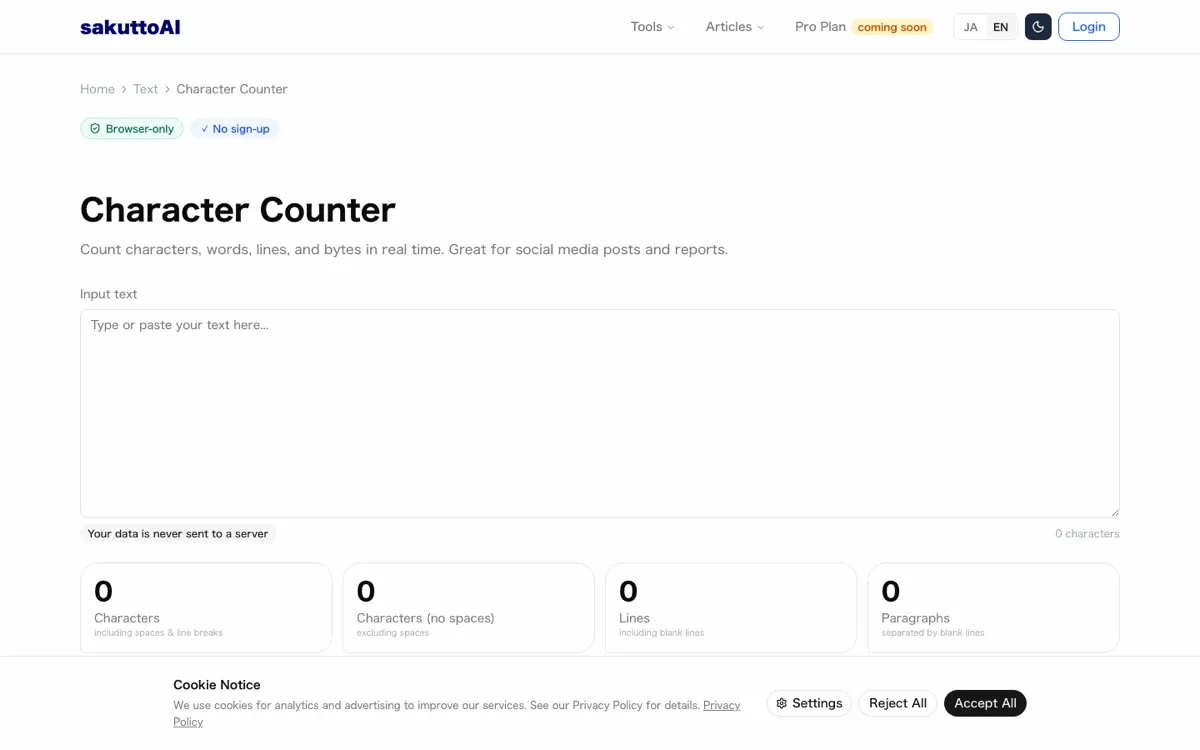
The counter shows several figures for the same text. Each figure fits a different kind of limit.
What the character count tool shows as you type
The tool shows eight figures on cards at once. Below the cards it shows byte counts for three encodings, which are rules for turning characters into bytes. A byte is the unit a computer uses to store text, and one character can take more than one byte, so the byte figures can differ from the character figures.
| Figure | What it counts |
|---|---|
| Characters | Every character, including spaces and line breaks |
| Characters (no spaces) | Every character except spaces; line breaks still count |
| Lines | The number of lines, blank lines included |
| Paragraphs | The number of blocks separated by blank lines |
| Manuscript pages | Pages of 400-character Japanese manuscript paper |
| Read time | Reading time at about 500 characters a minute |
| Words | The number of runs of English letters |
| Full / Half width | Full-width and half-width characters, leaving out spaces and line breaks |
Clicking a figure copies it. That's handy when you have to write a count on a cover page or a form.
Count characters on iPhone and Android
The character counter works in iPhone and Android browsers. Paste your text and the count appears at once, so you can check a draft you wrote on your phone before you send it. Processing happens in the browser, and your text is not sent to any external server.
Character count with spaces and without spaces
The counter shows the same text counted two ways side by side. Pick the figure that your rule names.
| Figure | What is counted | What is left out |
|---|---|---|
| Characters | Everything in the text | Nothing |
| Characters (no spaces) | Everything except spaces | Spaces |
Another program may count spaces or line breaks differently. When its number differs from the one you see here, compare it with both figures. For a count without spaces or line breaks, take Characters (no spaces) and subtract the line breaks, which number one fewer than Lines.
Do spaces count as characters?
Yes, in the Characters figure every space counts as one character, whether it is full-width (the wide form common in Japanese text) or half-width; Characters (no spaces) leaves them out. Check first whether your own rule counts spaces, because the totals differ. To find out which count applies, go through these in order:
- Look for wording such as "including spaces" or "excluding spaces" beside the limit.
- Look for a note about line breaks.
- If the rule names neither, ask whoever set it.
Line breaks, lines and paragraphs in the count
A line break, which you make with the Enter key, counts as one character in the Characters figure. Characters (no spaces) still counts it, so subtract the line breaks yourself when a rule leaves them out. Two other figures describe the shape of the text:
- Lines counts the rows of text.
- Paragraphs counts the blocks separated by blank lines.
Pressing Enter once starts a new line. A new paragraph starts only after a blank line.
Letter counter and character type breakdown
After the totals, the counter also shows what the text is made of. It gives a separate count for each of six character types:
- Hiragana, one of the two syllable scripts used in Japanese
- Katakana, the other syllable script used in Japanese
- Kanji, the characters of Chinese origin used in Japanese
- Letters
- Digits
- Symbols
The breakdown is useful for text that mixes Japanese and English. If you need a letter counter, read the Letters figure, because it counts only letters of the alphabet.
Characters vs letters: what each number includes
The Characters figure includes spaces and line breaks, along with letters, numbers and symbols. The Letters figure counts letters of the alphabet only, not numbers or symbols. For the same text, a letter count cannot be larger than the character count.
| Figure | What it includes |
|---|---|
| Characters | Letters, numbers, symbols, spaces and line breaks |
| Letters | Letters of the alphabet only |
Checking the balance of kanji, kana and letters
Compare the six counts and rework the text wherever one type runs higher than you expected. For example, if you expected mostly kana and the kanji count is the highest, the text deserves a second look.
Byte counter: UTF-8 and Shift-JIS byte counts
A byte count and a character count of the same text can differ, because one character can take more than one byte. The counter shows bytes for three encodings: UTF-8, Shift_JIS (an estimate) and UTF-16. An encoding is the rule that turns characters into bytes, and how many bytes a character takes depends on it.
The byte figure matters when a form or system sets its limit in bytes, not characters. Match the figure to the rule:
- If the rule names UTF-8, read the UTF-8 figure.
- If the rule names Shift-JIS, read the Shift_JIS figure.
- If the rule names UTF-16, read the UTF-16 figure.
- If the rule counts characters, read a Characters figure.
Full-width and half-width characters in a count
Full-width characters are the wide forms used in Japanese text, and half-width characters are the narrow forms. Each counts as one character, and whether their byte counts differ depends on the encoding.
| Count | Full-width character | Half-width character |
|---|---|---|
| Character count | One character | One character |
| UTF-8 bytes | Usually 3 bytes | 1 byte for letters and digits, 3 bytes for katakana |
| Shift_JIS bytes (estimate) | 2 bytes | 1 byte |
| UTF-16 bytes | Usually 2 bytes | 2 bytes |
UTF-16 is the only figure where the two forms take the same number of bytes. For text that mixes both forms, sakuttoAI also has a full-width and half-width converter that switches characters from one form to the other.
Checking a character limit before you post or submit
How many characters you may use depends on the form, platform or assignment that sets the limit, so no single figure fits every case. To check a text against that limit:
- Find the limit where you will submit the text.
- Check whether it counts spaces and line breaks.
- Paste your text into the counter and read the figure that matches.
- If the figure is over a maximum, shorten the text and check the figure again.
Social media and SMS limits differ by platform
Each platform sets its own limit and its own counting rule, and can change them. Check the limit on the platform itself, then compare it with the matching figure from the counter.
Essays, reports and forms with a length rule
When an assignment or form says "at least" or "no more than" a number of characters, ask whether spaces and line breaks count. Then compare your text with the matching figure:
- If spaces and line breaks both count, read Characters.
- If spaces do not count but line breaks do, read Characters (no spaces).
- If neither counts, take Characters (no spaces) and subtract the line breaks, which number one fewer than Lines.
- If the rule counts bytes, read a Bytes figure.
Paste your text into the character counter and read the figure that matches the rule. The text stays in your browser the whole time.
FAQ
- Is my text sent to a server?
- No. All processing happens in your browser, and the text is not sent to any external server.
- Is there a maximum number of characters I can count?
- The counter has no stated maximum, and it works for ordinary documents. A limit set by a form or platform is a different matter. Check that limit where you submit your text, then compare it with the matching figure from the counter.
- Are half-width characters counted as one character?
- Yes. In the character count, each half-width character and each full-width character counts as one character. The byte figures depend on the encoding. In UTF-16 both forms take 2 bytes. In the Shift_JIS estimate a half-width character takes 1 byte and a full-width one takes 2, and in UTF-8 a half-width letter or digit takes 1 byte while a full-width character usually takes 3.
- Why does my count differ from another app's count?
- Another program may count spaces or line breaks differently. The counter shows the count with spaces and the count without spaces side by side, so you can compare the other app's number with each one.
- Are line breaks counted as characters?
- Yes. A line break, which you make with the Enter key, counts as one character in the Characters figure. Characters (no spaces) still counts it. To leave line breaks out, subtract the number of line breaks, which is one fewer than the Lines figure.
Related articles
 Characters vs Bytes: UTF-8, VARCHAR, GraphemesCharacters vs bytes: é takes 2 bytes in UTF-8, and a VARCHAR character limit differs per database. Why the two counts diverge, and where it actually matters.
 Essay word count: what actually gets countedEssay word count, measured: the same paragraph gives 17 characters with spaces and line breaks, 16 without, one emoji as two and a family emoji as eight.
 Meta Description Length and SEO Title LengthGoogle sets no fixed limit on meta description length or SEO title length, but it shortens both to fit the device. Here is how to write and check them.
 Social media character limits: X, YouTube and moreSee official social media character limits for X (Twitter) and YouTube, how X counts characters, and how to check Instagram, Facebook, TikTok, LinkedIn.