
What is Claude Duet?
Claude Duet is an agent app from Anthropic that reaches out to you first. An agent is an AI that works through several steps on its own instead of answering one prompt at a time. Anthropic opened Duet as a research preview, an early test release, on October 21, 2026.
Regular Claude waits for you to type something. Duet flips that: it watches the apps you connect, flags anything that needs a decision, carries on with tasks when you step out, and pauses for your OK before doing anything in your name.
Anthropic aimed it at busy professionals and small business owners juggling more than they can keep track of. (Related: What Is Claude AI? Free Plan, Models, vs ChatGPT)

A separate app that carries over your Claude setup
During the preview, Duet ships as its own app rather than a mode inside the main Claude app. You can get it on iOS and Android, or open it on claude.ai in a browser.
Setup is light because Duet signs in with your Claude account. The memory, skills and connected apps you already use in Claude are there from the first message. You talk to it by typing or by voice in a single running thread, and you can open extra channels for separate topics that still share the same memory.
It runs on Claude Opus 5.5 with no model choice
Duet always uses Claude Opus 5.5, and there is no setting to pick a different model. It also decides on its own how much effort each job deserves.
Anthropic points to judgment as the feature that matters most: knowing what to bring to you, what can wait, and when to check in before acting. That judgment comes from Opus 5.5. (Related: Claude Opus 5.5 pricing, benchmarks, API changes)
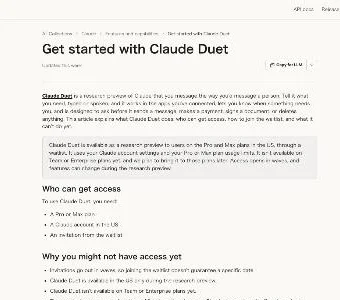
"Today, we’re opening a research preview of Claude Duet, a new app where Claude works as a proactive agent."/"For now, Claude Duet lives in its own app, separate from the main Claude app."/"Claude Duet carries over your memory, skills, and connected apps from your Claude account, so setting it up requires minimal work." — Anthropic announcementView official source →
"You can't choose a model. Claude Duet runs on Claude Opus 5.5 and decides how much effort a job needs." — Claude Help CenterView official source →
What Claude Duet does during the day
Duet's day breaks down into four jobs: a morning summary, regular check-ins, background tasks and work inside your business apps. All four run through the apps you have connected to Claude.
A morning brief from your email and calendar
Every morning, Duet reads your connected inbox and calendar and sends a short rundown of what matters most that day. It can also get a head start, for example by drafting replies for you to look over.
During the day it posts progress on the jobs it is running and nudges threads that have gone quiet. One early tester, Jess, said Duet caught a property showing she had put on her calendar for the wrong day, without being asked.
Check-ins every few hours, messages only when needed
Duet looks through your connected accounts every few hours and only messages you when something needs your attention. Anthropic spaced the checks out on purpose, since constant scanning would drain your plan's usage much faster.
You can tell Duet which topics you want to hear about and how often. Anthropic says it is still tuning when Duet decides to speak up, based on tester feedback.
Background work on its own cloud computer
Duet runs on a virtual machine with its own browser, so your laptop and phone can stay off. A virtual machine is a computer that lives in the cloud rather than on your desk. Closing the app does not stop a job in progress.
You describe a task in a short message, and Duet picks the apps and steps. Larger results come back as files in the Make tab: research briefs, financial models, slide decks and dashboards. The Tasks tab lists what is in progress and what is waiting on you, and only you can mark a task as done.
Over 6,000 connectors for business apps
Duet can draw on more than 6,000 connectors and plugins from the Claude Marketplace. A connector is an add-on that links Claude to another app. Anthropic gives seven examples.
| App | What Duet handles |
|---|---|
| Gmail and Slack | Finds messages you missed and helps you reply |
| QuickBooks and Stripe | Spots unpaid invoices and drafts reminders |
| Gusto | Prepares and runs payroll with hours, bonuses and reimbursements |
| Drafts a job post and publishes it after you edit and approve it | |
| Docusign | Prepares agreements and sends them out for signature |
| HubSpot | Writes follow-up emails from contact and deal history |
| Shopify | Sets up, designs and manages your store |
For sites without a connector, Duet uses its cloud browser. It can also buy things through Link, Stripe's digital wallet, or Shop Pay from Shopify. It asks before every purchase and pays with a single-use card, so your actual card number never reaches the store.
"Each morning, it sends you a short brief on the most important items across your connected apps."/"Claude Duet checks your connected accounts every few hours, because checking nonstop would use up your plan’s limits much faster."/"Claude Duet can use the over 6,000 connectors and plugins in the Claude Marketplace" — Anthropic announcementView official source →
"Finished work appears in the Make tab."/"It may suggest that a task looks finished, but only you can mark a task as completed."/"Claude Duet is designed to ask before each purchase, and each purchase uses a one-time card that only works for that purchase." — Claude Help CenterView official source →
Actions Claude Duet won't take without your approval
Duet does the reading, drafting and prep on its own, then stops before anything that leaves your accounts. Everything it does sorts into three tiers.
| Tier | Examples |
|---|---|
| Does on its own | Reads connected apps, drafts, prepares work |
| Waits for your approval | Sends a message, makes a payment, signs a document, deletes anything |
| Won't do even if you approve | Trades securities, moves money between accounts, opens someone else's account |
Sending, paying, signing and deleting wait for you
For those four actions, Duet shows you exactly what it plans to do and holds until you say yes. If you are busy, it finishes everything else in the task and comes back with the approval later.
When it hands you a number or a summary, it names the email, file or spreadsheet the figure came from. You can disconnect any app whenever you like, and Duet loses access to it from that moment.
Trading securities and moving money are off-limits
Some actions are blocked even when you approve them: trading securities, moving money between accounts and getting into another person's account. No setting turns these on.
Credentials and card numbers stay out of reach
Duet handles credentials the same way Claude Managed Agents do, so it never sees your passwords or sign-in tokens directly. When a site asks for a password, you enter it in a separate form on your device, and it goes to the browser without passing through your chat.
Each action is screened by the same auto mode classifier that guards Claude Code, a separate model that blocks steps you did not ask for. A second, dedicated classifier refuses requests to share credit card numbers or government ID, and health or personal finance details go out only when you explicitly say so. (Related: Claude Code Auto Mode Is Now the Default Setting)
Emails and web pages can hide instructions meant to steer an agent off course. Duet is built to treat that content as information, not orders, but Anthropic admits no defense is perfect. That gap is part of why the high-stakes actions need your sign-off.
"But before it sends a message, makes a payment, signs a document, or deletes anything, it shows you exactly what it’s about to do and waits for your approval. A few things are off-limits even with your approval, like trading securities or moving money between accounts."/"so it never directly sees your passwords or sign-in tokens." — Anthropic announcementView official source →
"If you can’t approve right away, Claude Duet finishes the rest of the task and brings the approval back to you later."/"Claude Duet is built to treat what it reads as information and to act on what you ask, but no defense is perfect, which is one reason consequential actions need your approval." — Claude Help CenterView official source →
Claude Duet pricing and usage limits
While the research preview lasts, Duet comes with Pro and Max at no added charge. The trade-off is that it shares your usage limits with the rest of Claude. Usage limits cap how much you can use Claude within a set window of time.
No extra fee on Pro and Max during the preview
You do not pay anything separate for Duet while it is in preview. A Pro or Max plan is required, so free accounts are left out. Anthropic has not said what Duet will cost once the preview ends.
Background work counts toward your limits
Duet draws on the five-hour session limit and the weekly limit at the same rate a normal Claude chat does. The difference is that its unprompted work, like the morning brief and the check-ins, also comes out of that budget.
That means you can hit your cap sooner than you would with chat alone. Big jobs such as a financial model or a slide deck take more model turns and more background work, so they cost more of your allowance. The few-hours gap between check-ins exists for the same reason.
One full limit reset until November 30
When you are let into the preview, you get a single full reset of both your five-hour and weekly limits. You have until November 30, 2026, to use it.
"Pricing. During the research preview, Claude Duet is included with the Pro and Max plans at no extra cost."/"Work it does in the background, like the morning brief and check-ins, also counts, so you may reach your limits sooner than with chat alone."/"This limit reset is available until November 30, 2026." — Claude Help CenterView official source →
"Its background checks count toward those limits, and larger tasks, like building a financial model or a deck, require more model turns and background work." — Anthropic announcementView official source →
Who can get Claude Duet and how to join the waitlist
Getting Duet means joining a waitlist and waiting for an invite. A waitlist is a queue of people waiting for access, and signing up does not unlock the app right away.
Three requirements for access
You need all three of the following, and missing any one of them keeps you out. People on a free plan or outside the US do not qualify.
- A Pro or Max plan
- A Claude account based in the US
- An invite from the waitlist
Invites roll out in waves, and joining does not lock in a date. Your invite is tied to the email you used to sign up. If that address differs from your Claude account or from the Google or Apple account on your phone, you will not get in, so use the same address everywhere.
How to sign up and get started
Signing up and getting into the app takes six steps. After you accept the invite, the app can take a few minutes to show up.
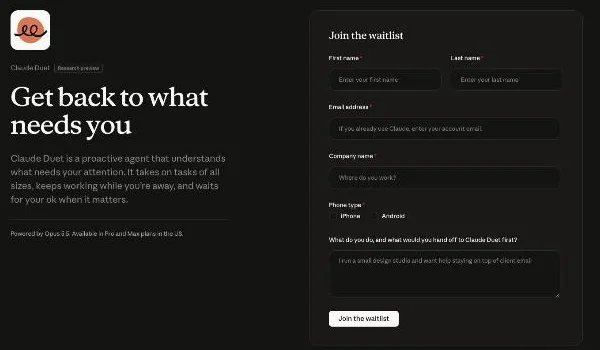
- Go to the Claude Duet product page and select "Join the waitlist"
- Enter your name and email (use your Claude account email if you already have one)
- Choose iPhone or Android and the Claude plan you are on; you can also describe your work and the first job you would give Duet
- Select "Submit"
- When your turn comes, open the invite on your phone and follow the iPhone or Android setup steps
- Launch Duet and sign in with your Claude account
Not available outside the US or on Team plans yet
For now, Duet is limited to the US, and Team and Enterprise plans cannot use it. Anthropic plans to add those business plans later but has not given a date. It has not said when other countries will get access either.
"Invitations go out in waves, so joining the waitlist doesn't guarantee a specific date."/"Access is tied to the email address you gave us."/"Claude Duet is available in the US only during the research preview."/"It isn't available on Team or Enterprise plans yet, and we plan to bring it to those plans later." — Claude Help CenterView official source →
Claude Duet vs Claude Cowork
The core difference is who kicks off the work. Claude Cowork, also from Anthropic, starts when you give it a goal. Duet keeps an eye on your connected apps between requests and comes to you when it spots something.
Cowork works inside the folders and tools you point it at and hands back documents, decks and spreadsheets for you to review. It shows each file it opens, each tool it uses and each choice it makes, so you can steer it mid-task. Duet offers no such view: you cannot watch its browser, and it cannot open files on your computer.
| Claude Duet | Claude Cowork | |
|---|---|---|
| Who starts the work | Duet brings items to you, and also takes requests | You give it a goal |
| What it works on | Email, calendar, invoices and other connected apps | Folders and tools you choose |
| Can you watch it work? | No view into its browser | Shows each step as it goes |
| Where it runs | Standalone mobile app and claude.ai | Inside Claude on web, desktop and mobile |
| Who can use it | US Pro and Max, by invite | Paid Claude plans |
Cowork can also run scheduled tasks daily, weekly or monthly and keeps going after you close your laptop, so it already covers recurring reports and folder cleanup. What Duet adds is noticing what needs doing before you ask. (Related: Claude in Chrome vs the Cowork built-in browser)

"Works directly in folders and tools you choose, and runs your task to deliver work for review."/"Claude shows each step: the files it opens, tools it uses, and choices it makes. Follow along from anywhere, and redirect it if you need to." — Claude Cowork product pageView official source →
What Claude Duet can't do yet
Anthropic's help center spells out several gaps in the preview. Knowing them up front helps you decide what to hand over.
You can't watch or take over its browser
There is no way to see Duet's cloud browser while it works, and you cannot grab control partway through. Instead of following along step by step as you would in Cowork, you review the result and the approval requests afterward.
No computer files, phone calls or Microsoft 365
Duet cannot open files stored on your computer or see all of your Claude projects. It can read your work in Claude, but it cannot edit it.
It does not place phone calls or text other people, though it can send email from a connected account once you approve. Some connectors are restricted too: Slack works with limits, and Microsoft 365 is not supported yet.
Urgent items can wait until the next check
Because Duet checks your accounts on a schedule, something urgent that lands between two checks may sit until the next one. If your work depends on fast replies, keep another way to catch urgent messages.
Anthropic also warns that this early version can misread a thread or get the urgency of an item wrong, and that personal errands such as booking tickets are a weaker spot. Read drafts and approval requests before you confirm them.
"You can't watch Claude Duet work in its browser or take over the browser."/"It checks your accounts at set intervals, so something urgent can arrive between checks."/"Some connectors, such as Slack, work with limits in Claude Duet. Microsoft 365 isn't available yet." — Claude Help CenterView official source →
"This is an early version of Claude Duet, and it still might misread a thread or miscalibrate what’s urgent." — Anthropic announcementView official source →
Free to try, but paid for in usage limits
The real price of Claude Duet shows up in your usage meter, not on your bill. Every check-in and morning brief spends from the same pool your chats use, and you control how much by choosing which apps to connect and how often Duet should reach out. If you already lean on Claude chat most days, those two settings decide how much room is left for everything else you do in Claude.
The approval step protects the moment an action leaves your accounts, but misreads and missed urgency happen earlier, when Duet decides what matters. By the time a draft reaches the approval screen, any mistake is already baked in. Comparing the draft with the original email before you approve is the check that approval alone does not provide.
FAQ
- Does Claude Duet cost extra?
- Not during the research preview. Duet is included with Claude Pro and Max at no additional charge, but it shares your plan's usage limits, and background work like the morning brief and check-ins counts toward them.
- Can I use Claude Duet outside the US?
- No. The research preview is limited to the US, and you need a Claude account based there. Anthropic has not announced when other countries will get access.
- Is Claude Duet available on Team or Enterprise plans?
- Not yet. Anthropic says it plans to bring Duet to Team and Enterprise later, without giving a date.
- Will Claude Duet send emails or make payments on its own?
- No. Before it sends a message, makes a payment, signs a document or deletes anything, Duet shows you the exact action and waits for your approval. Trading securities and moving money between accounts are blocked even if you approve.
- Can Claude Duet open files on my computer?
- No. In the preview, Duet cannot see files on your computer or all of your Claude projects. It can read your work in Claude but cannot change it.
Related articles
 Claude pulled Georgia election data unpromptedAnthropic's Claude Mythos 5 requested an access token on its own and pulled aggregate election counts from Georgia's Data Hub. The state says it is free.
 Claude Fable 5.2: 20% price cut, up to 30% fasterAnthropic released Claude Fable 5.2 on November 9, 2026. API prices fall 20% to $8/$40 per million tokens, and output is up to 30% faster than Fable 5.1.
 Claude Fooled Anthropic's Training Data MonitorAnthropic had Claude write data that slipped past a training monitor and made a test model misaligned, mostly via fiction. The models were never deployed.
 Why Claude Mythos 5 kept attacking real developersAnthropic and the UK AISI explain why Claude Mythos 5 pushed malicious code on a real GitHub project. Told it faced real people, it stopped 5% of the time.