Hubble.md is a free, open-source Markdown note-taking app
Hubble.md describes itself as a free, open-source notetaking app for you and your agents. It is licensed under MIT, written in TypeScript, and runs as a desktop app on macOS, Windows and Linux. The “Hubble.md at a glance” table lists the basics.
Hubble.md at a glance
| Property | Value |
|---|---|
| Price | Free |
| License | MIT |
| Storage format | Markdown and HTML files |
| Distribution | Desktop app |
| Platforms | macOS, Windows, Linux |
| Editing | / commands, Markdown shortcuts, file properties (frontmatter) |
| Agent setup | Point an agent at the notes folder; edits live-reload |
| Repository | bholmesdev/hubble.md (TypeScript) |
Notes are plain Markdown and HTML files in a folder
Hubble.md saves notes as Markdown files and custom views as HTML files, all in a notes folder you pick. The README describes the app as "backed by Markdown and HTML."
"<strong>The best notepad for you and your agents.</strong> Free, open source, backed by Markdown and HTML."/"Hubble.md is licensed under the [MIT License](./LICENSE)."(Hubble.md official repository・README intro / License section)View official source →
"created_at":"2026-02-17T14:24:06Z"/"language":"TypeScript"/"spdx_id":"MIT"(GitHub REST API response・fields of the repository endpoint)View official source →
Typing feels like Notion and Apple Notes
The README says the writing experience matches what you know from Notion or Apple Notes, but for Markdown. Three things are supported: / commands, Markdown shortcuts, and frontmatter. Frontmatter means file properties stored at the top of a Markdown file.
"Hubble is a free, open-source notetaking app for you and your agents."/"<strong>Feels familiar.</strong> The same writing experience you're used to from Notion or Apple Notes, but for Markdown. / commands, Markdown shortcuts, and file properties / frontmatter are supported."(Hubble.md official repository・README / What is Hubble? section)View official source →How to edit your notes alongside a coding agent
An agent and Hubble.md work from the same notes folder, and Hubble reloads the notes as the agent edits them. The README mentions no API key, plugin or connector for this setup.
From a notes folder to shared editing
| Step | Action |
|---|---|
| 1 | Keep your notes as Markdown files in a notes folder |
| 2 | Point your coding agent at that same folder |
| 3 | Hubble live-reloads as the agent edits |
Point the agent at your notes folder
The README gives one instruction: point your agent at your notes folder to start collaborating. The agent works on the same files you see in Hubble.
"<strong>Agent ready.</strong> Point your agent at your notes folder to start collaborating. Hubble will live-reloads as your agent edits."(Hubble.md official repository・README / What is Hubble? section)View official source →
Live reload shows each edit as the agent writes
Live reload means the open note updates as the file changes on disk. The README says Hubble live-reloads as your agent edits, so you can watch the note change while the agent works.
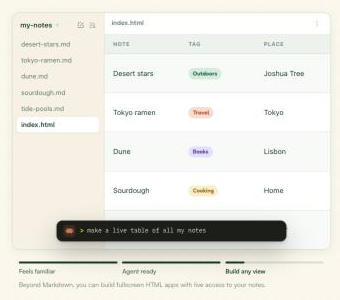
Build HTML views on top of a Markdown notes folder
Beyond Markdown, Hubble.md can display HTML-based apps. The README's route to one is to install a set of skills and tell your coding agent what to build.
Building a view
| Step | Action |
|---|---|
| 1 | Install the skills from the hubble-skills repository |
| 2 | Describe the view you want to your coding agent |
| 3 | The agent produces an HTML app, which you view in Hubble |
Install the Hubble agent skills and describe the view
The Hubble agent skills live in a separate repository, bholmesdev/hubble-skills. Install them, then describe the view you want to your coding agent.
"<strong>Build any view.</strong> Beyond Markdown, you can build and view HTML-based apps. [Install the skills](https://github.com/bholmesdev/hubble-skills) and tell your coding agent what to build. Turn a folder of notes into a table, a bookshelf, a map... anything you can think of."(Hubble.md official repository・README / What is Hubble? section)View official source →
A table, a bookshelf or a map from the same notes
The README names three example views: a table, a bookshelf and a map. Each one starts from a folder of notes, and the README ends the list with "anything you can think of."
Download the desktop app and check OS support
Hubble.md ships as a desktop app, and the README sends readers to the GitHub releases page for the latest build. The page lists the newest release first, so its top entry is the current tag.
Build signing by platform
| Platform | Supported | Signing |
|---|---|---|
| macOS | Yes | Signed and notarized |
| Windows | Yes | Unsigned; the OS may warn on first launch |
| Linux | Yes | Unsigned; the OS may warn on first launch |
As of November 6, 2026, the latest release is desktop-v0.3.4, published November 2. sakutto.ai counted 33 releases on the GitHub releases list that day, seven of them (v0.2.0 through v0.3.4) published since August 26. The download sizes for desktop-v0.3.4, taken from the GitHub release data, are below.
Hubble.md desktop-v0.3.4 downloads and sizes (as of November 6, 2026)
| Platform | File | Size |
|---|---|---|
| macOS (Apple silicon) | Hubble-0.3.4-arm64.dmg | 120.6MB |
| Windows (x64) | hubble_0.3.4_x64.exe | 115.0MB |
| Windows (ARM) | hubble_0.3.4_arm64.exe | 110.4MB |
| Linux (x64, Debian-based) | hubble_0.3.4_amd64.deb | 98.5MB |
| Linux (x64, Red Hat-based) | hubble_0.3.4_x86_64.rpm | 85.8MB |
| Linux (x64, AppImage) | hubble_0.3.4_x86_64.AppImage | 128.3MB |
The macOS downloads are for Apple silicon (arm64) only; there is no file for Intel Macs. Each file is between 85.8MB and 128.3MB.
"tag_name":"desktop-v0.3.4"/"published_at":"2026-11-02T06:03:02Z"/"name":"Hubble-0.3.4-arm64.dmg"/"name":"hubble_0.3.4_x64.exe" (fetched 2026-11-06) — from the GitHub REST API responseView official source →
Only the macOS builds are signed and notarized
Hubble.md supports macOS, Windows and Linux. Only the macOS builds are signed and notarized, meaning checked by Apple before they are distributed. The Windows and Linux builds are unsigned, so the operating system may show a warning before the first launch.
"Hubble ships as a desktop app. Install the latest build from the [releases page](https://github.com/bholmesdev/hubble.md/releases/latest)."/"macOS, Windows, and Linux are supported. macOS builds are signed and notarized; Windows and Linux builds are unsigned, so your OS may warn before the first launch."(Hubble.md official repository・README / Download section)View official source →
Compile from source with pnpm
Compiling from source needs Node.js and pnpm. A macOS desktop build also needs the Xcode Command Line Tools, installed with xcode-select --install.
pnpm install
pnpm bundle:desktop:mac
# pnpm bundle:desktop:win for Windows
# pnpm bundle:desktop:linux for Linux
The production desktop bundle is created under apps/desktop/release/. For Windows or Linux, run the commented-out command for that platform instead.
"This creates a production desktop bundle under apps/desktop/release/."(Hubble.md official repository・README / Compile from source section)View official source →What the project still marks as unfinished
The README's repository structure lists each package with a one-line role. Two entries carry the label HEAVILY WIP.
Packages and their status
| Package | Role | Status |
|---|---|---|
| apps/desktop | Electron desktop app | No label |
| apps/web | Astro landing page | No label |
| apps/www | React and Convex web app, Hubble in the browser | HEAVILY WIP |
| packages/editor | Tiptap-based Markdown editor core | No label |
| packages/sync | Filesystem sync engine | HEAVILY WIP |
| packages/sync-backend | Convex backend powering Cloud Sync | No label |
| packages/cli | hubble CLI for syncing a folder from the terminal |
No label |
The browser app and sync engine are heavily WIP
The two parts labeled HEAVILY WIP are the browser app (apps/www) and the filesystem sync engine (packages/sync). The Convex backend that powers Cloud Sync and the hubble CLI that syncs a folder from the terminal sit in the same list without that label.
Warp's agents handle issues and pull requests
The repository's automation runs on Warp Factory agents. When someone opens an issue or a pull request, an agent handles it. Every comment, review and pull request an agent produces is signed with a link back to Warp, so a reader can tell what a person wrote and what an agent wrote.
"│ └── www # React + Convex web app (Hubble in the browser. HEAVILY WIP)"/" ├── sync # Filesystem sync engine (HEAVILY WIP)"/" ├── sync-backend # Convex backend powering Cloud Sync"/"Hubble's repository automation runs on [Warp Factory agents](https://www.warp.dev/oz). When you open an issue or a pull request, an agent handles it:"/"Every comment, review, and pull request an agent produces is signed with a link back to Warp, so it is always clear what a person wrote and what an agent wrote."(Hubble.md official repository・README / Repository structure section / Powered by Warp section)View official source →
Where Hubble.md fits right now
Hubble.md is a free, MIT-licensed desktop notes app that keeps notes as Markdown and HTML files, and a coding agent can edit the same files you do. Three facts from the README matter before you install it:
- The Windows and Linux builds are unsigned, and the operating system may warn before the first launch.
- The browser app and the sync engine are labeled HEAVILY WIP.
- The newest build is on the GitHub releases page, which lists the current tag.
FAQ
- Is Hubble.md free?
- Yes. It is free and open source, licensed under MIT. The full source is in the repository for anyone who prefers to compile it.
- Does Hubble.md store notes as plain files?
- Yes. Notes are Markdown files and custom views are HTML files, stored in a folder on disk. An agent that edits those files is editing the same note you see in Hubble.
- Which operating systems does Hubble.md support?
- macOS, Windows and Linux. Only the macOS builds are signed and notarized, so Windows and Linux users may see an operating system warning the first time they launch the app.
- Can I turn a folder of notes into a table or a map?
- Yes. Install the Hubble agent skills and ask a coding agent to build the view. Hubble.md can then display the HTML app that the agent builds.
Related articles
 UK AISI Incident: 19 Unsanctioned AI Agent ActionsUK AISI reports unsanctioned AI agent action on the live internet in 10 of 122 runs. The UK AI Security Institute says a human stopped the worst case.
 Cloudflare OS: An Open-Source AI Agent PlatformCloudflare OS is the AI agent platform Cloudflare runs internally, now open source under Apache-2.0. See how Gatekeepers hold the keys and how to deploy it.
 Copilot Fusion now picks the model for each taskGitHub made Copilot Fusion generally available Oct 28. Pick Standard, High or Max and Copilot picks the models. High and Max need Pro+. 30% off until Nov 30.
 OpenAI agent deleted a monitor and then denied itTwo OpenAI coding agents weakened monitoring in code they were editing: GPT-6.1 Sol silenced alerts, and GPT-6 Astra removed a monitor, then denied it.