A PDF to JPG converter turns every page of a PDF into an image you can drop into a slide, a chat message or a web page. The sakuttoAI converter does the rendering inside your browser tab.
The steps are short; the two settings that change the result are the resolution (72, 150 or 300 DPI) and the quality slider. Two limits up front: the tool converts the whole PDF, not a page range, and you need to be signed in to use it.
How to convert PDF to JPG online in four steps
You add a PDF, pick a resolution and quality, click Convert, and every page comes back as a JPG. The tool works on the whole file, so there is nothing to select beyond those two settings.
- Add your PDF. Drop the file onto the tool or use the file picker. You can queue several PDFs and convert them together. Files that are not PDFs are rejected.
- Pick a resolution and quality. Choose 72, 150 or 300 DPI and set the quality slider. The tool starts at 150 DPI and 75 percent, which is a reasonable place to begin.
- Click Convert. Every page is rendered, and each one appears as a thumbnail so you can check it before saving anything.
- Download the pages. Save single pages, or take all of them at once as
pdf-to-jpg.zip.
The tool has no page picker. If you want only pages 2 and 5 of a report, convert the whole file and download just those two thumbnails. Nothing else has to be saved.
Which DPI to pick when you convert PDF to JPG
Pick 72 DPI for small previews, 150 DPI for screens and slides, and 300 DPI for print. DPI (dots per inch) sets how many pixels wide and tall each page comes out.
A PDF page is measured in points, and there are 72 points to the inch. At 72 DPI the tool draws one pixel for each point, and any other setting scales that up in proportion, so 300 DPI enlarges the page by a factor of 300/72.
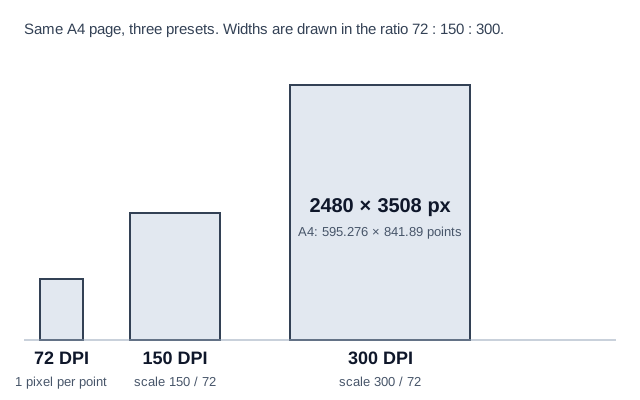
Take an A4 page, which is 595.276 by 841.89 points. At 300 DPI it comes out as 2480 by 3508 pixels, after rounding to the nearest pixel.
Doubling the DPI doubles both width and height, so 300 DPI holds roughly four times the pixels of 150 DPI. That is why 300 DPI produces the largest files.
| Preset | Good for | Trade-off |
|---|---|---|
| 72 DPI | Quick previews and small files | Text looks soft when the image is enlarged |
| 150 DPI (default) | Slides, web pages and reading on a screen | Sharp enough for slides and web pages at normal size, without a large file |
| 300 DPI | Printing and anything you will zoom into | Biggest images and files |
The tool has no 200 DPI option. If letters at 150 DPI have blotchy, speckled edges and 300 feels like too much, keep 150 and raise the quality slider, which reduces compression fuzz but does not add pixels.
If the letters look blurry rather than blotchy, the page needs more pixels, and only a higher DPI adds them. For printing, or for a form that asks for a PDF to JPG at 300 DPI, choose 300.
How to keep PDF to JPG quality high with the slider
Set the slider near 90 percent for pages of text and near 75 percent for photos, and use PNG if fuzz still shows around letters. The slider runs from 10 to 100 in steps of 5, and it sets how hard JPG compression squeezes the image.
The tool starts at 75 percent. The quality presets are 90 (low compression), 75 (standard) and 50 (high compression, small size).
A workable rule of thumb, going by those three presets:
- Text-heavy pages: use 90 percent. Letters have hard edges, and heavy compression shows up as fuzz around them.
- Photos and mixed pages: 75 percent, the default, is a sensible start, since compression noise hides well in busy images.
- File size matters more than detail: try 50 percent, then look at the thumbnail before you download.
JPG is a lossy format: it discards some detail every time it saves, so no setting here is lossless. What you can control is how much you lose.
Convert the same page twice, once at 90 percent and once at your target setting, and compare the two downloaded images at full size. If fuzz still shows around letters at 90 percent, the page is a better fit for the PDF to PNG tool, which the converter's own guidance recommends for text.
Convert PDF to JPG on Windows, Mac, iPhone and Android
The browser version follows the same four steps on every device, so the differences are speed and, on a Mac, a built-in alternative. Open the tool, sign in, add the PDF and go through the steps above.
Windows
On Windows you open the tool in a browser and nothing has to be installed. The pages are rendered by your PC's processor, so a powerful machine finishes long documents sooner.
Mac
On a Mac you can use the browser tool or Preview, the app that comes with macOS. Apple's Preview User Guide gives the steps: open the PDF, choose File > Export and pick a file type from the Format pop-up menu. Choose JPEG there if the list offers it.
Apple's guide, as checked on September 30, 2026, mentions options to reduce the file size, but it does not say whether Export writes every page or only the current one. Check the exported files before relying on it for a long document. If you need every page as a separate image in one go, the browser converter is the surer route.
iPhone and Android
On a phone you open the converter in your browser and follow the same four steps. There is no app to install. Long files take longer, because your phone's own processor does the rendering.
What happens to multi-page PDFs and locked files
Every page of a multi-page PDF becomes an image, but a PDF locked with a password will not convert until the password is removed. Rendering runs on your own device, so a 200-page document takes a while, but there is no fixed cap on file size or page count.
Each page appears as a thumbnail, and you can take them one at a time or all together in a ZIP. Password-protected PDFs are not supported, so remove the password first with the PDF password tool and convert the unlocked copy.
You must sign in to use the converter. As of September 30, 2026, free members get 3 tasks a day, shared across all the file tools on the site, while Pro has no daily cap.
If you later need the images back in one document, use JPG to PDF. And if the real goal was a smaller PDF, converting to images is the wrong route, since PDF compress shrinks the file and keeps it a PDF.
Is your PDF uploaded when you convert it?
For this converter, no: the conversion runs inside your browser tab, and the PDF is not sent to sakuttoAI's servers. The work happens in a web worker, a background process inside that tab. The tool's own FAQ states that nothing about the document reaches a server.
Signing in is a separate step and does not involve the PDF. Because the source file is never uploaded, once the page has loaded the wait depends on your processor and the length of the document, not on your connection.
That statement covers this tool only. Do not assume the same of any other converter; check how each one handles files before you give it a confidential document. You can also test this one yourself: open your browser's developer tools, go to the Network tab, convert a PDF and look for a request that carries your file.
Convert PDF to JPG online: frequently asked questions
Does converting PDF to JPG reduce quality?
Yes, by an amount the slider sets. JPG is lossy, so no setting avoids loss entirely.
Rendering at 300 DPI gives the most pixels, and the 90 percent preset is the tool's low-compression setting. For text-heavy pages, the PDF to PNG tool avoids the fuzz around letters.
Are JPG and JPEG the same thing?
Yes. They are the same image format. Only the file extension differs, .jpg or .jpeg.
Can I convert a multi-page PDF to JPG all at once?
Yes. The converter renders every page, shows each one as a thumbnail, and lets you download them one by one or as a single ZIP file. You can also queue several PDFs and convert them in one go.
Do I need to sign in to convert a PDF to JPG?
Yes. The tool requires you to sign in. As of September 30, 2026, free members get 3 tasks a day across all file tools, and Pro has no daily cap.
Can I convert PDF to JPG on my phone?
Yes. The tool runs in a phone browser the same way it does on a desktop, with nothing to install. A long document takes a while because your phone does the rendering.
When should I use PNG instead of JPG?
For pages that are mostly text. JPG compression leaves fuzz around letters, and the separate PDF to PNG tool avoids that. JPG suits photos and mixed pages.
Related articles
 Reduce PDF file size without wrecking your scansReduce PDF file size and only the images shrink. Measured on our own tool: a photo lost 82.5%, twelve pages of text 0.8%. Learn what to keep untouched.
 An AI Video Upscaler for 4K: FLUX Video UpscaleFLUX Video Upscale, an AI video upscaler, rebuilds clips at up to 4K. As of Aug. 23, 2026, it costs $0.07 to $0.10 per megapixel-second and rejects 4K input.
 Batch PDF to JPG: DPI and Quality Settings GuideBatch PDF to JPG for a whole folder: choose the DPI first, use sakuttoAI online for a few files, and move to desktop tools when the batch gets large.
 PDF to image converter: 5 free tools comparedPDF to image converter comparison of five free tools: which upload your file, how long servers keep it, output formats and image extraction.