What the official hosted X MCP server is
MCP, the Model Context Protocol, is a common standard for connecting AI tools to external services. A hosted MCP server is one that the service itself runs, so the AI tool connects to a web address such as api.x.com/mcp. X (formerly Twitter) is the service here, so a search for a Twitter MCP server is about the same service.
TechCrunch reported the launch on June 30, 2026. X's docs page carries no publish date. In TechCrunch's framing, users get X API access with their own account permissions, without building, hosting and authenticating their own MCP server.
X MCP and Docs MCP are two separate servers
X's docs name two servers: X MCP at api.x.com/mcp and Docs MCP at docs.x.com/mcp. X MCP calls endpoints on the X API. Docs MCP searches the API documentation.
The two servers in X's docs
Pick X MCP to pull data from X. Pick Docs MCP when the AI tool needs to read the API documentation before it writes a request.
"X hosts an MCP server for the X API documentation at https://docs.x.com/mcp"/"Search across the X documentation for relevant information, code examples, API references, and guides" — from the X MCP docsView official source →
The X MCP tools cover posts, users, bookmarks and trends
The docs list what X MCP can call: search posts, look up users, bookmarks, trends, news and Articles. The list ends with "and more", so it is a sample and not the full set of endpoints.
Take a research task as an example. An analyst asks an AI tool for recent posts on a topic, then for the accounts behind the most active posts. The first step matches the search posts endpoint on the docs' list, and the second matches look up users.
"Call X API endpoints (search posts, look up users, bookmarks, trends, news, Articles, and more)" — from the X MCP docsView official source →
How the xurl bridge signs in with OAuth PKCE
A bridge is a go-between that handles the sign-in step for the AI client. X MCP needs to know whose account is calling, and the bridge is where that happens. OAuth is a standard sign-in method that lets an app act for you without your password, and PKCE is the login flow X's docs name for it.
X's docs call this piece "the bridge", and their server table says to connect via xurl mcp. mcp.directory and explainx also put xurl in their headings. The xurl repository is on GitHub at github.com/xdevplatform/xurl.
The bridge authenticates as you with a PKCE flow
The docs say the bridge authenticates as you. You sign in with your own X account, and the tool calls that follow are made as that account. For a team, that means a shared setup acts as whoever signed in.
"The bridge authenticates as you (PKCE flow)" — from the X MCP authentication sectionView official source →
Tools act within your account’s scopes
Scopes are the list of permissions an account grants to an app. The docs say tools act with your account's scopes, so their access follows that list.
TechCrunch describes the setup as X API access with your own account permissions. Nothing in the excerpt gives the tools any extra reach.
"so tools act with your account's scopes." — from the X MCP authentication sectionView official source →
Read-only access with a static app-only Bearer token
A Bearer token is a fixed string that a client sends to prove it may call the API. An App-only token identifies your developer app and not a signed-in person. X's docs name it as the second way to connect, and it skips the bridge and the PKCE login.
Read endpoints such as search and user lookup can use the token. Calls that must run as your signed-in account go through the bridge from the section above.
Read endpoints can skip the bridge entirely
For read endpoints, the docs let a client point straight at the URL with a static App-only Bearer token. There is no bridge to run and no login step. A bearer token is accepted from whoever sends it, so the token itself is what grants access.
"For read endpoints, you can skip the bridge and point a client straight at the URL with a static App-only Bearer token." — from the X MCP authentication sectionView official source →
TechCrunch says the Write API is not supported
TechCrunch reported that the MCP tool is not compatible with X's Write API. In other words, writing to X through this server is not supported, according to that report. The docs excerpt above says nothing about writes.
One more claim sounds similar but is narrower. mcp.directory has a heading, "Writes fail with an app-only token", which is about the token. It is not the same statement as TechCrunch's report on the Write API.
Connecting Claude Desktop, Cursor, Grok and VS Code
X's docs give setup steps for four clients: Grok Build, Cursor, Claude Desktop and VS Code (GitHub Copilot). The screenshot below shows the first two, Grok Build and Cursor.
Setup instructions cover four named clients
X's docs give each client its own setup section, such as a config.toml block for Grok Build and an mcp.json block for Cursor. The explainx guide also gives each client a heading of its own, from Cursor to VS Code (GitHub Copilot Agent mode).
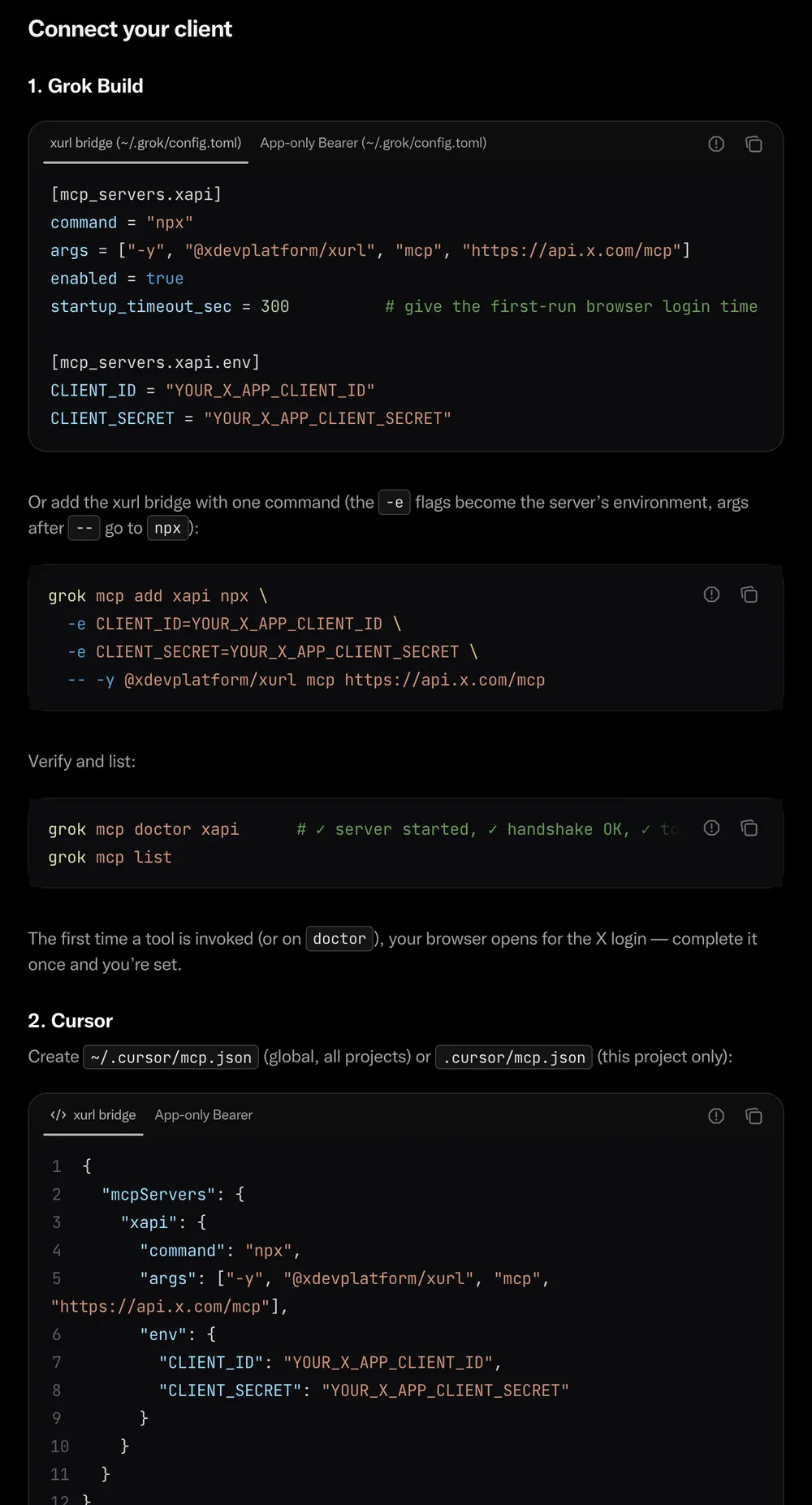
Cursor and VS Code each have setup instructions in the docs, as do the Claude desktop app and Grok through Grok Build. For the model behind Claude Desktop, see What Is Claude AI? Free Plan, Models, vs ChatGPT; for Grok costs, see Grok Pricing 2026: Free, SuperGrok, and API Costs.
Self-hosted xMCP is a separate project
mcp.directory separates the hosted X MCP server from xMCP, a self-hosted project. Its heading on hosted versus self-hosted servers notes that two things are named "X MCP", and a further section covers self-hosting xMCP instead. The xMCP code is at github.com/xdevplatform/xMCP.
The X MCP server comes as two hosted servers: X MCP for API calls and Docs MCP for documentation search. Sign in through the bridge with OAuth PKCE, or use a static App-only Bearer token for read endpoints.
FAQ
- What is the official X MCP server?
- It is a hosted MCP (Model Context Protocol, a common standard for connecting AI tools to external services) server run by X. Its X MCP half calls X API endpoints, and a second server, Docs MCP, searches X's developer documentation.
- How does the X MCP server sign you in?
- Through a bridge that runs an OAuth PKCE login. The docs say the bridge authenticates as you, so the tools act with your account's scopes.
- Can the X MCP server run without the bridge?
- For read endpoints, yes. The docs let a client connect straight to the URL with a static App-only Bearer token. The docs excerpt does not cover writing, and TechCrunch reported that the MCP tool is not compatible with X's Write API.
- What does the Docs MCP server do?
- It searches X's developer documentation. It lives at docs.x.com/mcp and offers the tools search_x and get_page_x, so an AI client can look up how an X API endpoint works.
Related articles
 MCP roadmap 2026: five priority areas to plan forThe MCP roadmap published in August 2026 sets five priority areas. See what they mean for the specification, Tasks, Streamable HTTP, agent identity and SDKs.
 MCP Specification 2026-07-28: Sessions RemovedMCP specification 2026-07-28 makes the protocol stateless, dropping sessions and the initialize handshake. What breaks, what replaces it, and what to rewrite.
 Apple MCP in Keynote, Pages and Numbers explainedApple MCP support comes to Keynote, Pages and Numbers in November, letting outside AI agents read and edit documents on macOS 27, plus a beta assistant.
 REA: AI Reverse Engineering MCP for Claude CodeREA is a free AI reverse engineering MCP server for Claude Code and Codex. One npx command sets it up, and Ghidra, IDA or Hopper reads apps without source.