Got a full width character where a half width character is expected — or the other way around? Mixed widths break sorting in contact lists, and email addresses or web forms stop accepting the text. This free online tool converts full-width to half-width, or back, for alphanumerics, katakana, symbols, and spaces, and switches katakana to hiragana on the same screen — all in your browser.
What full-width and half-width characters are
The difference is how much of a square cell each character takes up: the whole cell, or about half of it. Letters and digits (A vs A) and katakana (ア vs ア) come in both widths, as do common symbols such as @.
| Property | Full-width | Half-width |
|---|---|---|
| Width | Full square (1 character cell) | About half the width |
| Examples (alphanumeric) | A, 1, @ | A, 1, @ |
| Examples (katakana) | アイウ | アイウ |
| Unicode range (alphanumeric) | U+FF01–U+FF5E | U+0021–U+007E |
| Bytes (UTF-8) | 3 bytes | 1 byte |
In Unicode, full-width alphanumerics occupy U+FF01–U+FF5E, and their half-width counterparts are the ordinary ASCII range U+0021–U+007E. Full-width characters lie outside ASCII, so UTF-8 stores each in 3 bytes, against 1 byte for half-width ASCII. Half-width katakana (U+FF61–U+FF9F) is also outside ASCII, so it takes 3 bytes even though it looks "half-width."
How to convert full-width and half-width characters online
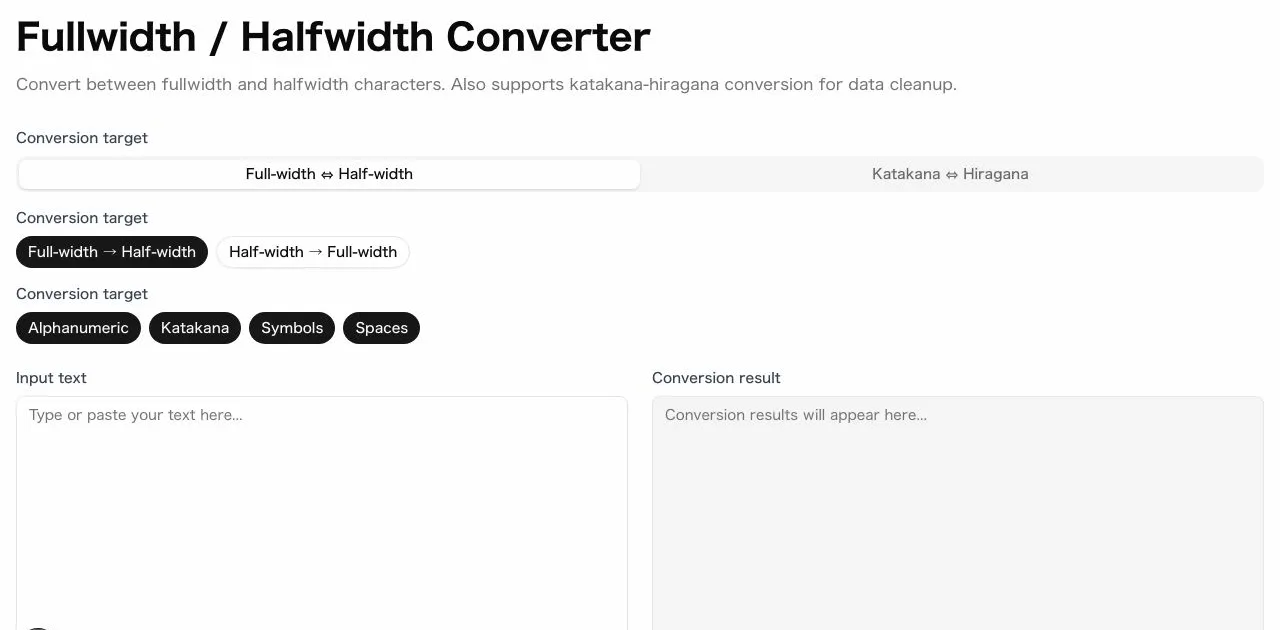
sakuttoAI's converter has two modes: Full-width ⇔ Half-width and Katakana ⇔ Hiragana. Both run in the browser, with no character limit.
Convert full-width characters to half-width, or back
- Select the "Full-width ⇔ Half-width" tab
- Choose the direction: full-width → half-width, or half-width → full-width
- Select which categories to convert — alphanumeric, katakana, symbol, space — any combination of the four
- Paste or type text in the left text area
- The converted result appears in real time on the right
- Click "Copy" to grab the result
Categories can be mixed in any combination, so "half-width alphanumerics only, katakana unchanged" takes just one toggle. Flip the direction and the same selection converts the text back to full-width.
Switch katakana to hiragana with the same tool
- Switch to the "Katakana ⇔ Hiragana" tab
- Choose the direction: katakana → hiragana, or hiragana → katakana
- Paste or type your text and copy the converted result
Converting full-width katakana to half-width katakana
To change only the width of katakana, select just the katakana category and choose a direction. Voiced and semi-voiced katakana convert as pairs that survive a round trip: full-width ガ becomes the two half-width characters ガ and converts back cleanly. The tool's katakana tables handle the base character and its mark together instead of as separate glyphs.
Why mixed character widths cause real problems
Contact lists and phone numbers
If one entry stores "03−1234−5678" in full-width and another stores "03-1234-5678" in half-width, the list treats them as two different numbers, so duplicates slip through and sorting splits them apart. Converting every entry to one width before matching solves it.
Email addresses and URLs need half-width characters
Every character in an address, including the @ sign, must be the ASCII version, not its full-width look-alike. A full-width address or link typically fails, so the message bounces or the page is not found.
Web forms that reject full-width input
Phone number and postal code fields often accept only ASCII digits, so pasting 03 instead of 03 triggers a validation error. The two look almost alike on screen, so the error is hard to trace back to character width.
Tips for keeping character widths consistent
Store letters and digits as half-width, because email addresses and URLs require it and many forms expect it. For katakana, the right width depends on where the text is going, so find out what the receiving form or database accepts before you convert. Save a copy of the original before a batch conversion and check the output afterward, since input method editors and pasting from some apps can quietly bring full-width characters back.
Summary: convert to one width before you match, search or submit
Full-width and half-width are the same characters shown at two different widths, across alphanumerics, katakana, symbols, and spaces. sakuttoAI's free tool converts either direction, per category, and also switches katakana to hiragana on the same screen. Your text never leaves the browser, and you don't need an account.
FAQ
- Is my text sent to a server?
- No. All processing happens entirely in your browser, and your text is never transmitted to any external server.
- Can I convert between katakana and hiragana too?
- Yes. The same page has a second mode for katakana ⇔ hiragana, on the same screen as the full-width/half-width converter.
- Are voiced and semi-voiced katakana handled correctly?
- Yes. Voiced marks (dakuten), semi-voiced marks (handakuten), and small characters (ぁ, ぃ, etc.) are all converted accurately, including half-width pairs like ガ.
- Can I choose which character types get converted?
- Yes. For full-width ⇔ half-width conversion you can mix and match from four categories: letters & numbers, katakana, symbols, and spaces.
- What happens to the long vowel mark "ー" when converting katakana to hiragana?
- It stays as-is. The long vowel mark is specific to katakana and has no hiragana equivalent, so it is preserved unchanged.
- Is there a character limit?
- No. There is no hard limit — typical documents work without any issues. For very long texts, performance may vary depending on your device.
- Is this the same as "zenkaku hankaku" conversion?
- Yes. Zenkaku is the Japanese term for full-width and hankaku for half-width, so a zenkaku hankaku converter and a full-width/half-width converter do the same job.
Related articles
 Full Width Half Width: How to Convert Your DataFull width half width mixing breaks lookups and CSV imports. Compare an online converter, Excel ASC/JIS and Python NFKC, and match one to your data.
 Compress PDF to 14MB for a Japan Tax ReturnCompress PDF attachments for Japan's e-Tax: the 14.0 MB cap per transmission, the 200 dpi and grayscale rules, and how to split a PDF that is still too big.
 Merge PDF Files at Work: 5 Practical UsesMerge PDF files at work: combine invoices, proposals, meeting packs and scans into one file, with the order, naming and checks that stop mistakes.
 Merge PDF Files Free: Combine PDFs OnlineMerge PDF files free in your browser with a free account and nothing to install. Covers page order, daily plan limits and how it compares with desktop tools.