
A job application, a set of scanned pages and a month of invoices all end up the same way: several PDFs that have to travel as one attachment. A free browser tool puts them into a single file in three steps, with nothing to install.
Merge PDF files into one: when it saves time
Sending, printing or archiving a stack of separate documents goes faster once the pages sit in a single file. The recipient opens one attachment instead of five, and a printer runs one job instead of five. The common cases are these:
- Job application: a resume and a cover letter, or an application form and its supporting papers.
- Meeting handouts: slides from several departments in one packet.
- Scans: individually scanned pages in one document.
- Invoices: a month of invoices bundled by client for record keeping.
- Reports: chapter drafts assembled into the final document.
The steps are the same for every case, because the tool only cares about the files you add and the order you put them in. Whether you have two files or a long list, the routine is the same.
Merge PDF files free in your browser
Three steps in sakuttoAI turn a stack of documents into one download, and the only setup is a sign-in by email link or Google, with no password and no software. The PDF merger runs in a browser, so it works the same on Windows, Mac and a phone. The tool page promises "Free, with no password and no watermark".
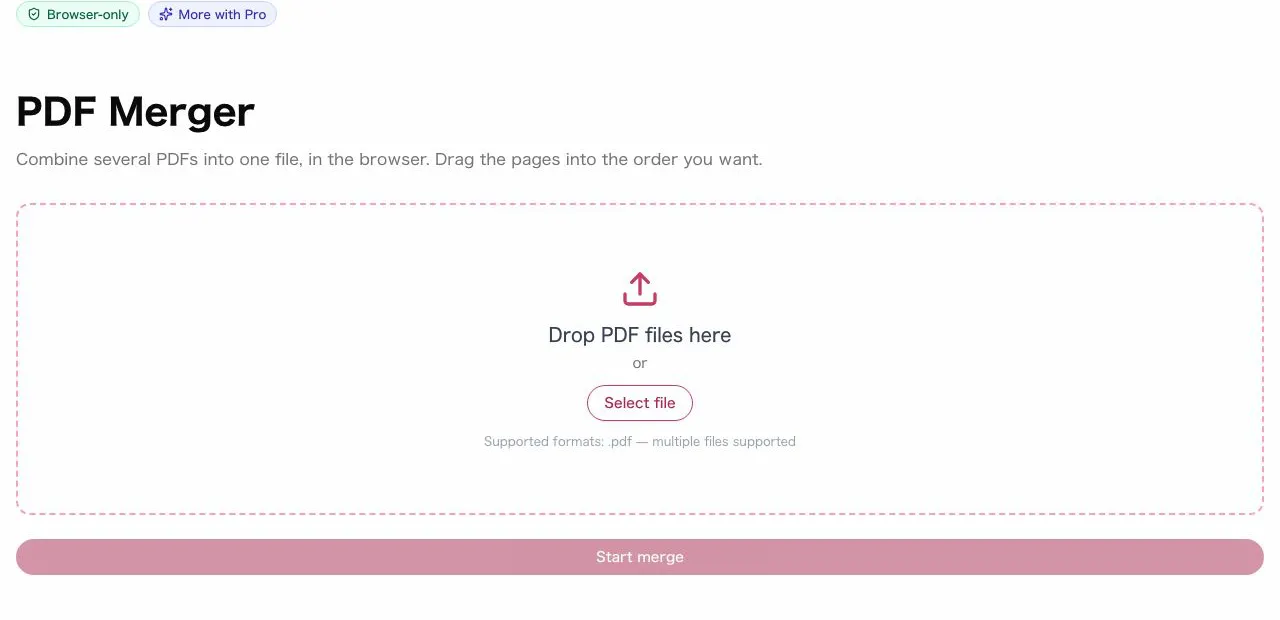
- Open the tool and add the PDFs. Click "Select file" or drag and drop them onto the page, and select several files at once if you like.
- Check the list of added files and drag them into the order you want. Remove a file added by mistake with its delete button.
- Click "Start merge", then download the combined PDF.
Pages are copied as they are: text stays text, images keep their original resolution and embedded fonts come along unchanged. A merged file therefore looks the same as the originals, only longer, and it can go straight to the printer or the recipient.
Combine PDFs in the right order
Because the list shows names without page previews, a misplaced entry stays invisible until the finished document is opened. Three habits prevent most mistakes:
- Number the files first. Rename them "01_Cover.pdf", "02_Body.pdf" and so on before adding them, so the right sequence is obvious.
- Read down the list before merging. Drag a file to a new position, or use the up and down arrows if you prefer clicking, and delete anything that does not belong.
- Open the result. After downloading, scroll through the merged file and check that no page is missing or out of place.
Reordering is possible right up to the moment you click "Start merge". Once the file is downloaded, a wrong order means going back to the list and merging again, which costs another task on the daily allowance described below.
Combine PDF free: online tool, software or Acrobat
Installation rights and budget settle the choice: the browser tool costs nothing and needs no setup, desktop programs run offline after an install, and Adobe's paid app adds page editing for a monthly fee. Below, “Three ways to combine PDFs” sets the three routes side by side.
Three ways to combine PDFs
| Method | Cost | Install | Notes |
|---|---|---|---|
| sakuttoAI | Free | None | Needs a connection and a sign-in |
| CubePDF Utility, pdftk | Free | Required | Run locally, work offline |
| Adobe Acrobat | Paid subscription | Required | Also reorders, deletes, rotates and annotates |
CubePDF Utility runs on Windows only. sakuttoAI works on any operating system with a browser, and each merge checks the daily task count, so it does not work offline. Pick by situation:
- A work or shared computer where you may not install programs: use the browser tool.
- No internet connection: use desktop software such as CubePDF Utility or pdftk, installed beforehand.
- A subscription you already pay for, or a document that also needs page edits: use Acrobat.
- A one-off merge on any machine: use the browser tool, since it asks only for a sign-in.
Is it safe to merge PDF files online?
Safety depends on where the work happens: a tool that sends documents to a server adds risks that a tool working inside your browser does not. sakuttoAI processes everything in the browser with the JavaScript library pdf-lib, so the PDFs are not uploaded or sent over the internet. That fact answers the question for sakuttoAI only; other tools differ, so check each one. The risks of an upload-based design are these:
- The files may be stored on the server for some time.
- They can be intercepted during the upload.
- A breach at the service can expose them.
Three checks apply to any online tool. First, find out whether it uploads files or processes them in the browser. Second, confirm the address starts with "https://".
Third, if an account is required, find out whether the service keeps your uploaded files in that account. A tool that answers all three clearly is easier to trust with a contract or a scan of an ID than one that does not say.
Free plan limits and password-protected PDFs
The daily cap counts tasks rather than documents, so one merge of any number of inputs uses a single task out of the 3 a day that every file tool shares. (as of October 2026) A free account gets that allowance, and Pro has no daily task limit. The tool sets no limit on how many files go into one merge, and quality does not change.
- Very large files: size is bounded by the browser's available memory. Ordinary office documents merge without trouble, and a very large file should be shrunk first with Compress PDF Online Free: Pick the Right Level.
- Password-protected PDFs: they cannot be merged directly. Take the password off with sakuttoAI's PDF password tool, then merge the unlocked copy.
- Only some pages needed: cut them out first with Split PDF Pages Free: Extract and Save Them and merge the pieces afterwards.
Summary: merge PDF files free without installing anything
The browser route costs nothing and installs nothing, and two checks, one before the merge and one after, keep the result correct. Number the file names and read the list before clicking "Start merge", then open the downloaded document and scan every page.
The limits to remember are the sign-in, the allowance of 3 tasks a day on a free account, and the lack of offline use. A work computer that blocks installs, a quick one-off merge and a phone all point to the PDF merger. A flight or an office with no internet points to CubePDF Utility or pdftk, and heavy page editing points to Acrobat.
FAQ
- Can I merge PDFs for free?
- Yes. You need to sign in with a free account (email link or Google, no password). Free accounts get 3 tasks per day in total across all file tools, and Pro has no daily task limit. Merging several PDFs at once counts as one task.
- Is there a limit on the number or size of PDFs I can merge?
- sakuttoAI doesn't limit how many files you merge; the free plan caps tasks instead, at 3 a day across the file tools. File size is bounded by your browser's available memory, and ordinary office documents merge without trouble. For very large files, compress them first.
- Can I reorder pages after adding files?
- Yes, right up until you merge. Drag a file to a new position, or use the up and down arrows if you prefer clicking. You can also remove files before merging, so you only combine exactly what you need.
- Can I merge PDFs from my smartphone?
- Yes. sakuttoAI works in any mobile browser with no app required. Open the site on your phone and select your files.
- Does merging reduce image quality?
- No. Pages are copied across as they are — text stays text, images keep their original resolution, and embedded fonts come along unchanged.
- Can I merge password-protected PDFs?
- Not directly. Take the password off first with sakuttoAI's PDF password tool, then merge the unlocked copy.
Related articles
 Are Online PDF Tools Safe? Merging and UploadsAre online PDF tools safe for a confidential file? See how server-upload and in-browser merging differ, and four checks that show which one a tool uses.
 Merge PDF Files at Work: 5 Practical UsesMerge PDF files at work: combine invoices, proposals, meeting packs and scans into one file, with the order, naming and checks that stop mistakes.
 Merge PDF Free: What Happens to Your UploadMerge PDF free tools differ in what they keep: Smallpdf deletes uploads after one hour, Sejda after two. See the limits and a no-upload way to combine PDFs.
 Split PDF Pages Free: Extract and Save ThemSplit PDF pages free in your browser: extract a single page, cut a page range, or save every page as its own file. No install, no upload, one free sign-in.