Tracing, prompt management and evals for LLM observability
Langfuse is an open source platform that records what an LLM application sent and received, then adds prompt storage and scoring on top of those records. LLM observability means seeing inside an application whose answers change from run to run. Langfuse's documentation says generative AI systems are non-deterministic, so debugging without an observability tool is closer to guesswork.
The unit it records is the trace, a structured log of one request. A trace holds the exact prompt sent, the model's response, token usage, latency, and any tool or retrieval steps in between. When an answer comes out wrong, you can read back the steps that led to it.
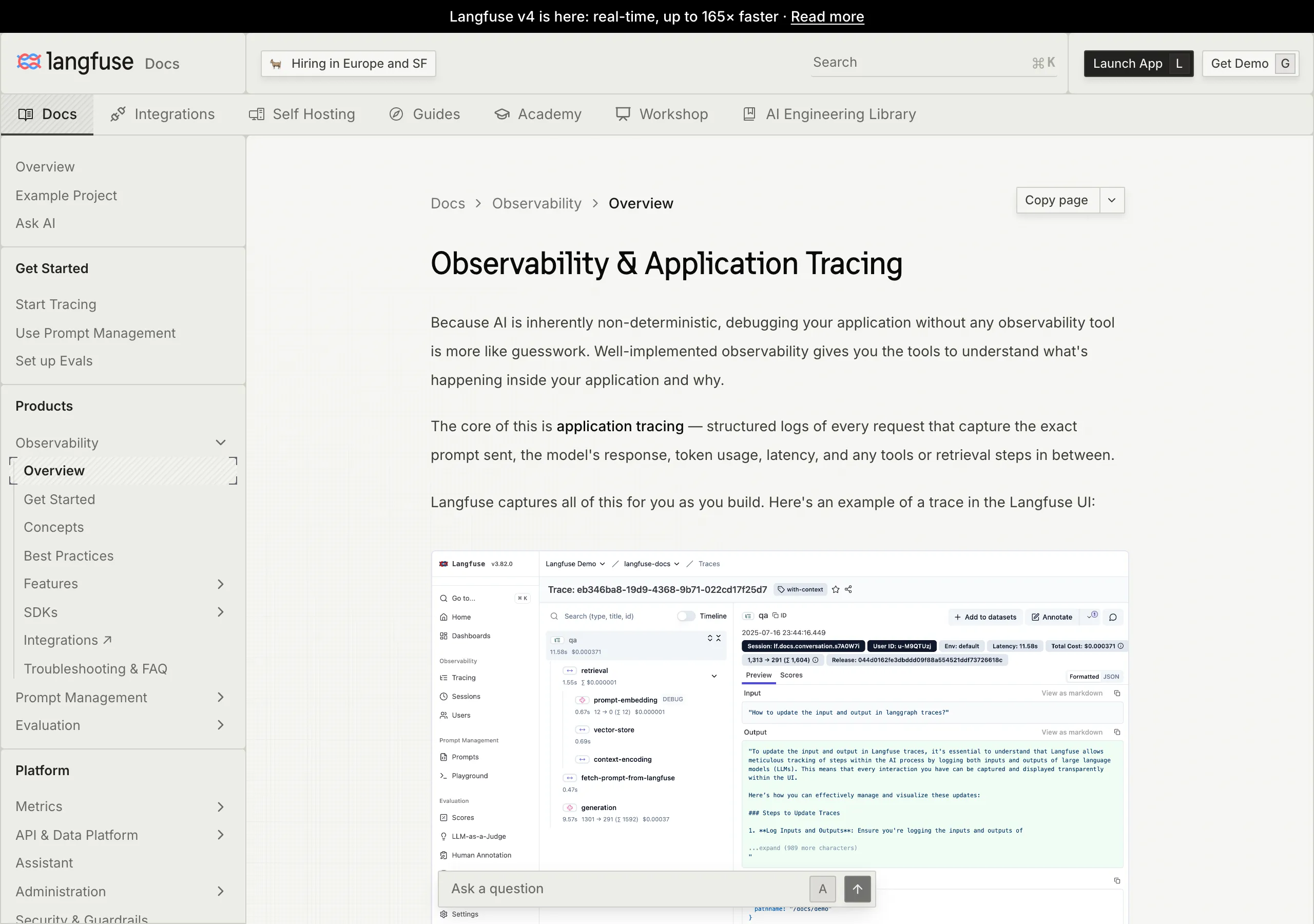
The other features all build on those records. Prompt management stores prompts centrally, keeps their versions and lets a team iterate on them together. Evaluations score outputs through LLM-as-a-judge (one model grading another model's answers), code evaluators, user feedback, manual labeling or custom pipelines run through the API and SDKs.
Datasets hold test sets and benchmarks for checking a change before it ships. The LLM playground lets you test prompts and model settings, and from a bad result in tracing you can jump straight into it. A documented API is also available, with an OpenAPI spec, a Postman collection and typed Python and JS/TS SDKs.
Tracing adds no latency to the request. The SDKs queue trace events locally and flush them in batches in the background, so the response time of the application stays the same.
Langfuse at a glance
| Item | Detail |
|---|---|
| Category | Open source LLM engineering platform |
| Core features | Tracing, prompt management, evaluations, datasets, playground, API |
| Deployment | Langfuse Cloud, or self-hosted with Docker Compose, Helm or Terraform |
| Free tier | Hobby plan: 50k units a month, 30 days of data, 2 users |
| License | MIT Expat, with the ee/ directories excluded |
| Ownership | Part of ClickHouse since January 2026 |
"Generative AI systems are inherently non-deterministic. Therefore, debugging your application without any observability tool is more like guesswork."/"The core of this is application tracing — structured logs of every request that capture the exact prompt sent, the model's response, token usage, latency, and any tools or retrieval steps in between."/"No. Langfuse SDKs send tracing data asynchronously in the background. Trace events are queued locally and flushed in batches, so your application's response time is not affected." (the first two paragraphs of the Observability Overview page, then its FAQ)View official source →
"Langfuse is an <strong>open source LLM engineering</strong> platform."/"It helps teams collaboratively develop, monitor, evaluate, and debug AI applications."/"helps you centrally manage, version control, and collaboratively iterate on your prompts"/"It supports LLM-as-a-judge, Code evaluators, user feedback collection, manual labeling, and custom evaluation pipelines via APIs/SDKs."/"OpenAPI spec, Postman collection, and typed SDKs for Python, JS/TS are available." (the README opening, plus the Prompt management, Evaluations and Comprehensive API entries under Core Features)View official source →
Langfuse and ClickHouse: ownership, license and open source
Langfuse has been part of ClickHouse since January 2026, and the LICENSE file names ClickHouse, Inc. as the copyright holder. The README banner announces the change, and the copyright line in LICENSE covers 2023-2026. The README also says Langfuse is made with the ClickHouse open source database.
The same README says the repository is MIT licensed except for the ee folders. The license scope follows the files, so the next subsection looks at where the line falls.
"since January 2026 we're part of ClickHouse"/"This repository is MIT licensed, except for the ee folders." (the banner at the top of the README, then its License section)View official source →
Open source license: what the ee/ directories change
Three paths in the repository use the license in ee/LICENSE, and the rest of the code is MIT Expat, except third-party components, which keep their own licenses. The LICENSE file sets three scopes:
- Everything under
ee/,web/src/ee/andworker/src/ee/, if those directories exist, uses the license defined inee/LICENSE. - Third-party components keep their original licenses.
- Content outside those directories and restrictions is available under the MIT Expat license.
So "Langfuse is MIT" describes most of the code but not every file you will open. The difference matters when you plan to patch, fork or redistribute, and the first thing to check is which directory the file you want to change sits in.
"All content that resides under the "ee/", "web/src/ee/", and/or "worker/src/ee/" directories of this repository, if these directories exist, is licensed under the license defined in "ee/LICENSE"."/"All third party components incorporated into the Langfuse Software are licensed under the original license provided by the owner of the applicable component."/"Content outside of the above mentioned directories or restrictions above is available under the "MIT Expat" license as defined below." (the three scope clauses of the LICENSE file)View official source →
Langfuse self hosted: Docker Compose, Helm or Terraform
The README lists four ways to run Langfuse on your own infrastructure, and it names Helm on Kubernetes as the preferred production deployment. The routes differ in how much you have to operate, so “Langfuse self-hosting routes” puts what each one takes next to what each one is for.
Langfuse self-hosting routes
| Route | What it takes | Purpose |
|---|---|---|
| Local (Docker Compose) | git clone --depth=1, then docker compose up |
Run Langfuse on your own machine in 5 minutes |
| VM | One virtual machine and Docker Compose | Run Langfuse on a single virtual machine |
| Kubernetes (Helm) | A Kubernetes cluster and a Helm release | The preferred production deployment |
| Terraform | Terraform, plus an AWS, Azure or GCP environment | Terraform Templates: AWS, Azure, GCP |
The local route is the README's five-minute Docker Compose path, and the VM route runs Compose on a single virtual machine. Kubernetes with Helm is the route the README calls the preferred production deployment. The README sends readers to the self-hosting documentation for architecture and configuration options and offers a mailing list for self-hosting updates.
Two defaults are worth knowing before the first start. The Docker images are based on Linux Alpine, and the Dockerfiles live in web/Dockerfile and worker/Dockerfile.
A self-hosted instance also reports basic usage statistics to a centralized server (PostHog) unless you set TELEMETRY_ENABLED=false. The README says the telemetry does not include raw traces, prompts, observations, scores or dataset contents.
If the OpenTelemetry endpoint answers with 4xx errors on a self-hosted instance, upgrade first. The endpoint was first introduced in v3.22.0, and the docs advise upgrading to the latest version.
"Run Langfuse on your own machine in 5 minutes using Docker Compose."/"Run Langfuse on a Kubernetes cluster using Helm. This is the preferred production deployment."/"Terraform Templates: AWS, Azure, GCP"/"We deploy this code base in Docker containers based on the Linux Alpine Image"/"The telemetry does not include raw traces, prompts, observations, scores, or dataset contents." (the bullet list under Self-Host Langfuse, then the Deploy and Telemetry sections of the README)View official source →
"If you encounter 4xx errors while self-hosting Langfuse, please upgrade your deployment to the latest version. The OpenTelemetry endpoint was first introduced in Langfuse v3.22.0" (the Troubleshooting section of the OpenTelemetry page)View official source →
OpenTelemetry tracing in Langfuse: OTel endpoint and limits
Traces reach Langfuse in two ways: through a Langfuse SDK, or through OpenTelemetry (OTel) sent to the /api/public/otel endpoint. With the SDK, the @observe() decorator traces any Python LLM application, and the OpenAI integration replaces the OpenAI SDK to capture model parameters without extra wiring.
The OTel route fits an application that already emits OpenTelemetry spans. The OTel-native Langfuse SDK v4 is the quickest way to start, and OpenLLMetry and OpenLIT extend tracing to Java and Go and to frameworks such as AutoGen and Semantic Kernel. OTLP replaces the deprecated POST /api/public/ingestion API.
One setting decides whether filtering works later. To filter or aggregate by userId, sessionId, metadata, version, release or tags, those trace-level attributes must be present on every span, not only on the root span.
The recommended way is OpenTelemetry Baggage (key-value pairs that travel with a request) with a BaggageSpanProcessor. With the Langfuse SDKs, propagate_attributes() in Python and propagateAttributes() in TypeScript do the same job.
Baggage travels across service boundaries and to third-party APIs, so never put passwords, API keys or personal data in it. Attributes that Langfuse does not map are nested under metadata.attributes and cannot be filtered directly. Use the langfuse.trace.metadata.* or langfuse.observation.metadata.* prefix to make a key filterable.
"The recommended approach for propagating these attributes across all spans is"/"certain trace-level attributes should be propagated to all spans within a" (the two sections on attribute propagation)View official source →
"The @observe() decorator makes it easy to trace any Python LLM application. In this quickstart we also use the Langfuse OpenAI integration to automatically capture all model parameters."/"Automated instrumentation using drop-in replacement of OpenAI SDK." (the quickstart paragraph, and the OpenAI row of the integrations table)View official source →
Langfuse Cloud OTel endpoint: regions and Basic Auth
Langfuse Cloud receives OTLP at four regional endpoints, and every request is authenticated with Basic Auth. The EU endpoint is the default shown in the docs.
Langfuse Cloud OTel endpoints by region
| Region | Endpoint |
|---|---|
| EU | https://cloud.langfuse.com/api/public/otel |
| US | https://us.cloud.langfuse.com/api/public/otel |
| Japan | https://jp.cloud.langfuse.com/api/public/otel |
| HIPAA | https://hipaa.cloud.langfuse.com/api/public/otel |
The credential is the base64 encoding of the public key and the secret key joined by a colon. The docs build it with echo -n "<public key>:<secret key>" | base64, and on GNU systems with long keys the command needs -w 0. A local self-hosted deployment on v3.22.0 or later takes traces at http://localhost:3000/api/public/otel.
"Langfuse can receive traces on the /api/public/otel (OTLP) endpoint."/"Langfuse uses Basic Auth to authenticate requests."/"Other Langfuse data regions include" (the endpoint section, the authentication section and the data-region list)View official source →
Does Langfuse OTel tracing accept gRPC? OTLP over HTTP only
No. Langfuse accepts OTLP over HTTP, with HTTP/JSON or HTTP/protobuf payloads, and gRPC is not supported yet. OTLP is the OpenTelemetry Protocol, the wire format exporters use to ship spans. The documentation states the limit on the page body and repeats it under Troubleshooting.
A sender that can only export over gRPC therefore cannot talk to Langfuse directly. The OpenTelemetry Collector is the documented bridge between the two.
"Please note that Langfuse currently supports OTLP over HTTP with both HTTP/JSON and HTTP/protobuf"/"gRPC is not supported yet." (the note on supported protocols)View official source →
Real-time OpenTelemetry tracing needs an ingestion header
Setting the x-langfuse-ingestion-version: 4 header makes directly sent spans appear in real time, and without it they can be delayed by up to 10 minutes. The header applies to the v4 data model and the v2 Observations and Metrics APIs. Without the header the data still arrives, only late.
The OTEL_EXPORTER_OTLP_HEADERS example in the docs already carries the header. If you set signal-specific variables instead, put the same header on OTEL_EXPORTER_OTLP_TRACES_HEADERS and point OTEL_EXPORTER_OTLP_TRACES_ENDPOINT at /api/public/otel/v1/traces. Check these lines first when traces look slow to show up.
"If you send spans directly via OpenTelemetry, include the x-langfuse-ingestion-version: 4 header so that new data appears in real time on the v4 data model and the v2 Observations and Metrics APIs."/"Without this header, directly ingested OpenTelemetry data can be delayed by up to 10 minutes."/"The OTEL_EXPORTER_OTLP_HEADERS configuration above already includes the header." (the "Enable real-time ingestion in Langfuse v4" section)View official source →
OTel Collector export to Langfuse Cloud over otlphttp
The documented OpenTelemetry Collector config receives gRPC on port 4317 and HTTP on port 4318, then exports to Langfuse with the otlphttp exporter. So a sender limited to gRPC can speak gRPC to the Collector, and the Collector speaks HTTP to Langfuse. The config also uses a batch processor and a memory limiter, and the exporter adds the Basic Authorization header and the ingestion version header.
The Collector's filterprocessor can forward only selected spans, for example those whose gen_ai.system is openai. Filtering at span level can leave traces incomplete, and Langfuse requires a root span so that a trace is created correctly. When you inspect raw payloads while debugging an exporter, a JSON formatter makes the nesting readable.
"Langfuse also requires that a root span is sent to our backend to ensure that a trace is created correctly." (the filtering section of the OpenTelemetry page)View official source →
Langfuse pricing: Cloud plans and the free tier
Every paid Langfuse Cloud plan includes the same 100k units a month, so a higher plan buys retention, throughput, limits and compliance rather than more units. Self-hosting replaces “Langfuse Cloud plans” with your own running costs, and the pricing page itself has a Self-hosted tab next to the Cloud tab.
Langfuse Cloud plans
| Plan | Monthly | Units | Data access | Users |
|---|---|---|---|---|
| Hobby | Free | 50k | 30 days | 2 |
| Core | $29 | 100k | 90 days | Unlimited |
| Pro | $199 | 100k | 3 years | Unlimited |
| Enterprise | $2499 | 100k | 3 years | Unlimited |
Ingestion throughput is 1,000 requests a minute on Hobby, 4,000 on Core, 20,000 on Pro and custom on Enterprise. The general API rate limit rises from 30 requests a minute on Hobby to 100 on Core and 1,000 on Pro, and is custom on Enterprise.
Pro adds SOC2 and ISO27001 reports, a HIPAA-ready region, data retention management and unlimited annotation queues. Enterprise adds audit logs, the SCIM API, custom rate limits and an uptime SLA on top of everything in Pro. Because the allowance stays at 100k units, the choice between plans depends on retention, throughput and compliance needs, not on how many units you expect to send.
"Get started on the Hobby plan for free. No credit card required."/"50k units / month included"/"30 days data access"/"2 users"/"Community support via GitHub"/"$29 / month"/"90 days data access"/"$199 / month"/"3 years data access"/"SOC2 & ISO27001 reports, HIPAA-ready region"/"$2499 / month"/"100k units / month included, additional: $8/100k units. Lower with volume (pricing calculator)"/"Ingestion throughput"/"1,000 requests / min"/"4,000 requests / min"/"20,000 requests / min"/"Custom"/"Rate limit (General API)"/"30 requests / min"/"100 requests / min"/"1,000 requests / min" (the Hobby, Core, Pro and Enterprise cards, then the Ingestion throughput and Rate limit rows of the plan comparison table)View official source →
Langfuse Cloud free tier: limits on the Hobby plan
The Hobby plan is free with no credit card, and it caps use at 50k units a month, 30 days of data access and 2 users. Ingestion is limited to 1,000 requests a minute and the general API to 30 requests a minute. The plan also includes 2 alerts and 1 human annotation queue, while projects are unlimited and every platform feature is available within those limits.
Support on Hobby is community support through GitHub. Data can live in the US, EU or Japan region.
The 2-user cap applies to every Hobby project, and every paid plan removes it. Compare your real monthly traffic with the unit cap before treating the free tier as a long-term home.
"Get started on the Hobby plan for free. No credit card required."/"50k units / month included"/"30 days data access"/"2 users" (the Hobby plan card, each item on its own line)View official source →
Pricing beyond the free tier: overage, tiers and discounts
Past the included 100k units, usage costs $8 per 100k units, and the rate falls in steps to $6 per 100k at 50M units and above. The pricing page shows the graduated rates in a breakdown, and its calculator example works out 200,000 monthly units on Core as $29 base plus $8 usage, or $37 a month.
Graduated rates for usage beyond the allowance
| Monthly units | Rate |
|---|---|
| 0-100k | Free |
| 100k-1M | $8 per 100k |
| 1-10M | $7 per 100k |
| 10-50M | $6.5 per 100k |
| 50M+ | $6 per 100k |
Pro offers an optional Teams add-on for $300 a month. It brings enterprise SSO such as Okta, SSO enforcement, fine-grained RBAC and a support channel on dedicated Slack or MS Teams.
Discounts exist for early-stage startups (50% off in the first year) and for research and students (up to 100% off, limits apply). Non-profits get $199 in credits a month, and open source projects get $300 in credits a month in the first year. Applications go through support@langfuse.com.
"100k units / month included, additional: $8/100k units. Lower with volume (pricing calculator)"/"Early-stage startups 50% off, first year" (the additional-usage line of a plan card, and the Discounts section)View official source →
Langfuse self hosted or Cloud: three checks before you commit
Three checks settle a Langfuse self hosted decision: license scope, protocol and the Cloud caps. The license file shows which directories fall outside MIT, the README lists the routes for running it yourself, and the plan limits are printed on the pricing page. Run these three checks before committing:
- License scope. Will your changes touch
ee/,web/src/ee/orworker/src/ee/? If they will, the license inee/LICENSEapplies to those files, not MIT. - Protocol. Can your collector or exporter send OTLP over HTTP? If it only speaks gRPC, route it through an OpenTelemetry Collector with the otlphttp exporter.
- Cloud caps. If you stay on Langfuse Cloud, does the Hobby plan (50k units, 30 days, 2 users) cover your real traffic? If not, compare the paid plans against the running cost of your own deployment.
Langfuse self hosted suits a team that wants traces on its own infrastructure and has people to operate it. A team that wants a managed product can skip the license question and compare Cloud plans on retention and limits instead, but the protocol check still applies, because the Cloud endpoint also takes OTLP over HTTP only. Teams that also run models on their own hardware can read Local LLM Coding Now Hits 75% of Cloud AI for that side.
FAQ
- Is Langfuse really free to self-host?
- Yes for most of the repository, which is MIT Expat. The exception is narrow but real: the ee/, web/src/ee/ and worker/src/ee/ directories carry a separate license defined in ee/LICENSE. Content outside those paths is MIT (third-party components keep their own licenses), so check which side of the line your changes land on before you fork.
- How much does the Langfuse free tier include?
- The Hobby plan on Langfuse Cloud needs no credit card and includes 50k units per month, 30 days of data access, two users, and community support through GitHub. Every paid plan includes the same 100k units, so a higher plan is not a bigger allowance. It buys longer retention (90 days on Core, three years on Pro and Enterprise) and more ingestion throughput.
- Does Langfuse support OTLP over gRPC?
- Not yet. The OpenTelemetry integration accepts OTLP over HTTP with both HTTP/JSON and HTTP/protobuf payloads, and the documentation says gRPC is not supported. A sender that only exports over gRPC can send to an OpenTelemetry Collector first, which then exports to Langfuse with the otlphttp exporter.
- Will tracing add latency to my application?
- No. The SDKs send trace data in the background. Events are queued locally and flushed in batches, so the response time your users see does not change.
- Which deployment should I pick for production?
- Helm on Kubernetes. The README calls Docker Compose a five-minute path for running Langfuse on your own machine, and calls the Kubernetes route the preferred production deployment. Terraform templates for AWS, Azure and GCP are the fourth route.
Related articles
 Claude Platform adds OpenTelemetry agent tracingClaude Platform now exports OpenTelemetry traces in public beta. Managed Agents, the Messages API and SDKs send them to Datadog, Langfuse or any OTLP tool.
 Free OBS captions on CPU only: setting up HayamimiFree OBS captions on CPU alone: Hayamimi is an MIT-licensed speech recognizer that runs in under 2GB of RAM. Set it up in OBS and learn its limits.
 How to turn off Apple Intelligence on macOS 27On macOS 27 you can turn off Apple Intelligence features but not delete the models. How to remove them with RemoveMacAI, what breaks, and how to undo it.
 GCC AI Policy: The 15-Line Rule Is Not in the TextGCC AI policy declines legally significant LLM-generated code. The text never says 15 lines; that figure comes from GNU copyright guidance.