
A contract, an ID scan, or a payslip often has to be combined into one PDF before it is sent anywhere. Free web tools make that easy, but they also ask you to hand the file to someone else's website, which raises a fair question about what happens to it.
Are online PDF merge tools safe to use?
The answer turns on where the file is processed: an upload service copies it to the provider's server, while a browser-based one keeps it on your device. Both can look the same on screen, with a drop zone and a merge button, so the page design tells you nothing about which one you are using. For a contract or an ID scan, that difference is the whole question, because a file on your device stays under your control and a file on a server sits on infrastructure you do not control.
Price does not change this, and neither does the fact that a tool runs online. Four risks and four checks turn that single question into something you can act on.
Server upload or in-browser: how the two models differ
What separates them is the machine that does the work: the provider's server in one case, your own computer in the other. A server-upload tool uploads the PDFs to the provider's server, merges them there, and offers the result for download. For that whole stretch, your files are on a machine you do not run.
An in-browser tool runs the merge on your device with code the page loads into your browser, so the file is not sent over the internet for the merge. The page itself still loads from the provider's website, and an account or usage check can still go online, but the PDF is not part of that traffic.
The sakuttoAI PDF Merge tool page describes the second model. It says the tool runs in the browser and that documents are never transmitted, and it points to the browser's Network tab as a way to confirm that no requests involve your PDF files.
Runs in the browser — your documents are never transmitted / no requests involving your PDF files are madeView official source →— from the sakuttoAI PDF Merge tool page
Four risks that come with uploading a PDF
None of these happens with every provider, but each becomes possible once a file sits on someone else's server. Weigh them as possibilities, not as a description of any named service. The four risks are these:
- Files that stay on the server. A file may remain on the server for a while after processing, so it exists outside your control until the provider removes it.
- Terms that govern uploaded files. The provider's terms of service and privacy policy decide what it may do with a file you upload.
- A security incident at the provider. If the provider is breached, files it still stores could be exposed.
- A connection without HTTPS. If the address starts with http:// instead of https://, the connection is not encrypted and an upload could be intercepted.
When the merge runs in the browser, the first, third, and fourth risks do not touch the PDF, because the file is never stored or sent. The terms of service still apply to your account and usage data, so reading them remains worthwhile.
Check four things before you trust a PDF merge tool
Everything needed can be read off the service's own page before a file is added, and the processing method matters most because it decides whether the PDF leaves your device. The other three checks cover the connection, the account, and the written policy. Each takes a few moments and needs no technical background.
Where the file is processed
Look for a plain statement such as "runs in the browser" or "files are never uploaded" on the tool's page, and treat a page that says nothing as an unanswered question. The Network tab in your browser's developer tools can confirm the claim: if merging adds no request that carries your file, the file stayed local.
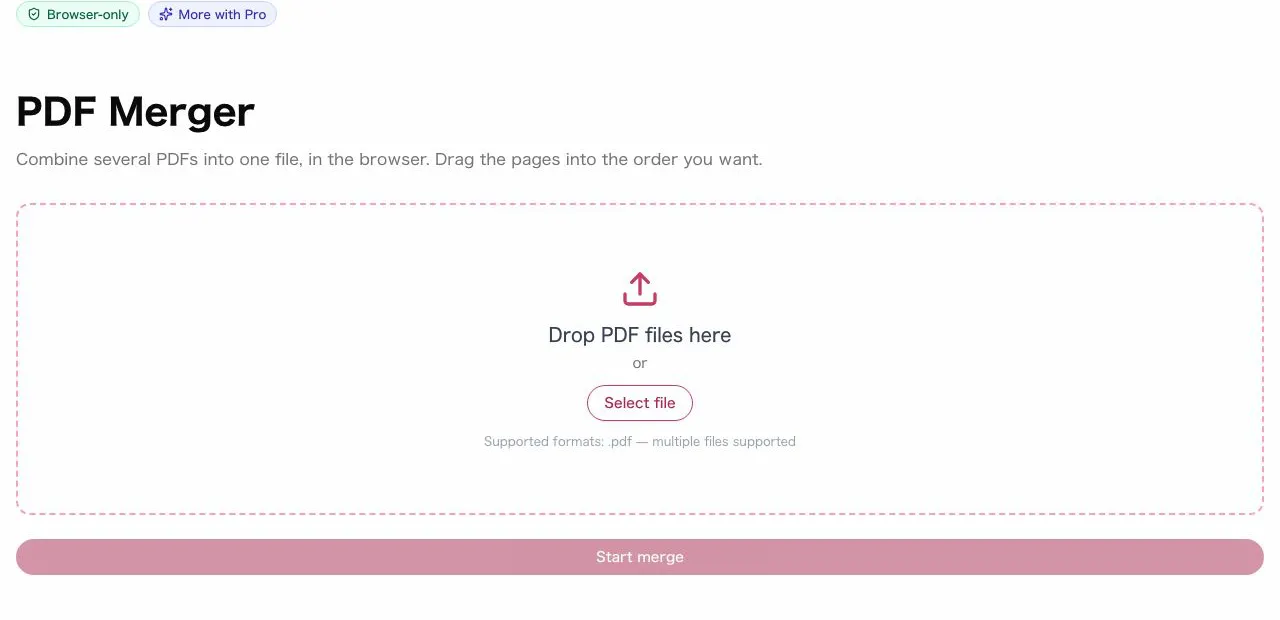
The tool screen itself will not tell you. The sakuttoAI screen has a Browser-only badge, a drop zone labeled "Drop PDF files here", and "Select file" and "Start merge" buttons. It has no setting for the processing method, because everything runs locally.
Whether the address uses HTTPS
A URL that starts with https:// means the connection is encrypted, and a padlock icon in the address bar shows it. An address that starts with http:// is not encrypted, so do not add a file on that page.
Whether an account is required
An account can tie your usage history to your personal details, so it is worth noticing when a tool demands one. It does not by itself mean the PDF is uploaded, because a browser-based tool can keep the file local even when you are signed in. sakuttoAI, for instance, asks for a free account, yet the merge runs in the browser.
What the privacy policy says
Look in the privacy policy for whether files are stored, for how long, and whether they are shared with third parties. A policy that answers all three plainly tells you more than one that only promises to take security seriously.
Merging confidential work PDFs: what to ask first
A company's security policy may restrict sending files to outside services, and that policy applies even when a tool keeps the file on your device. Before adopting a tool for contracts or client records, confirm with the IT or information security team whether outside web tools are allowed at all. Bring the processing method with you: whether the tool uploads the file or merges it in the browser, and whether it needs an account.
If outside web tools are not allowed, merge with desktop software that your company already approves. A written answer from IT also settles the question for everyone who uses the tool afterward, so nobody has to decide alone whether a file may leave the company.
Safest ways to merge a PDF: browser, desktop, or upload
Both local methods keep the file on your machine, so the choice between them depends on whether you can install software and whether you need to work offline. Desktop software suits a machine where installation is allowed, and a browser-based tool suits one where it is not.
How three ways of merging a PDF handle your file
| Method | Upload | Offline | Setup |
|---|---|---|---|
| Browser-based tool | None | No, needs a connection | Free account (sakuttoAI) |
| Desktop software | None | Yes | Install |
| Server-upload tool | Yes, leak risk depends on the provider | No | None |
A browser-based tool needs no installation and keeps the PDF on your device, but it does need an internet connection: the merge runs locally, while the tool checks the daily task count online. Desktop software works without a connection but has to be installed first. A server-upload tool needs no setup, and its leak risk depends on the provider's storage, terms, and security.
To combine PDFs without uploading them, use the free PDF merge tool from sakuttoAI, which runs in the browser. Sign in with a free account, add the PDFs, and start the merge.
Summary: choose the processing method first
Price and polish tell you little; where the merge runs tells you what happens to the file. Before merging a confidential PDF, find out whether the tool processes it in your browser or on its server, and for work files check with IT first.
A free in-browser tool can keep files local, while a paid upload service still uploads them. sakuttoAI's PDF merge tool is free with a free account and merges in the browser, so the PDF stays on your device while account and usage data still go online. The steps for combining files are covered in Merge PDF Files Free: Combine PDFs Online.
FAQ
- Is merging PDFs online dangerous?
- That depends on the processing method. A server-upload tool puts your PDF on the provider's server, so the provider's storage and security become part of the risk. A browser-based tool does the merge on your device. The sakuttoAI tool page says it runs in the browser and does not transmit documents.
- Is it true that sakuttoAI never sends my files to a server?
- The tool page says no requests involving your PDF files are made, and it points to the Network tab of the browser's developer tools as a way to check. Open that tab, run a merge, and see whether any request carries your file. Sign-in and the daily task count still go online.
- Can I use an online tool for confidential company documents?
- A browser-based tool keeps the PDF on your device for the merge, but your company's security policy may still restrict outside services. Confirm with your IT or information security team before you adopt any tool.
- Are free PDF merge tools safe?
- Price does not settle it; the processing method does. A free in-browser tool can keep your files local, while a paid server-upload service still uploads them. Check where the file is processed before you look at the price.
- How can I verify a PDF merge tool's security?
- Read the tool's page for where the file is processed, confirm the address starts with https://, note whether an account is required, and read the privacy policy for storage, retention, and sharing. For a technical check, watch the Network tab in your browser's developer tools while the tool runs.
Related articles
 Merge PDF Files Free: Combine PDFs OnlineMerge PDF files free in your browser with a free account and nothing to install. Covers page order, daily plan limits and how it compares with desktop tools.
 Merge PDF Free: What Happens to Your UploadMerge PDF free tools differ in what they keep: Smallpdf deletes uploads after one hour, Sejda after two. See the limits and a no-upload way to combine PDFs.
 Safe PDF Compressor: Keep Your File on Your DeviceA safe PDF compressor keeps your file on your device. See how sakuttoAI compresses in the browser, what its one network request sends, and how to check it.
 Merge PDF Files at Work: 5 Practical UsesMerge PDF files at work: combine invoices, proposals, meeting packs and scans into one file, with the order, naming and checks that stop mistakes.