What is My Fish in Sakana Chat?
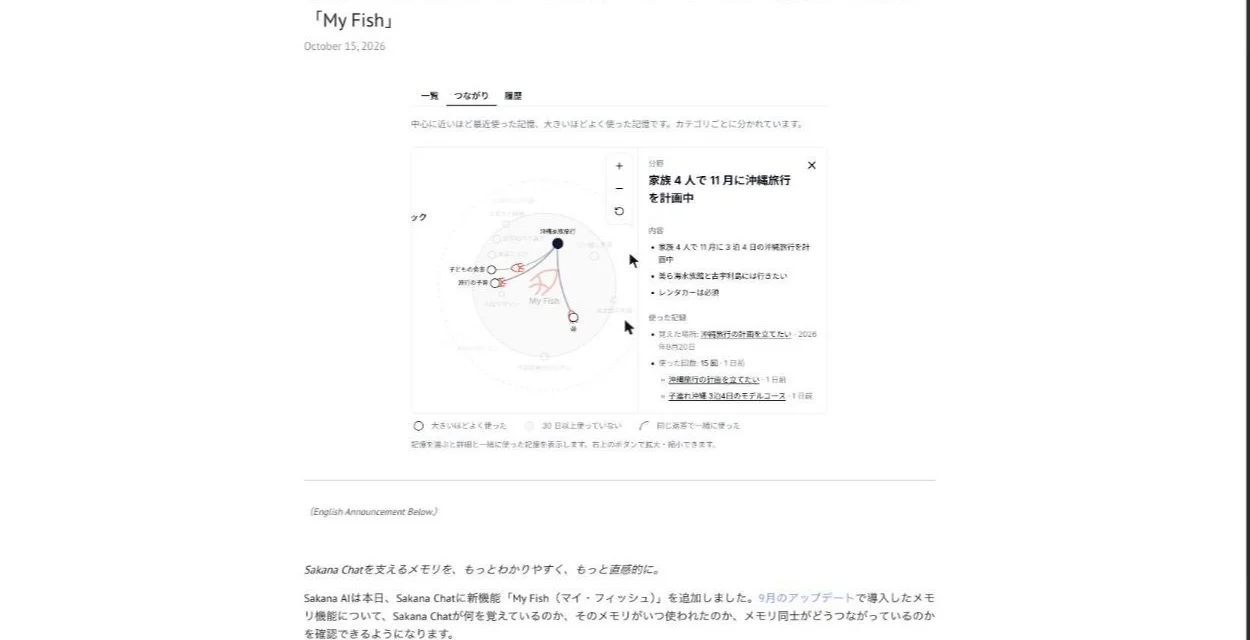
My Fish is a part of Sakana Chat's settings that shows what the chatbot's memory has stored about you. Sakana AI added it on October 15, 2026.
It lists each memory, records when memories were read or saved, and draws a map of which memories get used together. It works on the web and in the mobile version.
It opens up the memory added in September
Memory itself arrived earlier, in a September 17, 2026 update that also made Fugu Max available to every Sakana Chat user. With memory, things you mention once, such as your role, a current project or the way you want answers written, carry over into later chats. It works with both Namazu (see Sakana Namazu API: pricing, setup and EU limits) and Fugu Max.
Until My Fish, Sakana AI says, memory mostly ran behind the scenes. Memory also starts from that update, so anything you said before September 17 is not part of it.
What the memory chooses to keep
Memory is switched on by default, but Sakana Chat does not keep every detail of every chat. It keeps what is likely to help in later conversations. The announcement gives three kinds of examples:
- How you like Sakana Chat to answer you
- A project or goal you are working toward
- Useful details about you
Memory works with both Namazu and Fugu Max. You can review what has been remembered from the settings screen at any time, or turn the feature off entirely. — from Sakana AI (locale-specific display)View official source →
Rather than keeping every detail, it focuses on information that may continue to be helpful — from Sakana AI (locale-specific display)View official source →
Overview, Connections and History in My Fish
What each My Fish view shows (Sakana AI blog)
| View | What you can find there |
|---|---|
| Overview | Memories by category, with fact count, times read and last use |
| Connections | A map of memories by recency and frequency of use |
| History | A timeline of every memory read and write |
My Fish has three views, and a heatmap sits above all of them. The heatmap marks when Sakana Chat used a memory and when it learned something new, so you can spot busy periods before opening any single memory.
Overview groups memories and links back to the chat
Overview puts every memory on one page, grouped into categories such as your profile, preferences, current projects and favorite topics. Each memory shows how many facts it holds, how many times it has been read and when it was last used.
Open a memory and you see the individual facts and the conversations they came from. You can also jump straight back into the original chat, which helps when you want to know why Sakana Chat thinks something about you.
Connections maps memories used in the same reply
Connections lays your memories out as a map with your fish in the middle. Position, size and shading each mean something:
- Memories nearer the center were used more recently
- Bigger memories have been used more often
- Faded memories have not been used in 30 days or more
Lines join memories that showed up together in the same reply, which tells you what Sakana Chat tends to combine. Picking a memory brings up its facts, the date Sakana Chat learned it, the chats that used it and the memories it is usually paired with.
Selecting the fish in the center opens your profile. On a phone, the details open in a drawer from the bottom of the screen, and swiping up shows the rest.
History and the heatmap show memory reads and writes
History is a timeline of every time Sakana Chat read or saved a memory. Expand a write and you see exactly which facts were added at that point. Read it alongside the heatmap to find the day a new fact appeared.
For each memory, you can see how many facts it contains, how often it has been read, and when it was last used. — from Sakana AI (locale-specific display)View official source →
How to open My Fish on web and mobile
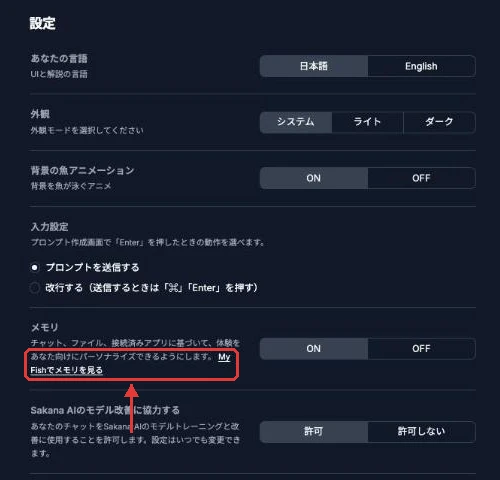
You open My Fish from Settings, and Sakana Chat also links to it from inside a conversation. Both routes work on the web and on mobile.
Open it from Settings on web or mobile
Click your account at the bottom of the sidebar, go to Settings, then Memory, and choose "View memories in My Fish". The same path applies on the web and on mobile.
Select a memory chip during a chat
When Sakana Chat reads or saves a memory while writing a reply, a small chip appears in its thinking process. The announcement gives examples like these:
- "Checked memory: Trip to Spain, Hiking"
- "Learned something new: Osaka marathon"
Selecting a chip opens My Fish at that memory. You can see what was used without leaving the conversation to dig through Settings.
Click your account at the bottom of the sidebar, then open Settings → Memory → “View memories in My Fish” on web or mobile. — from Sakana AI (locale-specific display)View official source →
Memory and training are two separate settings
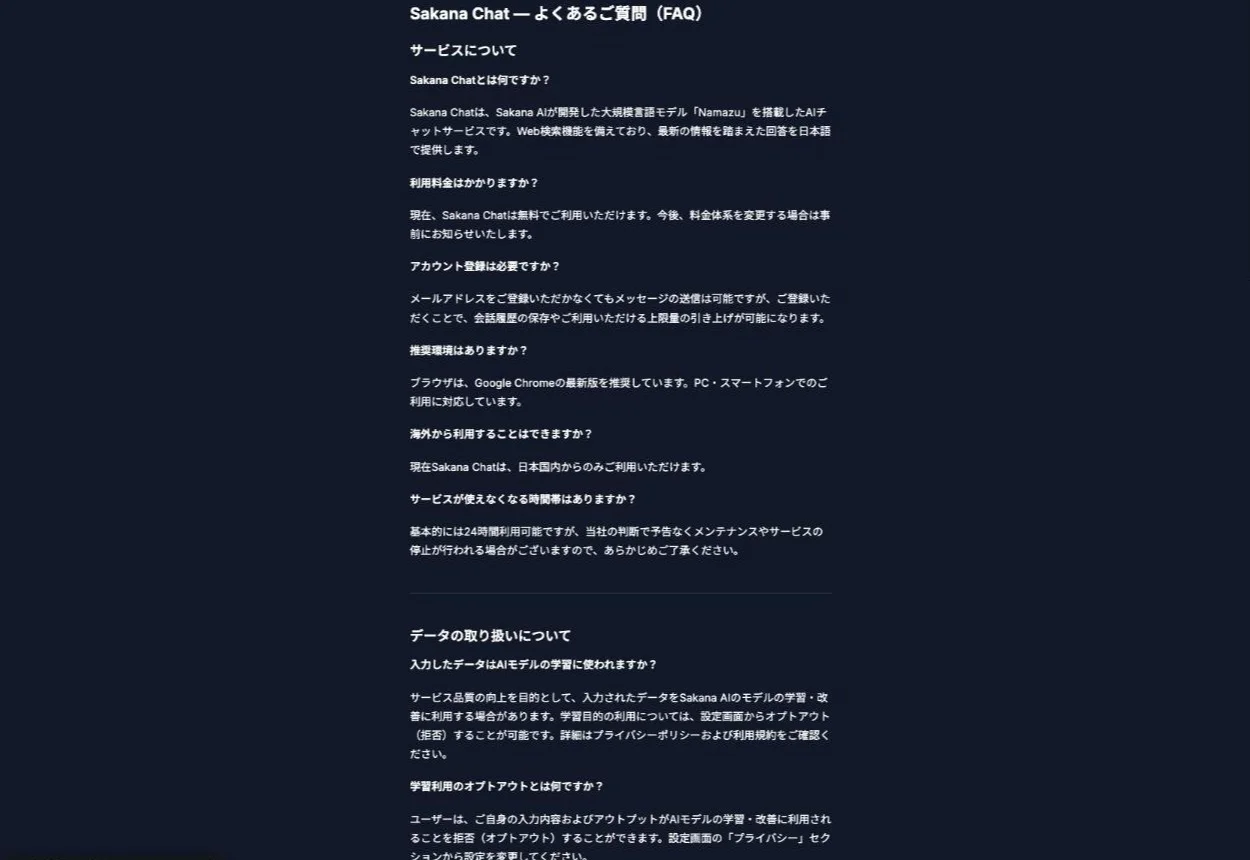
Sakana Chat has two different switches: one for memory and one for whether your inputs train Sakana AI's models. Sakana AI does not say that turning one off affects the other, so set both if you care about both.
Memory is on by default and can be switched off
Memory starts out switched on, and you can turn it off in Settings at any time. If you have used Sakana Chat since September 17 without changing anything, it has probably picked up some details about you already. Switch it off when there is something you do not want remembered, or when you want a chat with no memory involved.
Opting out of training is a separate setting
Sakana Chat may use what you type to train and improve Sakana AI's models. You can opt out, meaning you decline that use.
The FAQ points to a Privacy section, but as of October 29, 2026, Settings has no section by that name. Instead, a switch just below Memory asks whether Sakana AI may use your chats to improve its models, and you opt out by turning it off.
Opting out does not limit the basic features. The FAQ adds that data may still be reviewed for safety, abuse prevention and quality evaluation after you opt out.
No announced way to delete a single memory
Neither the My Fish announcement nor the FAQ says whether you can delete one memory at a time. What the FAQ does describe is deleting your chat history or your whole account, which you request through the contact form.
The FAQ also prohibits entering your own or anyone else's personal information. Leaving that kind of detail out of your chats is the most reliable way to keep it out of memory.
ユーザーは、ご自身の入力内容およびアウトプットがAIモデルの学習・改善に利用されることを拒否(オプトアウト)することができます。設定画面の「プライバシー」セクションから設定を変更してください。 — from Sakana ChatView official source →
Can you use Sakana Chat outside Japan?
No. Sakana Chat is currently available only from within Japan, so most readers abroad cannot open My Fish for themselves yet. Inside Japan it is free as of October 2026, and you can send messages without registering.
Creating an account keeps your chat history and raises your usage limit. Chat history and account data are stored on Google Cloud infrastructure in Japan.
現在Sakana Chatは、日本国内からのみご利用いただけます。 — from Sakana ChatView official source →
If you already use Sakana Chat, open the Overview first
My Fish shows what memory holds and how it is used, but no official page explains how to remove a single memory. The documented way to stop memory is to turn the whole feature off, and Sakana AI calls My Fish only a first step toward memories that evolve and stay useful over time.
If memory has been on since September 17, start with the Overview to see what is there, then decide whether to keep memory on. Check the model improvement setting as well if you do not want your chats used for training.
FAQ
- Does My Fish include chats from before September 2026?
- No. Memory only covers conversations from the September 17, 2026 update onward, so My Fish can only show what Sakana Chat picked up after that date.
- Is Sakana Chat free?
- Yes. Sakana Chat is free as of October 2026, and Sakana AI says it will announce any pricing change in advance. You can send messages without an account, but signing up keeps your chat history and raises the usage limit.
- Where is Sakana Chat data stored?
- According to the FAQ, chat history and account data are kept on Google Cloud infrastructure in Japan, and chat history is retained while the account is active.
Related articles
 Sakana AI API Platform: Fugu with admin controlsSakana AI API Platform entered early access on October 28, 2026, offering Fugu and Fugu Ultra via an OpenAI-compatible API with audit logs and budget caps.
 Sakana Aquarium: An Enterprise AI Agent PlatformSakana Aquarium is Sakana AI's enterprise AI agent platform, announced Oct. 23, 2026. It maps company data in an ontology and runs agents with human approval.
 Sakana AI Signs Japan Defense Deal to Study AISakana AI signed a contract with Japan's Ministry of Defense on July 29, 2026 to study and demonstrate AI for intelligence analysis. Its value is undisclosed.
 New Namazu in Sakana Translate: What 160 Tests SaySakana Translate now runs a new Sakana Namazu model and is still free. Sakana AI says it won over half of 160 in-house Japanese-to-English tests.