
What Sakana Namazu is: a Japanese LLM built on Kimi K2.6
Sakana Namazu is a Japanese-tuned LLM that Sakana AI built on Moonshot AI's Kimi K2.6 and opened as an API on August 3, 2026. You reach it through an OpenAI-compatible endpoint rather than a chat window, so it is meant to sit inside your own apps and scripts. Web search and code execution come built in.
Sakana Namazu at a glance (Sakana AI blog, product page and pricing page)
sakana-namazu (priced as sakana-namazu-v1.0 on the pricing page)https://api.sakana.ai/v1Today we are releasing Sakana Namazu, an API powered by an updated version of the large language model that has been running inside Sakana Chat. It is an LLM specialized for the Japanese language and for the way business is done in Japan, with web search and code execution available as built-in tools. If you already have code written against an OpenAI-compatible API, rewriting base_url is all it takes to start using it. — From the opening of Sakana AI's English announcement, dated August 3, 2026 (Japanese and English originals on the same URL; locale-specific display)View official source →
Moonshot AI's open Kimi model with extra Japanese training
Because Moonshot AI publishes Kimi K2.6 as an open-weight model, Sakana could take it as a starting point and train it further on its own in-house data. Open-weight means the trained parameters are public and other companies can build on them.
Sakana names three targets for the training. The first is Japanese and Japanese business contexts. The product page illustrates that with business documents, email, keigo (the honorific register) and business customs.
The other two are fewer needless refusals on certain topics and less bias in the answers. None of those targets is about English output.
The announcement does not explain how the training was done. The product page's FAQ says the details will be covered on Sakana's technical blog, but as of September 29, 2026, the blog had no post describing the training.
Sakana Namazu is a Japanese-specialized LLM API from Sakana AI. It is built on Kimi K2.6, the open model published by Moonshot AI. Using our own in-house data, we adapted the model to Japanese and to Japanese business contexts, and we also tuned it to reduce unnecessary refusals on certain topics and to limit bias in its outputs. — From the section describing the base model and the extra training (Japanese and English originals on the same URL; locale-specific display)View official source →
Why Sakana Chat's model became an API, and how Fugu differs
The API serves an updated version of the model Sakana AI had been running in Sakana Chat, its own chat service, since that service launched on March 24, 2026. The March post described prototype Namazu models built on DeepSeek, Llama and gpt-oss bases. The August version is built on Kimi K2.6, and Sakana says it beats earlier versions on both the quality of its Japanese answers and agent work, meaning multi-step tasks that use tools.
Sakana says it built the API because people kept asking to call the model from their own products and workflows. Sakana also argues that developers doing real work in Japanese have few good API options: frontier models cost a lot, and a raw open model leaves doubts about quality and data handling.
Sakana Fugu is a different product. Sakana's FAQ describes Fugu as coordinating several frontier models, while Namazu is a single model that answers on its own (Sakana Fugu Ultra is not always the best Fugu covers the Fugu side). For what came after the API launch, see New Namazu in Sakana Translate: What 160 Tests Say.
Ever since Sakana Chat launched, we have heard the same request many times over: people wanted to use this model from their own products and workflows through an API. / At the same time, the choice of LLM APIs that can handle real work in Japanese is still limited. Frontier models are costly, and using an open model as it comes leaves open questions about quality and about how data is handled. — From the section explaining why Sakana AI released the API (Japanese and English originals on the same URL; locale-specific display)View official source →
Sakana Fugu orchestrates multiple frontier models to deliver its performance, whereas Sakana Namazu is a single in-house model — refined with our own additional training — that works on its own as an API. — From the FAQ entry comparing the two products (locale-specific display)View official source →
Sakana Namazu API pricing: tokens plus tool fees
Namazu has no monthly fee: each million input tokens costs $0.95 and each million output tokens $4.00. Cached input drops to $0.15, and the two built-in tools carry their own charges. Those are the rates the console pricing page lists for sakana-namazu-v1.0 as of September 29, 2026.
Sakana Namazu pricing (Sakana AI API Console, as of September 29, 2026)
| Item | Price | Note |
|---|---|---|
| Input | $0.95 per 1M tokens | — |
| Output | $4.00 per 1M tokens | Thinking tokens billed at this rate |
| Cached input | $0.15 per 1M tokens | Repeated prompt prefix served from cache |
| Web search | $7.00 per 1,000 calls | Each query and each page fetch counts as one call |
| Code execution | $0.12 per hour | Billed for sandbox session time |
There are no monthly fees or subscription plans — Sakana Namazu is billed purely on a pay-as-you-go (per-token) basis. Built-in tools (web search and code execution) are billed separately. / Token pricing for sakana-namazu-v1.0 per 1M tokens. / Thinking tokens are billed at the same rate as output tokens. — From the Sakana Namazu section of the pricing page (locale-specific display)View official source →
Per-token LLM API pricing with no monthly plan
The bill counts tokens: what the model reads is charged at the input rate, and what it writes, thinking included, at the output rate. A token is a small chunk of text. Thinking tokens are the reasoning the model works through before it answers.
Cached input is the repeated start of a prompt, such as a long system prompt, that Sakana serves from its cache at the $0.15 rate. The console does sell monthly plans at $20, $100 and $200, but those cover Fugu, Fugu Ultra and Fugu Max, not Namazu. Charges are in US dollars, and yen billing is offered only on the Enterprise plan.
For a sense of scale, take 10,000 requests that each send 2,000 tokens and get 500 back. That is 20 million input tokens ($19.00) plus 5 million output tokens ($20.00), or $39.00 at list prices with no tools and no cache hits. Output is a fifth of the tokens but about half the bill, so token for token, long answers move the total more than long prompts do.
Web search and code execution are billed on top
Turn on the built-in tools and two more charges appear: $7.00 per 1,000 web search calls and $0.12 per hour of code execution. Every search query counts as a call, and so does every page the model fetches. Code execution is billed for sandbox time, from when the session is created until the response finishes.
A second cost is harder to see. With tools on, a single API request becomes a chain of model calls, which Sakana calls the agent loop. Each call in the chain reads the whole conversation again, earlier search results, page text and code output included, and all of it is billed as input tokens.
Sakana says the shared start of the prompt is typically served from cache at the cheaper rate, so the input bill climbs more slowly than the token count. Even so, the cost of a research-style request depends on how many searches and page fetches the model decides to make, so run one real workflow before you budget. On the Chat Completions API the cached share appears in usage.prompt_tokens_details.cached_tokens, and tool calls show up in the response as items such as web_search_call.
When built-in tools such as web search or code execution are enabled, a single API request runs multiple model calls internally — the model calls a tool, receives the result, and reasons again (the "agent loop"). / Each internal call re-sends the full prompt, including the conversation history and all tool results so far. Search results, fetched web page content, and code execution output are therefore billed as input tokens on subsequent internal calls. The input token count in the response's usage object is the total across all internal calls. / Cached tokens are billed at the discounted cached-input rate, so input cost grows slowly even in long loops. — From the explanation of how tool use is billed (locale-specific display)View official source →
Namazu benchmarks: Sakana AI's gains over Kimi K2.6
Sakana AI reports that Namazu beat Kimi K2.6 on three Japanese-focused tests and kept the base model's reasoning level, but every comparison is against that base model alone. FairPoliticsQA is the only score the post's prose spells out. The other five, reasoning included, appear only in a bar chart in the post.
FairPoliticsQA score (figures published by Sakana AI)
A gain of 22.2 points, about 1.65x the base score (calculated from the two published figures). Sakana does not say what the percentage counts.


FairPoliticsQA and JFBench: Namazu beats the base model
Namazu scored 56.30% on FairPoliticsQA against 34.10% for Kimi K2.6, and Sakana says it also beat the base on JFBench and on a translation test. FairPoliticsQA is Sakana's in-house test of whether answers stay neutral instead of leaning toward one country's values.
JFBench, developed by Preferred Networks, measures how well a model follows instructions written in Japanese. Sakana ran 200 items at each of four levels, with 1, 2, 4 or 8 constraints per instruction, and its chart puts Namazu at 37.40% against 35.90% for the base. On the third test, a Japanese-English translation task that covers Japan-specific names and honorifics, the chart has Namazu at 52.20% against 47.80%.
For reasoning, Sakana used AIME26 for math, MMLU-Pro for broad knowledge and LiveCodeBench v6 for coding. It says Namazu kept the base model's strong results on all three, and the chart shows small gains: 96.67% vs 96.40% on AIME26, 90.33% vs 88.02% on MMLU-Pro and 90.33% vs 89.60% on LiveCodeBench v6.
It outperformed the base model on all of the following: JFBench, which measures instruction following in Japanese; a Japanese-English translation task that accounts for Japan-specific proper nouns and honorific language; and FairPoliticsQA, which measures whether answers stay neutral rather than leaning toward the values of any one country. / The gain on FairPoliticsQA is especially large, rising from 34.10% to 56.30%, showing that on top of general Japanese ability, the model is better able to answer with Japan-specific knowledge and context in mind. — From the Japanese benchmark results in Sakana AI's announcement (Japanese and English originals on the same URL; locale-specific display)View official source →
No comparison with other Japanese AI models was published
Neither the announcement nor the product page sets Namazu beside other vendors' Japanese AI models, so these results show gains over Kimi K2.6, not a ranking. Two of the three Japanese tests, FairPoliticsQA and the translation task, are benchmarks Sakana built itself. JFBench is the only one that is publicly available, and Sakana links to its GitHub repository.
That leaves the practical test to you. Run a batch of your own Japanese prompts through Namazu and through the model you use now, then compare the answers and the usage bills side by side. If agent work is the goal, CoffeeBench by Sakana AI: How It Works and Results shows another way of checking whether a model can carry out a long task.
JFBench is a benchmark developed by Preferred Networks for measuring instruction-following ability in Japanese. For this evaluation, we sampled 200 items from each of the constraint counts 1, 2, 4, and 8. The Japanese-English translation task and FairPoliticsQA are internal benchmarks we built ourselves. — From the note on where the benchmarks come from (Japanese and English originals on the same URL; locale-specific display)View official source →
Namazu API setup: swap base_url, check region and data use
You call Namazu with the OpenAI SDK you already have by changing two settings, but check your region and Sakana's data defaults before real data goes in. The two settings are the base URL and the model name. The checks are whether Namazu is offered where you work, and whether your inputs may be used for training.
Swap the base_url in OpenAI-compatible API code
Create a key in the Sakana AI Console, change base_url and the model name, and the rest of your OpenAI-compatible code stays the same. The endpoint is https://api.sakana.ai/v1 and the model is sakana-namazu. The official quick start, shown below, lays out the same three steps.
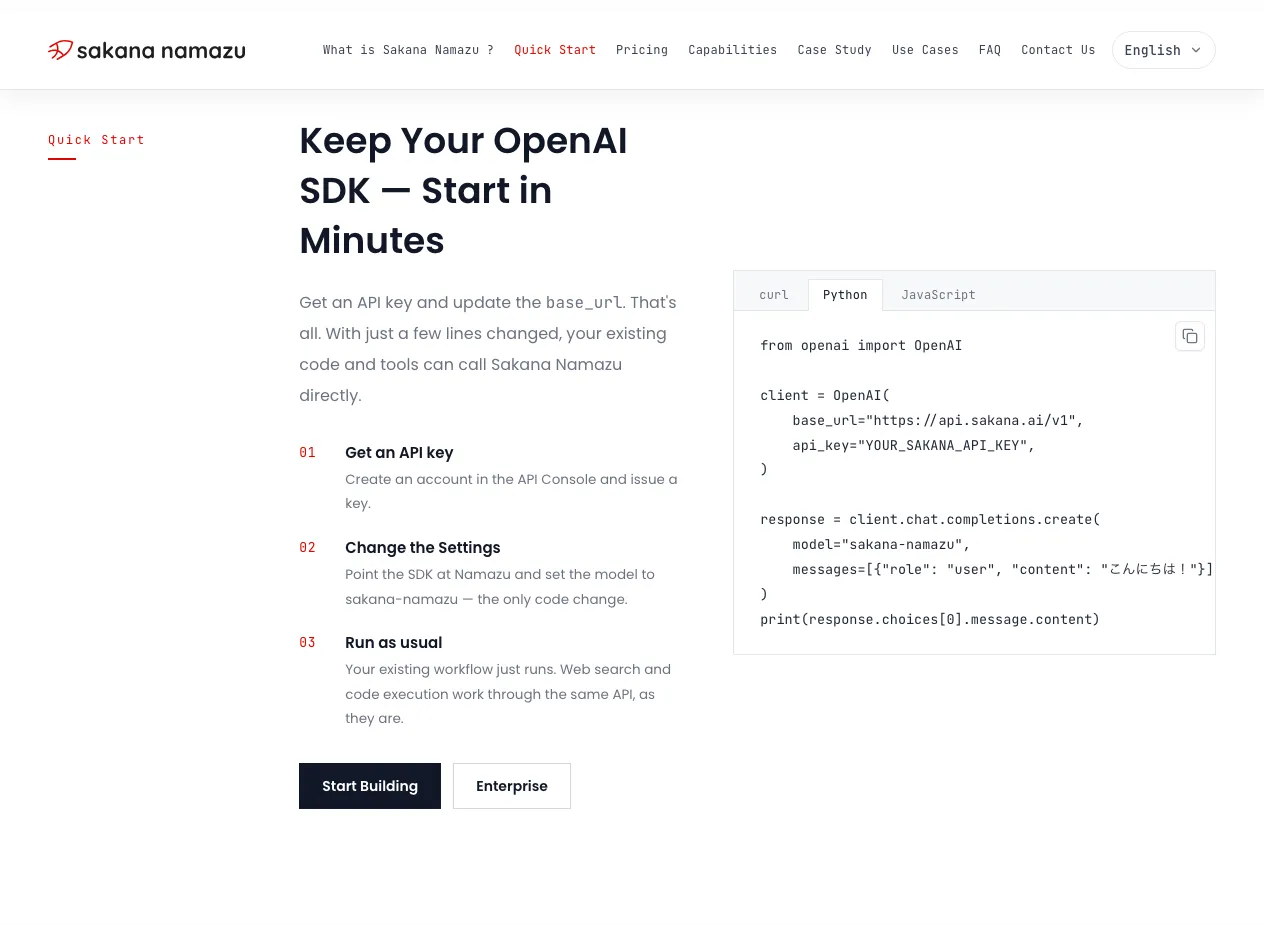
The snippet below is adapted from that official Python sample. The only change is that the key comes from an environment variable, SAKANA_API_KEY, an arbitrary name; Sakana's sample shows a placeholder string instead.
import os
from openai import OpenAI

client = OpenAI(
    base_url="https://api.sakana.ai/v1",
    api_key=os.environ["SAKANA_API_KEY"],
)
response = client.chat.completions.create(
    model="sakana-namazu",
    messages=[{"role": "user", "content": "こんにちは!"}],
)
print(response.choices[0].message.content)
Request bodies are JSON, and they grow quickly once function definitions and search results are added. Laying out the messages array cleanly makes a failing call quicker to debug.
The FAQ on the product page says the same endpoint swap works for coding agents, and Sakana Fugu in Claude Code: Setup, Models, v1.1 shows how that swap went for Fugu. If you route traffic through another platform, the same page lists OpenRouter and Merge as other places to reach Namazu, and Vercel AI Gateway also carries it as sakana/namazu (all as of September 29, 2026).
Keep Your OpenAI SDK — Start in Minutes / Get an API key and update the base_url. That's all. / Sakana Namazu is available through an OpenAI-compatible API. Point your existing client or coding harness at the Sakana Namazu endpoint with your API key and start sending requests — no SDK migration required. — From the Quick Start section and the first FAQ entry (locale-specific display)View official source →
Not yet available in the EU, UK or Switzerland
As of September 29, 2026, Sakana's product page says Namazu is not available in the EU/EEA, the UK or Switzerland while the company works to meet GDPR and other regional requirements. The notice gives no date for a change. If you work from one of those places, Namazu is not an option yet.
Where your data is processed is a separate question: Sakana's FAQ says it cannot currently guarantee that processing happens entirely inside Japan. For enterprise customers, the product page lists region selection and zero data retention among the requirements Sakana says it can discuss.
Not yet available in the EU/EEA, the UK, or Switzerland while we work toward compliance with GDPR and other region-specific regulations. / At present, we cannot guarantee that data processing is completed entirely within Japan. / For enterprise use, we can discuss requirements such as billing in Japanese Yen, invoice-based payment, region selection, and zero data retention. — From the notice under the page header, the FAQ, and the contact section (locale-specific display)View official source →
Your inputs may train the model unless you opt out
Opt out in the Console settings before any customer or company data goes through the API; until you do, Sakana may use those inputs to train and improve its models. Sakana's FAQ says the opt-out is available at any time, and the Console privacy policy has the full terms.
Namazu fits high-volume Japanese work you can test on your own data, such as the support replies, order-data analysis and Monday-morning market research reports that Sakana's announcement gives as examples. Sakana's FAQ also recommends it for problem-solving from Japanese instructions and for teams that run frontier models at high volume and want to cut that cost.
Hold off if you work from the EU, the UK or Switzerland, or if your data must stay in Japan and Sakana's enterprise terms do not settle that for you. If you can use it, judge Namazu on your own prompts and bills rather than on the base-model comparison. For more on the models and companies around Namazu, see Kimi K3 benchmarks, pricing and open weights and Sakana AI NVIDIA Partnership: Nemotron Joins Fugu.
By default, your inputs may be used to train and improve our models. You can opt out at any time from the Console settings. See our Privacy Policy for details. — From the FAQ entry on training use (locale-specific display)View official source →
FAQ
- How much does Sakana Namazu cost?
- There is no monthly fee; you pay per token. Per 1M tokens it is $0.95 for input, $4.00 for output and $0.15 for cached input, and thinking tokens are billed at the output rate. Web search ($7.00 per 1,000 calls) and code execution ($0.12 per hour) are billed on top. Sakana's console listed these prices on September 29, 2026.
- Can I reuse code I already wrote for the OpenAI API?
- Yes. Namazu is served through an OpenAI-compatible API, so you keep the OpenAI SDK, set base_url to https://api.sakana.ai/v1, use a Sakana API key and pass sakana-namazu as the model. Web search and code execution come through the same API.
- How is it different from the base model, Kimi K2.6?
- Sakana AI takes Moonshot AI's open model Kimi K2.6 as the base and trains it further, aiming at stronger Japanese and more neutral answers. A technical write-up is promised, but as of September 29, 2026, Sakana's blog had not posted one.
- Can I use Sakana Namazu in the EU or the UK?
- Not yet. As of September 29, 2026, Sakana's product page says Namazu is not available in the EU/EEA, the UK or Switzerland while the company works to meet GDPR and other regional requirements. Sakana also says it cannot currently guarantee that processing stays entirely within Japan.
- Will my input be used to train the model?
- By default, it may be. Sakana AI's FAQ says inputs may feed into training and improving its models, and the Console settings let you turn that use off at any time. Opt out before business data goes through the API.
Related articles
 Sakana AI API Platform: Fugu with admin controlsSakana AI API Platform entered early access on October 28, 2026, offering Fugu and Fugu Ultra via an OpenAI-compatible API with audit logs and budget caps.
 New Namazu in Sakana Translate: What 160 Tests SaySakana Translate now runs a new Sakana Namazu model and is still free. Sakana AI says it won over half of 160 in-house Japanese-to-English tests.
 Sakana Aquarium: An Enterprise AI Agent PlatformSakana Aquarium is Sakana AI's enterprise AI agent platform, announced Oct. 23, 2026. It maps company data in an ontology and runs agents with human approval.
 Sakana Chat's My Fish shows what the AI remembersMy Fish shows what Sakana Chat's memory holds about you. Memory is on by default, opting out of training is separate, and Sakana Chat only works in Japan.