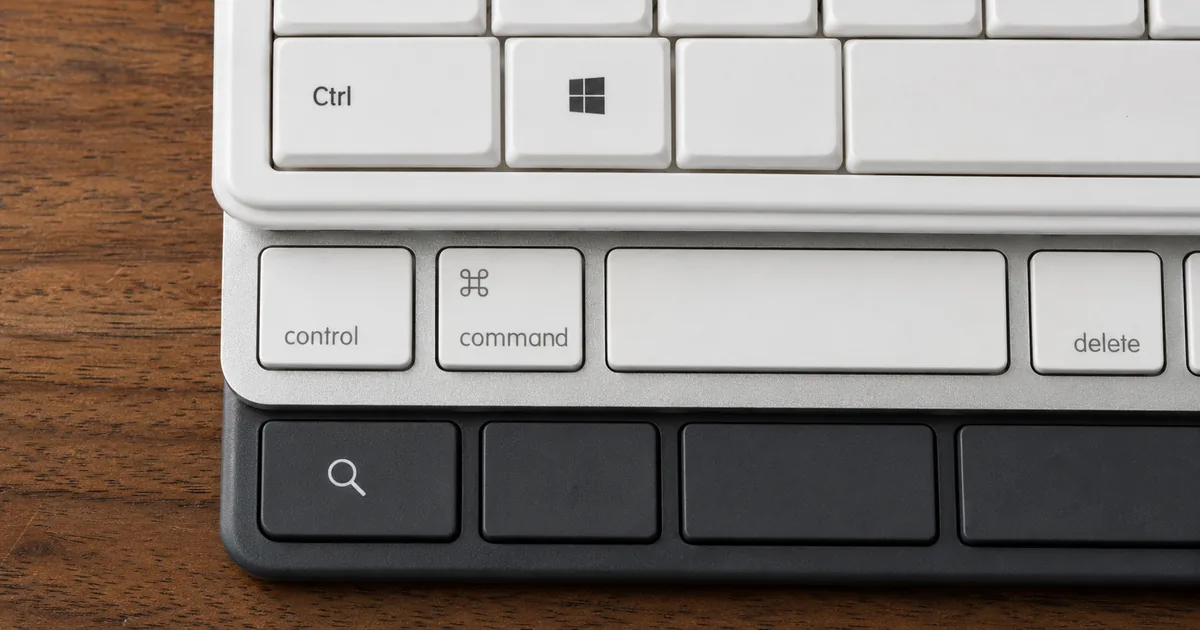
The first week on a Mac after years of Windows is rarely a matter of learning a long list. Only two operations genuinely have to be relearned, and knowing which two turns the rest of the table into something you consult rather than memorize.
Why the shortcuts differ between Windows and Mac
How the modifier keys line up
A modifier key does nothing on its own. It changes the meaning of whatever key you press with it, and Ctrl, Alt, Shift and the Windows key are the four that Windows uses. Shortcuts look different across the two systems because the modifiers divide the work differently, not because the underlying actions differ.
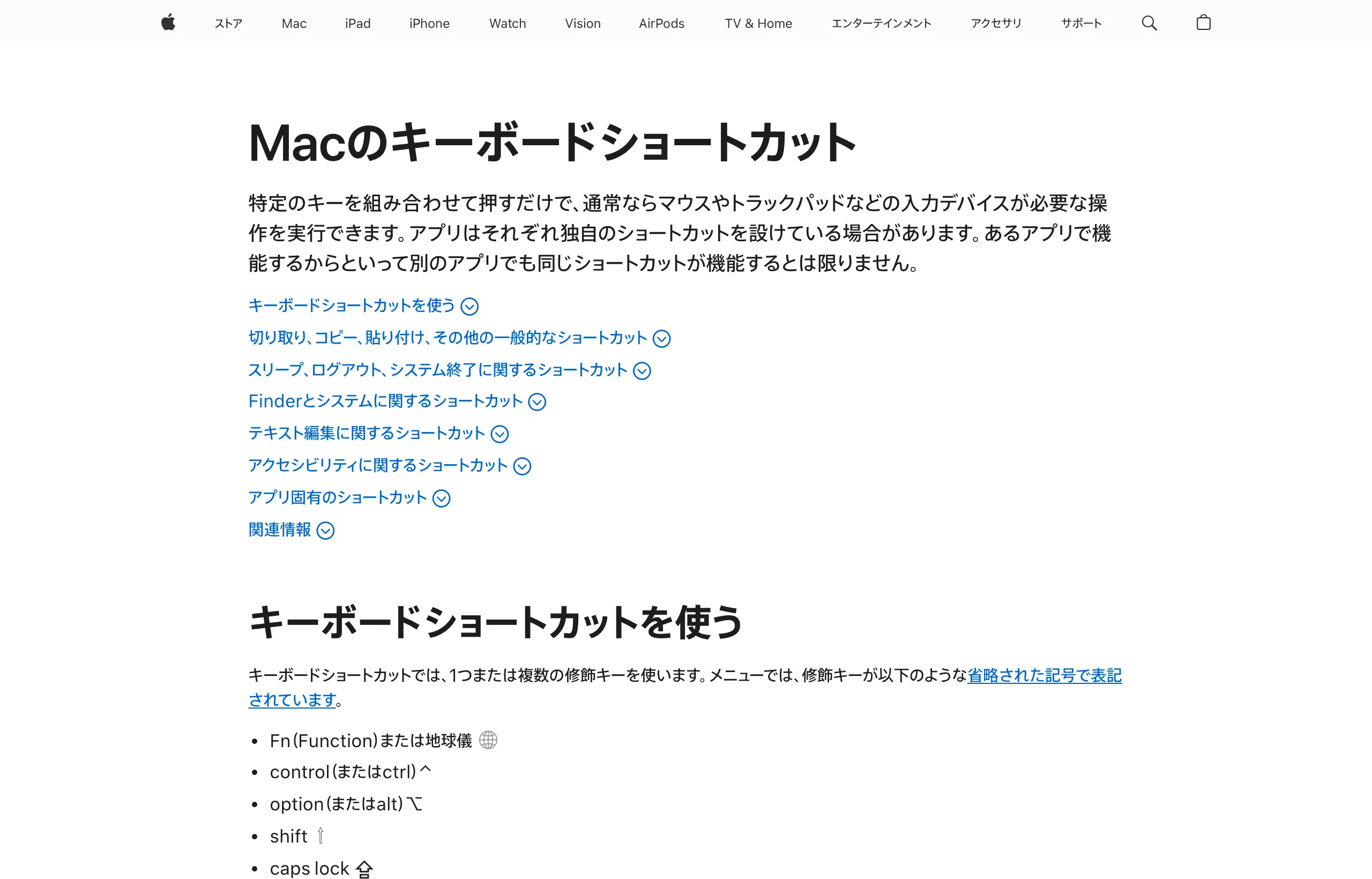
Apple writes its shortcuts with symbols rather than words. Control is ⌃, Option is ⌥, Shift is ⇧, Caps Lock is ⇪ and Command is ⌘, with Esc, Tab, Delete, Return and the four arrow keys carrying symbols of their own — thirteen keys in all.
Fn, which Apple also lists, is shown as a globe rather than a symbol. Once those symbols are readable, Apple's own support pages become usable as a reference.
Control on Windows becomes Command on Mac
This single swap covers most of the day. Copy is Ctrl + C on Windows and ⌘ + C on a Mac, paste is Ctrl + V and ⌘ + V, save is Ctrl + S and ⌘ + S. Both vendors describe the same action in their documentation, which is what makes the swap safe to rely on.
Nothing new has to be memorized inside that range. The letter stays put and only the key held down changes.
Keyboard shortcuts use one or more of these modifier keys, which in menus are abbreviated using symbols — from the introduction to the modifier key listView official source →
Mac has both a Command key and a Control key
This is the point where people coming from Windows get stuck. The Mac keyboard also has a key labeled Control, separate from Command, so reading Windows' Ctrl as that key leaves most shortcuts dead.
Apple's list includes combinations such as Control-Command-F that press both at once, which settles the question of whether they are the same key. Control turns up in a narrow set of tasks: locking the screen with Control-⌘-Q, or cycling input sources with Control-Space. The reliable mental model is that everything you used Ctrl for now lives on Command, and Control is a different key with its own jobs.
Only the modifier keys need relearning
With the modifier mapping in place, the letters are shared. C copies, S saves, F finds and Z undoes on both systems, which puts the whole relearning job on the modifier mapping itself.
That leaves the two operations the mapping cannot explain: deleting characters, and moving the cursor to the start or end of a line. Both are covered under "Where the keys really change" below, so that section stands on its own. Everything else is a lookup in the table.
The 58 shortcuts side by side
What the 58 rows cover
The table below holds 58 operations people reach for daily. The search box above the table takes either a task or a key name, and you can filter by category or sort any column. Nothing is sent anywhere; the filtering runs in the browser.
A row is included when any of the three vendors documents the operation, so not every row is covered by all three. An em dash in a cell means that operating system's official list has no entry for it. That is a statement about the documentation, not about the hardware, and individual apps may still provide the action.
Shortcuts that only exist inside a spreadsheet are out of scope here. Cell selection, formula entry and sheet navigation are covered in "Excel shortcut keys cheat sheet, Windows and Mac", which lays them out the same way.
Chromebook keys are in the same table
The table carries a Chromebook column, and for anyone arriving from Windows it reads almost identically. Copy, paste and save all stay on Ctrl.
What differs is the Search key, labeled Launcher on some models. Google documents Caps Lock as Search + Alt and the jump to the start of a line as Search + Left arrow, and screenshots as Ctrl + Show windows. A Chromebook also carries the full list on the device itself, reachable from the keyboard.
Turn Caps Lock on or off: Press Search + Alt . / To find all keyboard shortcuts, press Ctrl + Search + s . — from the Chromebook shortcut list and its introductionView official source →
Where the keys really change
The two places the mapping breaks down
Two operations refuse to follow the Control-to-Command rule, and both involve keys that Windows has and the Mac does not. They are also the two that come up constantly while writing, so they account for most of the trouble in the first week.
Getting them wrong looks like a broken keyboard, when the mapping has simply run out. Read them once and the rest of the table behaves.
The Mac delete key behaves like Backspace
A Windows keyboard has two deletion keys: Backspace clears the character to the left, while Delete clears the one to the right. The Mac ships one key called delete, and it clears to the left, which makes it the Backspace of the pair.
To remove the character on the right, add Fn and press Fn-delete. Hold down plain delete expecting to clear text ahead of the cursor and it eats the text behind it instead. Whole-word deletion, on the other hand, follows the usual mapping: Ctrl + Backspace on Windows, Option-delete on a Mac.
Delete characters to the left of the cursor. — from the description of Backspace in the text editing shortcutsView official source →
Delete the character to the right of the insertion point. Or use Fn-Delete. — from the description of the right-hand deletion shortcutView official source →
Line start and line end work differently
Three systems, three answers. Windows has dedicated Home and End keys, the Mac keyboard has neither and uses Command with the left and right arrows, and a Chromebook uses Search with the same arrows.
Document-level jumps follow the same split, with Ctrl + Home on Windows against ⌘ + Up arrow on a Mac. Word-by-word movement is the one piece that behaves: Ctrl + arrow on Windows becomes Option + arrow on a Mac. Adding Shift to any of these extends the selection instead of just moving.
Move the cursor backward to the beginning of the line. — from the description of the Home keyView official source →
Move the insertion point to the beginning of the current line. — from the description of the Command plus Left Arrow shortcutView official source →
What to check when a shortcut does nothing
Four things to check, in order
Before blaming the keyboard, four checks account for nearly every case. Work down the list in order and the cause usually surfaces within the first two.
The app comes first. Shortcuts are not the operating system's exclusive property, and Apple says outright that a shortcut working in one app guarantees nothing about the next one. Microsoft notes the same thing about Ctrl + Shift + V for pasting without formatting.
Input-source switching is the second check. Ctrl + Space switches the Chinese input method on Windows, and on a Mac it steps to the previous input source, so a key combination can be swallowed before the app ever sees it.
Turning the second input source off and retrying tells the two causes apart. Where half-width and full-width characters are part of the confusion, "Full Width Half Width Converter, Free and Batch" covers that side of input switching.
Third comes the possibility that the feature was never on. Windows clipboard history, reached with Windows key + V, is off until you enable it, which looks identical to a broken shortcut from the outside.
The fourth check is the combination itself, since memory drifts. On a Chromebook the whole list is one shortcut away with Ctrl + Search + s. An iPhone photo (HEIC) that your PC refuses to open is a different problem; "Open HEIC files on Windows: the missing codec" walks through that one.
Every app can have its own shortcuts, and shortcuts that work in one app might not work in another. — from the introduction to the shortcut listView official source →
Open the clipboard history. / Note: Clipboard history isn't turned on by default. — from the description of Windows key + V and its noteView official source →
Windows and Mac keyboard shortcuts in short
What to carry away
The difference between Windows and Mac shortcuts comes down to modifier keys carrying different loads. Swap Control for Command and most of the day works; the only two left to learn are character deletion and cursor jumps.
Once those are in place the table stops being a study aid and becomes a lookup. All 58 rows come from the published documentation of Microsoft, Apple and Google, so what is printed there is what the standard configuration does.
FAQ
- Do Windows keyboard shortcuts work on a Mac?
- Most of them do once you swap Control for Command. Copy is Ctrl + C on Windows and ⌘ + C on a Mac, and the letter key stays the same. Deleting characters and moving to the start or end of a line are the exceptions, because the Mac uses different keys for both.
- Why does the Mac delete key remove the wrong character?
- The Mac delete key removes the character to the left, the way Backspace does on Windows. To remove the character on the right, press Fn together with delete. Apple lists that combination separately from plain delete.
- A shortcut does nothing. What should I check?
- Check the app first, because shortcuts are not owned by the operating system alone and an app can override them. Then check whether the feature is switched on at all. Windows clipboard history, for example, is off until you turn it on.
- Are Chromebook shortcuts the same as Windows ones?
- The everyday ones are. Copy, paste and save all use Ctrl, exactly as on Windows. Caps Lock and cursor jumps use the Search key instead, which some models label Launcher, and screenshots use Ctrl + Show windows. The Chromebook also carries its own list on the device.
Related articles
 Keyboard symbols: names and how to type all 33Keyboard symbols: names and the keys that type them in a searchable list, plus Alt codes and Mac Option shortcuts for special characters not on the keyboard.
 Excel shortcut keys cheat sheet, Windows and MacExcel shortcut keys cheat sheet for Windows and Mac, grouped by task: copy and paste, insert row, undo and redo, save as, merge cells, and Mac differences.
 Date format cheat sheet: Python, PHP, Go and ExcelDate format codes for Python strftime, PHP date, Go layouts, JavaScript Intl options and Excel in one searchable table, with yyyymmdd and ISO 8601 examples.
 Windows Update failed: error codes and fixesWindows Update failed with 0x800f0922, 0x80070005 or 0xC1900101? Filter the table by code to see what it means and how to fix it, with DISM and SFC steps.