
What a context window means for AI models
A context window is all the text a model can refer to while it writes a reply, including the reply as it is being written. People also call it the context length. The "model" here is the engine inside ChatGPT, Claude or Gemini that actually produces the answer.
Context window at a glance
| Also called | Context length |
| What it is | The text a model can see while writing one reply |
| Unit | Tokens (small chunks of text) |
| Closest analogy | Working memory or short-term memory |
| Not the same as | Training data, which never sits in the window |
Working memory, not training data
The context window is separate from everything the model learned in training. A model is built from a huge pile of text, but that pile is not loaded into each conversation.
Anthropic describes the window as the model's "working memory," and Google compares it to short-term memory. You can only hold so much in your head at once, and a model can only look at so much text for any one reply.
Measured in tokens, not words
Window sizes are given in tokens, the small chunks a model splits text into before reading it. A short common word is often one token, while a long or unusual word can be split into several.
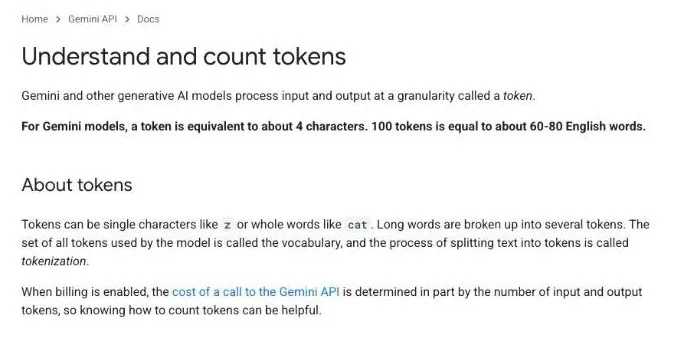
How much text fits in a token depends on the model. Google's rule of thumb for Gemini is about 4 characters per token, so 100 tokens comes to roughly 60 to 80 English words.
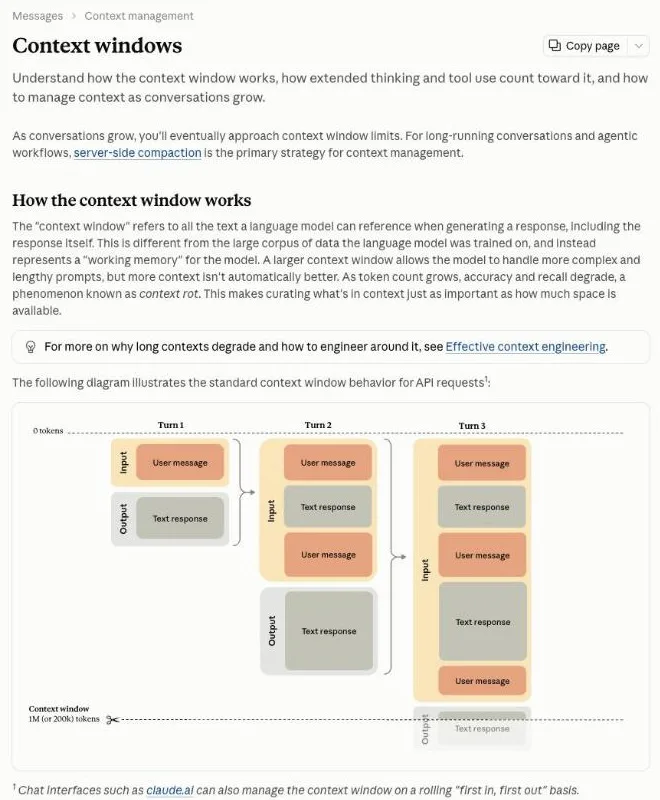
The "context window" refers to all the text a language model can reference when generating a response, including the response itself. This is different from the large corpus of data the language model was trained on, and instead represents a "working memory" for the model. (How the context window works) — from AnthropicView official source →
For Gemini models, a token is equivalent to about 4 characters. 100 tokens is equal to about 60-80 English words. (About tokens) — from GoogleView official source →
Everything in the chat counts toward the limit
What you type is only a small part of what sits in the context window. The app's own instructions, every earlier message, attached files and the reply the model is writing all draw on the same budget.
What takes up space in the context window
| What | Example |
|---|---|
| System instructions | The setup text an app sends before your first message |
| Chat history | Every earlier question and answer |
| Attachments | Images, PDFs, documents |
| Tool results | Search results, code output |
| Your new message | The question you just typed |
| The reply | The answer being written, plus any visible reasoning |
Instructions, files and the reply all use space
Anthropic lists four things that count toward the window. Some of them never appear on your screen.
- The system prompt
- Every message, including tool results, images and documents
- The definitions of any tools the model can call
- The model's own output, including its extended thinking
Claude Code, Anthropic's coding tool, sends a large block of setup text along with your very first message. We break down that overhead in "Claude Code Token Usage: 33K vs OpenCode's 7K."
Each turn adds to the history
Every time you send a message, the model reads the whole conversation again, so the history keeps growing. Your second question arrives with the first exchange attached, and your third arrives with the first two.
Earlier turns are kept in full, not trimmed. Even short messages add up, and a long enough chat will eventually reach the limit.
Everything in the request counts toward the context window: the system prompt, every message in messages (including tool results, images, and documents), and your tool definitions. The output Claude generates for the turn, including its extended thinking, counts too./As the conversation advances through turns, each user message and assistant response accumulates within the context window, and previous turns are preserved completely. (How the context window works) — from AnthropicView official source →
What happens when the window fills up
What happens at the limit depends on whether you are using a chat app or calling the model through an API. Chat apps tend to quietly let old material go, while APIs refuse or stop.
What happens at the limit
| Where | What happens |
|---|---|
| Chat apps such as claude.ai | The oldest messages may drop out |
| API, input already too long | The request fails with "prompt is too long" |
| API, reply hits the limit | The reply stops where it is |
| Long conversations | Compaction summarizes older turns |
Chat apps drop the oldest messages
Chat apps such as claude.ai can handle a full window by dropping the oldest messages first. From then on, each new exchange pushes the earliest one out.
Once a message has dropped out, the model can no longer see it. That is why a chatbot can seem to forget instructions you gave at the start of a long conversation. If something matters, repeat it later in the chat.
APIs return an error instead of dropping text
An API is the interface programs use to call a model, and it does not drop anything for you. On Anthropic's API, a request whose input alone is over the limit fails on every model with a "prompt is too long" error.
If the input fits but the reply runs into the limit, Claude 4.5 and newer models stop at that point. Developers count tokens before sending to avoid both cases.
Compaction summarizes older turns
For conversations that run up against the limit, compaction replaces earlier turns with a summary so the chat can keep going. Anthropic runs this on its servers for long-running conversations and agents.
A summary keeps the gist, not the exact wording. If you need numbers or conditions kept word for word, restate them in a recent message.
Chat interfaces such as claude.ai can also manage the context window on a rolling "first in, first out" basis./If the input alone already exceeds the model's context window, the API returns a 400 invalid_request_error ("prompt is too long") on every model./Compaction automatically summarizes earlier parts of the conversation on the server, so the conversation can continue past the context window limit. (How the context window works; Manage context with compaction) — from AnthropicView official source →
Context windows grew from 8,000 to 1 million tokens
Context windows have grown more than a hundredfold in a few years. Google says early generative models could take only 8,000 tokens at a time, and the newest models from Google and Anthropic now take 1 million.
How context windows grew (per Google)
From early generative models to Gemini. Source: Google, Long context.
 Gemini
 was the first model to take 1 million tokens
Google says Gemini was the first model able to accept 1 million tokens. Before that, windows had grown from 8,000 tokens to 32,000 and then 128,000.
With smaller windows, Google notes, developers often have to drop old messages, summarize them or set up retrieval, which fetches only the relevant passages. A million tokens is enough to hand over a whole set of documents up front.
The newest Claude models have 1 million tokens
As of October 2026, Anthropic's newest models, including Claude Opus 5.5 and Claude Sonnet 5.5, have a 1-million-token context window. Older models such as Claude Sonnet 4.5 have 200,000.
Limits also vary by product, not just by model. OpenAI's Codex, for example, uses a smaller window than its models support, as we explain in "Codex context window cut to 272K: why that number." Each vendor's model list is the place to check current figures.
1 million tokens is about 50,000 lines of code
By Google's count, 1 million tokens is about 50,000 lines of code at 80 characters a line, or eight average-length English novels. Those figures assume English text, and how many tokens other languages take depends on the model's tokenizer.
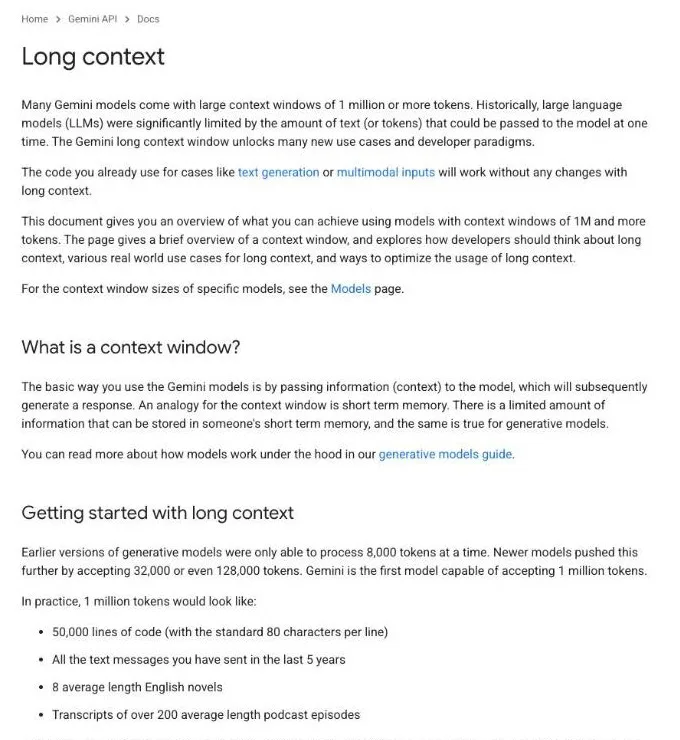
Earlier versions of generative models were only able to process 8,000 tokens at a time. Newer models pushed this further by accepting 32,000 or even 128,000 tokens. Gemini is the first model capable of accepting 1 million tokens./50,000 lines of code (with the standard 80 characters per line)/8 average length English novels (What is a context window?) — from GoogleView official source →
A bigger context window isn't always better
A larger window lets you include more, but filling it does not make answers better. Accuracy drops as the window fills, and information in the middle of a long input is the most likely to be missed.
Working with long inputs
| Problem | What to do |
|---|---|
| Accuracy drops as more text goes in | Include only what is relevant |
| The middle of long inputs gets missed | Put key facts at the start or end |
| The question gets buried | Ask your question after the material |
Context rot lowers accuracy as the window fills
Anthropic says that as token count grows, a model's accuracy and recall degrade, which it calls context rot. More room in the window does not mean the model uses all of it equally well.
That makes choosing what to include as important as how much fits. Pasting in loosely related material can crowd out the part you actually need the model to read.
Models miss information in the middle
Models tend to use information at the start and end of a long input well and the middle much less well. Liu and colleagues reported this in their 2023 paper "Lost in the Middle," which tested multi-document question answering and key-value lookups.
The drop showed up even in models built for long inputs. Put the facts and conditions that matter most near the top or the bottom, not buried halfway through.
Put only what matters in, and ask last
With long inputs, include only the relevant material and put your question after it. Google says that when the context is long, placing the query at the end of the prompt usually gives better results.
To summarize a 50-page report, for example, paste the chapters that matter and then write "List the three main points of this report" underneath. Deciding what goes into the window, and in what order, is known as context engineering; we cover Anthropic's guidance in "Context Engineering: Claude Code's Prompt Cut 80%+."
A larger context window allows the model to handle more complex and lengthy prompts, but more context isn't automatically better. As token count grows, accuracy and recall degrade, a phenomenon known as context rot. (How the context window works) — from AnthropicView official source →
In particular, we observe that performance is often highest when relevant information occurs at the beginning or end of the input context, and significantly degrades when models must access relevant information in the middle of long contexts, even for explicitly long-context models. (Abstract) — from arXivView official source →
In most cases, especially if the total context is long, the model's performance will be better if you put your query / question at the end of the prompt (after all the other context). (Where is the best place to put my query in the context window?) — from GoogleView official source →
Bigger windows help only if the model reads them well
A context window is the text a model can see while writing one reply, counted in tokens. Your prompt, the app's instructions, the chat history, attachments and the reply all share it, and when it fills, chat apps drop old messages while APIs return an error.
Windows now reach 1 million tokens on the newest Claude models, but accuracy still falls as they fill and the middle of long inputs gets missed. Include only what matters and ask your question last.
FAQ
- Is context length the same as a context window?
- Yes. Both terms describe the same limit: the amount of text a model can look at while it writes a reply, measured in tokens. Vendors and tools use the two names interchangeably.
- How many words is 1 million tokens?
- It depends on the model's tokenizer, so there is no fixed conversion. Google's rule of thumb for Gemini is about 4 characters per token, or 60 to 80 English words per 100 tokens, which puts 1 million tokens somewhere around 600,000 to 800,000 words.
- Why does a chatbot forget what I said earlier?
- Long chats eventually fill the context window. Chat apps can then drop the oldest messages to make room, and anything that has dropped out is no longer visible to the model, so it answers as if you never said it.
Related articles
 AI Comparison: ChatGPT, Claude, Gemini PricingAI comparison for 2026: ChatGPT, Claude, Gemini, and Copilot pricing and free-plan limits, plus a use-case guide to picking the plan that fits your work.
 AI fact check: only 40% of cited stats hold upAI fact check: Trakkr traced 1,285 stats cited by ChatGPT, Perplexity, Gemini, Claude and AI Overviews. Only 40% led to a matching study. How to check one.
 Claude Google Sheets, Docs and Slides add-on guideThe Claude Google Sheets add-on, Claude for Google Workspace, edits Sheets, Docs and Slides files in place on paid plans. Setup, edit modes and beta limits.
 Claude Opus 4.6 vs 4.7 vs 4.8 pricing comparedClaude Opus 4.6, 4.7 and 4.8 all cost $5 input and $25 output per million tokens, but 4.7 and 4.8 use a tokenizer that can bill up to 35% more tokens.