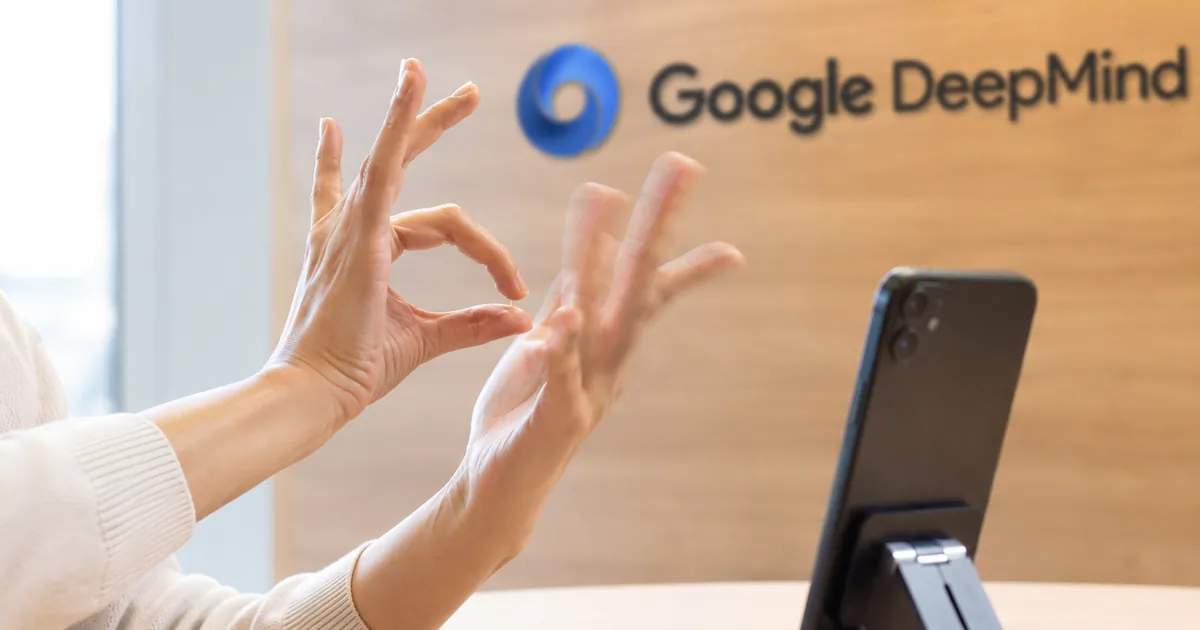
Sign language AI now works in Gboard and Live Transcribe on Pixel 11
Google DeepMind's sign-language-to-text model, SL2T, now powers sign-to-text dictation on Pixel 11 in Gboard and Live Transcribe, turning ASL into English at no extra cost. The Google DeepMind Sign Language Team announced it in a post dated August 12, 2026. The team calls it the first time sign language AI has left the lab for consumer products.
Google's Pixel 11 how-to post followed on August 21, 2026, when the Pixel 11 series was already in stores. The DeepMind post presents the feature as dictation for signers: hearing users can speak instead of typing, and now Deaf users can sign to the phone wherever they would type.
Gboard lets you sign to search, draft messages, and ask Gemini
Since Gboard is the Pixel 11's keyboard, SL2T lets a Deaf user sign anywhere they would otherwise type. Google names three uses: searching the web, drafting messages or documents, and asking Gemini to answer questions or do tasks. Its testers, Google says, found signing in ASL faster, more natural and more delightful than typing in English.
Setup takes two steps, according to Google's Pixel 11 post: add sign-to-text to the Gboard toolbar, then sign in ASL to the front camera. The translation appears on the outer display. The feature reads hand shapes, facial expressions and body movements and writes the ASL out as English sentences in real time.
"Similarly to how hearing users can use dictation to speak instead of typing, this feature enables Deaf users to sign to their phone anywhere they’d normally type. You can sign to search the web, draft messages or documents, and ask Gemini to solve queries or execute tasks."/"According to our testers, signing in ASL is faster, more natural, and more delightful than typing in English." — from the opening section of the post, August 12, 2026View official source →
"It analyzes hand shapes, facial expressions, and body movements to translate ASL into written English sentences in real time."/"To use this feature on a Pixel 11 device, add sign-to-text to your Gboard toolbar, and sign in ASL to the front camera. The translations will appear on the outer display." — from Google's Pixel 11 how-to postView official source →
In Live Transcribe, you can sign replies instead of typing them
Live Transcribe covers conversations, letting a Deaf user sign replies instead of typing back and forth. The Pixel 11 post adds that both one-handed and two-handed signing work, so signers can use their native language in Live Transcribe or anywhere on the device through Gboard.
Neither Google post says what the hearing person in the conversation sees or does. Both cover only the Deaf user's side, where signed replies become text, and neither gives setup steps specific to Live Transcribe.
"In Live Transcribe, you can sign responses in conversations instead of having to type back and forth." — from the opening section of the post, August 12, 2026View official source →
"The feature, which supports both one-handed and two-handed signing, lets signers use their native language to express themselves when using Live Transcribe or across their device with Gboard." — from Google's Pixel 11 how-to postView official source →
ASL to English on Pixel 11 is what ships at launch
At launch the feature is ASL to English on Pixel 11, one direction only, in Gboard and Live Transcribe. Google says more devices are coming soon and other languages will follow, but gives no list or dates. The table below sums up what ships.
SL2T at launch
| Status at launch | |
|---|---|
| Direction | Sign to text only |
| Language pair | ASL to English |
| Apps | Gboard and Live Transcribe |
| Devices | Pixel 11 first; more devices "coming soon", with no date |
| Price | No additional cost |
| Other sign languages | Google says more will follow; no list or dates |
This release works only from sign to text, so the phone does not turn English into signing. Google lists sign language generation among its next steps.
"SL2T powers sign-to-text dictation in Gboard and Live Transcribe on Pixel 11 , starting with American Sign Language (ASL) to English. More devices are coming soon, and additional languages will follow."/"You can experience SL2T in Gboard and Live Transcribe first on Pixel 11 , with more devices coming soon — all at no additional cost." — from the opening and the "Looking ahead" section of the postView official source →
"The Pixel 11 series is available on shelves now." — from Google's Pixel 11 how-to postView official source →
SL2T turns pose landmarks into English text, skipping the gloss step
SL2T converts pose landmarks, the points a phone tracks on a signer's body, directly into English text without going through glosses, the written labels for signs that earlier translation work relied on. Google says only the coordinates of those points reach the server, never the camera video. Translating straight from landmarks, it adds, removes artificial vocabulary limits and lets translation quality improve as data grows.
Sign language translation needs vision and real machine translation
Google describes sign language translation as two hard problems in one: real machine translation between separate languages, and computer vision that can follow movement across the whole body. Spoken-language AI has advanced quickly, Google notes, but that progress has not reached the more than 200 sign languages used by an estimated 70 million Deaf and hard of hearing people. For Deaf communities, sign languages are the primary languages and central to cultural identity.
The first problem is language. Speech-to-text maps sound to written words in the same language step by step. ASL is a natural language with its own grammar and vocabulary, so ASL to English is real translation between two languages, not a sign-by-sign swap into English words.
The second problem, vision, comes from how a sign language carries meaning: through the hands, arms, torso, head and face moving together. Tracking all of it at high frame rates is demanding computer vision work, and Google says early attempts such as sign language gloves fell short because sign languages are not simply "English on the hands." Reading them takes fine-grained perception of whole-body movement plus full translation, and SL2T is built for both.
"Yet this technological revolution has not reached the world’s more than 200 sign languages — and the estimated 70 million Deaf and hard of hearing people who use them."/"Sign languages are the primary languages of Deaf communities around the world and the cornerstone of Deaf cultural identity."/"First, transcribing speech is a matter of performing a sequential mapping from sound to text in the same language, whereas sign languages are independent, natural languages with their own distinct grammars and lexicons. As a result, they require true machine translation rather than a sequential process of sign-to-word transformations."/"Sign languages convey meaning through simultaneous movements of the hands, arms, torso, head, and face. Accurately tracking these at high frame rates is a difficult and computationally demanding computer vision task."/"Given this background, it is easy to understand why some early attempts at sign language technology, like sign language gloves, were fundamentally limited: sign languages aren't simply “English on the hands.” They require complex visual perception of fine-grained whole-body movements and full-fledged language translation. SL2T is designed to deliver both." — from the opening and the "Why sign languages matter" section of the postView official source →
Only pose landmarks, not video, reach the server
SL2T works from a sequence of pose landmarks instead of the raw camera feed, according to Google, and only their coordinates go to the server. An on-device model called MediaPipe Holistic tracks those points on the phone itself.
Google cites user privacy as the reason for working from landmarks. Since only coordinates are sent for translation, the original video can be thrown away immediately.
On the server, SL2T converts the coordinate sequence into streaming text without glosses. Much earlier research on sign language translation depended on glosses, which, Google says, miss the rich, non-linear side of signing, such as non-manual markers (signals made without the hands) and spatial constructions.
"To protect user privacy, SL2T sees sign language as a sequence of pose landmark locations rather than a raw camera feed. An on-device model ( MediaPipe Holistic ) tracks the location of points on the signer, and only these geometric coordinates are sent to the server for translation, allowing the original video to be discarded immediately."/"SL2T translates this coordinate sequence directly into text, bypassing intermediate annotations known as “glosses” that are widely used in prior work on sign language translation. Glosses fail to capture rich, non-linear aspects of sign languages such as non-manual markers and spatial constructions. Translating directly from landmarks removes artificial vocabulary limits and allows translation quality to scale directly with data."/"SL2T sees sign language inputs as points on the signer's body and translates them into streaming text outputs." — from the "How SL2T works" section and a video caption in the postView official source →
Training covers 50+ sign languages, with about a quarter in ASL
SL2T was trained on more than 100,000 hours of data from over 50 sign languages, about a quarter of it ASL. Google describes the approach as a user-centered, culturally informed design paired with large-scale data. The languages, dialects and skill levels are trained together rather than in separate models.
In Google's experiments, training them together taught the model structures common to sign languages, and it outperformed models trained on one language. Still, only ASL to English is turned on at launch, and the post does not say which of the other trained languages comes next.
"We built SL2T by combining a user-centric, culturally informed approach with massive data scaling. The model is trained on over 100,000 hours of data across more than 50 sign languages — with roughly a quarter of the data in ASL. Training jointly on diverse languages, dialects, and proficiency levels causes the model to learn shared underlying structures, outperforming single-language models in our experiments." — from the "How SL2T works" section of the postView official source →
Google reports 70 BLEURT zero-shot on FLEURS-ASL and names its errors
SL2T scores 70 BLEURT zero-shot on FLEURS-ASL (sd-test), Google reports, well above any score reported before. Google calls FLEURS-ASL a benchmark for ASL to English translation quality and SL2T the most capable sign language translation model so far on key benchmarks like it.
BLEURT is a learned metric that scores how close a translation comes to a reference, and zero-shot means the model was not tuned on the benchmark's data beforehand. The score is Google's own, and Google also lists the practical problems it tackled and the errors still left.
Google also worked on latency, hallucination, and left-handed signing
A strong benchmark score alone does not make a model usable in daily life, Google says, so the team also worked on four practical problems. It names all four in the same paragraph as the score:
- Streaming latency: keeping the wait short while text streams out during signing.
- Hallucination on non-signing inputs: stopping the model from producing text when what the camera sees is not signing.
- Fairness for left-handed signers, who make up 10% of signers according to Google.
- One-handed signing, for when the other hand is holding the phone.
None of the four comes with a measured result. The post gives no latency figure and no accuracy number for left-handed or one-handed signing.
"SL2T is the most capable sign language translation model to date according to key benchmarks like FLEURS-ASL (sd-test), which assesses ASL to English translation quality. SL2T achieves a remarkable zero-shot score of 70 BLEURT, which is significantly higher than any previously reported score. But optimizing academic benchmarks alone doesn’t guarantee usability in real-world applications, so we worked hard on practical issues like minimizing streaming latency, preventing hallucination on non-signing inputs, ensuring fairness for the 10% of signers who are left-handed, and improving performance for one-handed signing, which is used while holding a smartphone in the other hand." — from the "How SL2T works" section of the postView official source →
ASL to English errors remain in fingerspelling and classifiers
The caption under Google's examples admits that occasional ASL to English errors remain and names five kinds. Google shows five FLEURS-ASL examples, each pairing the original English sentence with SL2T's output, and the named errors show up in only two of them.
Error types named in Google's caption
| Error type | Example Google gives |
|---|---|
| Rare signs | None shown |
| Rapid fingerspelling | "prey" came out as "grey" |
| Passive constructions | None shown |
| Classifier depictions | "claws" was dropped |
| Tense without context | "kicked off" became "start" |
Those errors come from two sentences. The original bird sentence describes a feathered bird of prey with claws like a Velociraptor's, believed to have walked on two legs. SL2T's output says the creature "eats grey" and drops the claws.
In the rugby sentence, the tense changes. The original says the games "kicked off" at 10:00am, while SL2T says games "start" at 10 a.m. The other three examples, on the Cook Islands, income tax in federal countries and great-grandchildren on an alien world, have no error named in the caption.
Rare signs and passive constructions are only named in the caption, with no example. Google gives no error rate or count per type, so the table shows what kinds of mistakes occur, not how often.
"This fully feathered, warm blooded bird of prey was believed to have walked upright on two legs with claws like the Velociraptor."/"This creature is warm-blooded, eats grey, and is covered in feathers. It is believed that it walks on two legs like a velociraptor."/"The games kicked off at 10:00am with great weather and apart from mid morning drizzle which quickly cleared up, it was a perfect day for 7's rugby."/"Games start at 10 a.m. in great weather. There is a light rain in the morning that clears up. It's a perfect day for 7v7 rugby."/"Examples from the FLEURS-ASL benchmark. SL2T accurately translates complex ASL into fluent English. Occasional errors remain in rare signs, rapid fingerspelling ("prey" → "grey"), passive constructions, classifier depictions (dropping "claws"), and tense without context ("kicked off" → "start")." — two rows of the table (original English, then SL2T's output) and the caption under itView official source →
Deaf community input shaped Google's sign language AI
Deaf perspectives shaped every stage of SL2T, from first concept to impact assessment, Google says. The project was conceived by Sam Sepah, a Deaf Googler.
Deaf partners helped gather the data, Deaf user studies evaluated the model, and Deaf experts assessed its impact. Google sums up the principle as building with the Deaf community, not only for it.
The AISLAC advisory committee and a joint impact report for SL2T 1.0
Google set up the AI Sign Language Advisory Committee (AISLAC) and co-wrote a joint impact report for SL2T 1.0 in Gboard and Live Transcribe. The committee brings together many Deaf organizations from around the world and subject-matter experts. Google calls this participatory governance, where the communities most affected by a technology directly shape its development priorities.
According to Google, the report sets out the technology's capabilities and current limits. Google plans the same joint approach for every major sign language release. The post neither summarizes the report's findings nor links to it.
"We believe in building with the Deaf community, not just for it. Deaf perspectives have shaped every stage of this project — from conceptualization by Sam Sepah, a Deaf Googler, to data collection with Deaf partners, evaluation in Deaf user studies, and impact assessment of the technology with Deaf experts."/"To guide responsible real-world deployment, we established the AI Sign Language Advisory Committee (AISLAC), bringing together many global Deaf organizations and subject-matter experts. Through this participatory governance model, the communities most impacted by our technology directly influence our development priorities. We co-authored a joint impact report for the release of SL2T 1.0 in Gboard and Live Transcribe, transparently detailing the technology's capabilities and current limitations — a collaborative approach we plan to continue for all major sign language releases." — from the "Building with the community" section of the postView official source →
Additional sign languages and sign language generation are next
Google's next steps are more sign languages, sign language generation and what it calls frontier AI capabilities, none with dates. Today's release works one way, from signing to text. Google calls bringing ASL input to phones only the beginning.
Google states the goal behind that list plainly. It links the work to its mission of making the world's information universally accessible, and says universal accessibility means full parity with spoken and written languages.
SL2T was built jointly by teams from Google DeepMind and Android. Google's acknowledgements list 15 people on the core team that developed the model and 13 on the Android team that put it into both apps.
Google's post likens sign-to-text to voice dictation. For the speech side of that comparison, Gemini 3.5 Transcribe: pricing and API limits covers Google's speech-to-text API.
On Pixel 11, sign language AI now means ASL to English sign-to-text in Gboard and Live Transcribe, built on pose landmarks instead of video. Google scores it at 70 BLEURT zero-shot, lists the occasional errors that remain, and says more languages and devices will follow, without dates.
"SL2T builds upon decades of foundational research across academia and industry, but bringing ASL input to users’ phones is only the beginning. Google’s mission is to organize the world's information and make it universally accessible and useful. Achieving universal accessibility means reaching full parity with spoken and written languages. Our team is working to expand this technology into additional sign languages, sign language generation, and frontier AI capabilities."/"This work was done jointly by teams from Google DeepMind and Android." — from the "Looking ahead" and "Acknowledgements" sections of the postView official source →
FAQ
- What is SL2T?
- SL2T is Google DeepMind's sign-language-to-text translation model. On Pixel 11 it powers sign-to-text dictation in Gboard and Live Transcribe, translating American Sign Language (ASL) into English. Google says more devices and more languages will follow, without giving dates.
- Is SL2T a sign language translator app?
- No. SL2T is a model that Google offers as a sign-to-text feature inside Gboard and Live Transcribe on Pixel 11, and neither Google post names a separate Google sign language translator app. Someone looking for an AI sign language translator or an ASL translator on Pixel 11 can add sign-to-text to the Gboard toolbar and sign in ASL to the front camera.
- Does SL2T send video of me to Google?
- According to Google, no. An on-device model called MediaPipe Holistic tracks points on the signer's body, and only those geometric coordinates go to the server for translation. Google says this lets the original video be discarded immediately.
- Which sign languages and devices does SL2T support?
- At launch, SL2T supports only American Sign Language to English, and only on Pixel 11. Google says more devices are coming soon and other languages will follow, but gives no list or dates. The model was trained on data from more than 50 sign languages, and about a quarter of that data is ASL.
- How accurate is ASL to English translation on Pixel 11?
- Google reports a zero-shot score of 70 BLEURT on FLEURS-ASL (sd-test), a benchmark it says assesses ASL to English translation quality, and calls that significantly higher than any previously reported score. It also names occasional errors that remain in rare signs, rapid fingerspelling ("prey" came out as "grey"), passive constructions, classifier depictions and tense without context. Google gives no error rate, and the score is its own report.
Related articles
 What is Genie 4? Google's world model with audioGenie 4 is Google DeepMind's world model that adds ambient sound and live dialogue to explorable worlds. Only testers have it; Ultra subscribers are next.
 Gemini Robotics 2: Whole-Body and Multi-RobotGemini Robotics 2 is DeepMind's VLA for whole-body robot control, announced July 30, 2026, with ER 2 and On-Device 2. Only ER 2 is in AI Studio at launch.
 AI fact check: only 40% of cited stats hold upAI fact check: Trakkr traced 1,285 stats cited by ChatGPT, Perplexity, Gemini, Claude and AI Overviews. Only 40% led to a matching study. How to check one.
 Reddit to require logins as search referrals fallReddit will test a logged-in-only site outside the US in Q4. Search referrals fell over 1M a week in October; its CEO says Google's AI Mode drives no traffic.