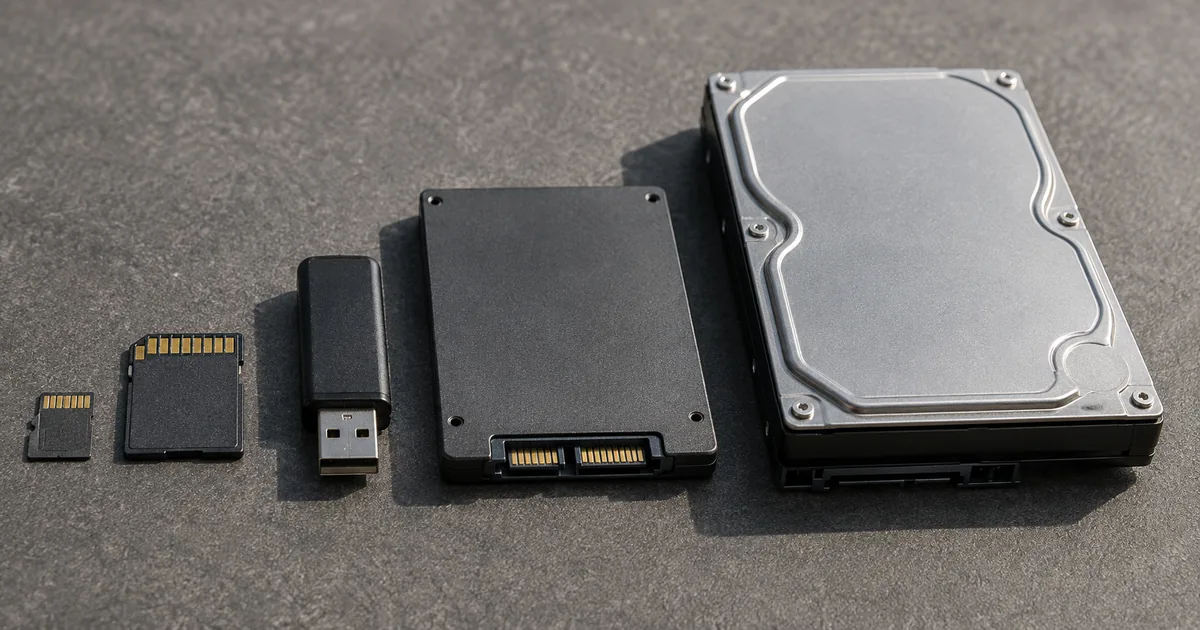
A terabyte is 1,024 gigabytes when a computer counts it and 1,000 gigabytes when a manufacturer prints it on the box, which is why a drive labeled 1TB shows up as roughly 931GB. The same split runs down the whole scale: B, KB, MB, GB, TB, one step of 1,024 between each pair in binary. Once you know the order and the step, you can compare any two file sizes at a glance.
How many GB in a TB: 1,024 in binary, 1,000 in decimal
A terabyte is 1,024 gigabytes in binary and 1,000 gigabytes in decimal. Which number you see depends on who is doing the counting, not on how much storage the drive holds.
| Counting system | 1TB equals | Where you see it |
|---|---|---|
| Binary (base 2) | 1,024GB | Windows, system BIOS |
| Decimal (base 10) | 1,000GB | Drive labels and packaging |
Why two different numbers exist
Storage hardware is sold in decimal units and read back in binary ones. Seagate says drive makers market capacity in decimal, while Windows and the system BIOS — the small program that starts a PC before Windows loads — count in binary.
Neither figure is wrong. Both count the same bytes. The gap is not a rounding artifact: in decimal a terabyte is 1,000,000,000,000 bytes, while in binary it is 1,099,511,627,776 bytes, so the binary count of the same storage comes out lower.
ハードディスク・ドライブのメーカーは、十進法(基本10)単位でドライブの容量を表示しています。/FDISK、システムBIOS、Windows、旧バージョンのmacOSなどのプログラムでは、二進法(基本2)が用いられています。 — from the two passages naming which side uses which system. One URL, served in the reader's locale: it returned Japanese here, so the Japanese is quoted as published. Translated, the first says drive makers state capacity in decimal (base 10) units, and the second that programs such as FDISK, the system BIOS, Windows and older versions of macOS use binary (base 2).View official source →
File size units in order: B, KB, MB, GB, TB
The units run B (byte), KB (kilobyte), MB (megabyte), GB (gigabyte) and TB (terabyte), smallest first. Where a unit sits in that sequence is the only thing you need to compare two of them.
- The initials K, M, G and T rise in the same order
- Anything to the right of another unit is the larger of the two, so MB beats KB and GB beats MB
- Above TB the sequence continues with PB (petabyte) and EB (exabyte)
The letter in front of the B is a prefix describing size; the unit itself stays the byte. Day to day KB through GB covers almost everything, and TB shows up mostly on drives and storage plans.
Bits and bytes are not the same thing
A bit holds a single 0 or 1, and eight bits make one byte. NIST defines a byte as two to the power of three bits in its comparison table.
Connection speeds are quoted in Mbps, which counts bits, while file sizes are quoted in MB, which counts bytes. So the same word "mega" covers quantities that differ by a factor of eight, and reading a line speed as a file size overstates it eightfold. To turn a line speed into a download time, see Mbps vs MB: convert to MB/s and time downloads.
one byte 1 B = 2 3 bit = 8 bit — from the comparison table defining a byte as two to the third power bits (superscripts flatten to 2 3 in plain text)View official source →
What fits in one byte: one ASCII character
Characters in the ASCII range, meaning unaccented letters, digits and common punctuation, take one byte each. Save 1,000 of them as plain text and the file comes to exactly 1,000 bytes.
Characters outside that range cost more. UTF-8, the standard encoding on the web, spends three bytes on each Japanese character, so the same 1,000 characters come to 3,000 bytes.
That is why a text file's size rarely matches its visible length. Characters vs Bytes: UTF-8, VARCHAR, Graphemes gives the byte cost per character in each encoding.
Conversion tables for bytes through terabytes
You do not have to memorize these values. Find the row that matches the conversion in front of you and read the number off it.
One step up: multiply by 1,024
| Conversion | Value |
|---|---|
| 1KB to B | 1,024B |
| 1MB to KB | 1,024KB |
| 1GB to MB | 1,024MB |
| 1TB to GB | 1,024GB |
Two steps up: multiply by 1,048,576
Two steps means multiplying by 1,024 twice, and 1,024 multiplied by itself is 1,048,576. That one number covers every two-step conversion between B and TB.
| Conversion | Value |
|---|---|
| 1MB to B | 1,048,576B |
| 1GB to KB | 1,048,576KB |
| 1TB to MB | 1,048,576MB |
Converting in the other direction
Going the other way means dividing rather than multiplying. A file quoted in kilobytes becomes megabytes once you divide it by 1,024, which is how a four-digit KB figure turns into a single-digit MB one.
That one division is the whole of the kilobyte to megabyte conversion. Skipping a unit — kilobytes straight to gigabytes — divides by 1,048,576 instead.
Why a 1TB drive shows about 931GB in Windows
Connect a drive labeled 1TB to a Windows machine and the capacity reads as roughly 931GB. Nothing has been lost and nothing is faulty; the same bytes have been recounted in bigger groups.
The calculation behind 931.3GB
A decimal terabyte is 1,000,000,000,000 bytes. Windows divides that figure by 1,073,741,824, the number of bytes in a binary gigabyte.
1,000,000,000,000 / 1,073,741,824 = 931.3 (rounded)
That result is what appears on screen. The drive holds every byte the label promised; Windows just counts them in groups of 1,073,741,824.
How the gap grows with capacity
The shortfall widens as drives get larger, because the same proportional difference applies to a bigger figure. On a 2TB drive the gap reaches about 137.4GB.
| Label | Shown in Windows | Difference |
|---|---|---|
| 256GB | about 238.4GB | about 17.6GB |
| 512GB | about 476.8GB | about 35.2GB |
| 1TB | about 931.3GB | about 68.7GB |
| 2TB | about 1,862.6GB | about 137.4GB |
The prefixes that remove the ambiguity: KiB, MiB, GiB
A separate set of prefixes exists for counts in 1,024s. The International Electrotechnical Commission approved KiB, MiB, GiB and TiB in December 1998, read as kibibyte, mebibyte, gibibyte and tebibyte, though everyday displays still say KB, MB and GB.
The GNU coreutils manual documents the resulting split: the SI prefix is a lowercase k, and the ISO/IEC 80000-13 prefix is Ki. Both long habit and POSIX, the standard that Unix-style systems follow, treat a lowercase k as meaning KiB. That is why the same letter can mean 1,000 in one tool and 1,024 in another.
In December 1998 the International Electrotechnical Commission (IEC), the leading international organization for worldwide standardization in electrotechnology, approved as an IEC International Standard names and symbols for prefixes for binary multiples for use in the fields of data processing and data transmission. — from the opening statement of when the binary prefixes were approved and by whomView official source →
kibibyte: 2^{10} = 1024. 'K' is special: the SI prefix is 'k' and the ISO/IEC 80000-13 prefix is 'Ki', but tradition and POSIX use 'k' to mean 'KiB'. — from the suffix list distinguishing K, k and KiView official source →
What actually fits in a KB, MB, GB or TB
Conversion gives you a number, not a sense of how big it is. A file listed at 68.5KB and a drive sold as 1TB are both just digits until you can put a real file beside them.
Every image and font size below is a real file served by sakutto.ai, measured on 9 October 2026. Files of the same type vary widely with their contents, so read them as orders of magnitude rather than fixed sizes.
Kilobytes: text files and web images
| Item | Measured size |
|---|---|
| 1,000 ASCII characters of text | 1,000B, about 1KB |
| 1,000 Japanese characters in UTF-8 | 3,000B, about 2.9KB |
| Article header image, WebP at 1200x630, median of 266 files | 68.5KB |
| Largest of those 266 header images | 190.0KB |
Every item in the table above stays under 1,024KB, so each is counted in kilobytes. Those 266 images ranged from 14.1KB to 190.0KB.
That is a spread of more than thirteen to one within one format at one set of dimensions, which is why one file cannot stand for a whole category. If you need to bring an image down from megabytes to kilobytes, Compress Images Online, Free: JPEG, PNG, WebP shows how.
Megabytes: fonts, documents and photographs
| Item | Measured size |
|---|---|
| Japanese font embedded in generated PDFs, TTF, regular weight | 4,426.8KB, about 4.32MB |
| The same font in bold | 4,547.3KB, about 4.44MB |
A Japanese font crosses the megabyte line because it carries outlines for about 16,700 characters. For comparison, one of the header images above used to be a 1,098.9KB PNG; saved as WebP it is 58.8KB.
Most documents and photographs land in this range. A file reaching several megabytes usually holds images rather than text.
Gigabytes and terabytes: whole drives, not files
Above a gigabyte the number generally describes storage rather than a single file. Gigabytes measure phone and laptop capacity; terabytes measure external drives and storage plans.
For scale, one gigabyte holds roughly 14,000 of the header images measured above, 1,073,741,824 bytes divided by their mean of 74,829 bytes. Single files reach gigabyte size only in video and games.
Summary: the order and the 1,024 step
File size units run B, KB, MB, GB and TB, with each step 1,024 times the one below. Order and step size together answer every comparison.
- 1KB is 1,024B, 1MB is 1,024KB, 1GB is 1,024MB and 1TB is 1,024GB
- Two steps means 1,048,576, which is 1,024 multiplied by itself
- Manufacturers count in 1,000s, so a 1TB drive reads as about 931GB in Windows
- KiB, MiB and GiB are the standard prefixes for counts in 1,024s
When a figure looks wrong, check which system produced it. Packaging counts in 1,000s and Windows counts in 1,024s, and both numbers describe the same storage.
FAQ
- How many GB are in a TB?
- There are two correct answers because there are two counting systems. Drive manufacturers label capacity in decimal, where 1TB is 1,000GB. Seagate's support note says programs such as the system BIOS, Windows and older versions of macOS count in binary, where 1TB is 1,024GB. The same drive is described both ways, which is why a 1TB drive appears as roughly 931GB once it has been recounted.
- Is MB bigger than KB?
- Yes. A megabyte is 1,024 kilobytes as your computer counts and 1,000 as NIST defines it, and MB is the larger unit either way. The units run B, KB, MB, GB, TB from smallest to largest, and the initials K, M, G, T follow the same order, so the position of a unit in that sequence settles any comparison.
- How do I convert kilobytes to megabytes?
- Divide by 1,024. Going the other way, multiply by 1,024. Two steps up or down means using 1,048,576 instead, because 1,024 multiplied by itself gives that number. NIST reserves the plain megabyte for 1,000,000 bytes and gives the 1,024-based unit its own name, MiB, so a conversion by that standard divides by 1,000 instead.
- What are KiB, MiB and GiB?
- They are prefixes that state explicitly that the count is in 1,024s. The International Electrotechnical Commission approved them in December 1998, and they are read as kibibyte, mebibyte and gibibyte. You will see them in Linux command output and in download tools. NIST notes that they are not part of the International System of Units.
Related articles
 Mbps vs MB: convert to MB/s and time downloadsMbps vs MB is bits versus bytes. A byte is eight bits, so divide a plan speed by eight to get MB/s: 100 Mbps is 12.5 MB/s, so 1,000 MB takes 80 seconds.
 How many grams in a tablespoon? Sugar 12.6 gGrams in a tablespoon: 12.6 g of sugar, 14.2 g of butter, 18 g of salt. The spoon is 15 mL, the cup is 240 mL, and the cup is where charts go wrong.
 Claude Fable 5.2: 20% price cut, up to 30% fasterAnthropic released Claude Fable 5.2 on November 9, 2026. API prices fall 20% to $8/$40 per million tokens, and output is up to 30% faster than Fable 5.1.
 PayPay security and passkeys in 10 Japan pay appsPayPay security compared with 9 other Japanese payment apps: passkeys, extra checks to send or pay, and fraud compensation deadlines.