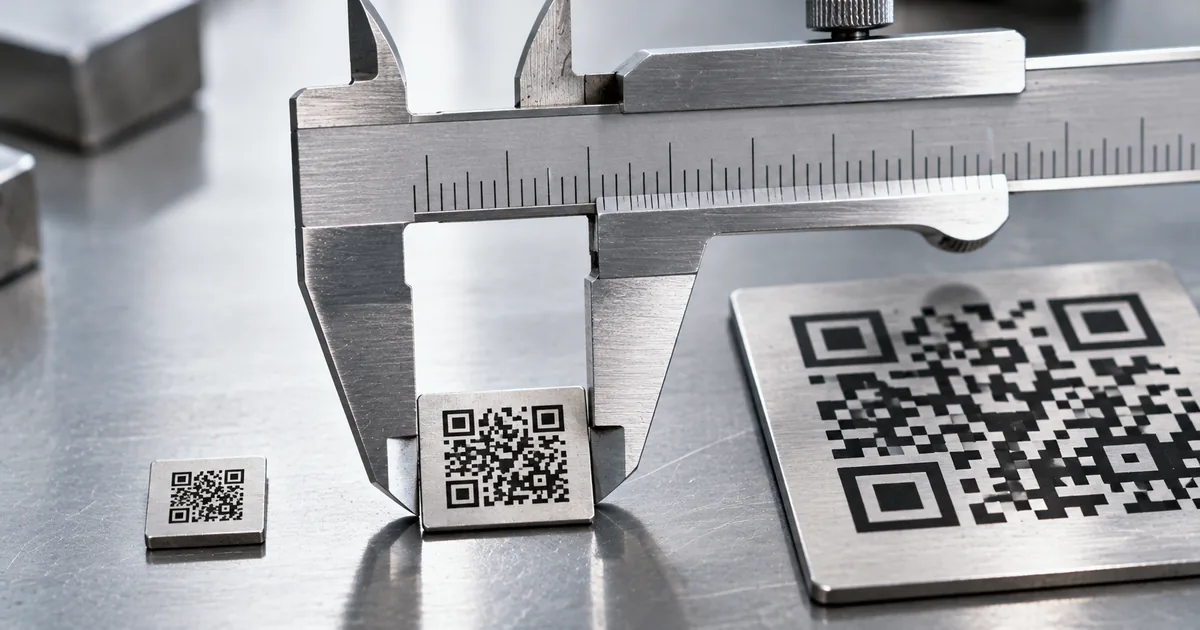
Most QR code generators tell you to print at least 2 cm across, but that number is a working recommendation rather than a rule from the specification. The physical floor is closer to 3.5 mm. Knowing which of the two applies to your artwork is what keeps a print run from failing.
The smallest QR code size that still scans is about 2 cm
Vendors who generate QR codes for a living land on the same figure: 2 cm × 2 cm, or roughly 0.8 inches on a side. If the space in your layout is 2 cm or wider, you can stop worrying and place the code.
That figure is not in the standard. QR Code was approved as JIS X 0510 in January 1999 and as ISO/IEC18004 in June 2000, and neither document sets a millimeter size. The 2 cm recommendation comes from what phone cameras cope with at arm's length, which is a different question from what a printer can render.
The physical floor sits much lower. The smallest pattern the format allows is 21 modules across, one module being a single black or white square, and a laser printer at 600 dpi can hold one module down to 0.17 mm. Multiply the two and you get about 3.57 mm.
That is what the press can put on paper, and nothing more. It is not a promise that a phone will read it. Printable and readable are two different limits, and the gap between them is where print runs go wrong.
"For example, if a QR Code's dimensions are 1 cm x 1 cm, it must be scannable from 10 cm away" / "A QR Code size of around 2 cm x 2 cm and no more than 9 cm x 9 cm should accommodate most product packaging info" — from the QR code vendor Bitly's guide to minimum sizesView official source →
Module size, not code size, sets the floor
Two codes can both be 2 cm wide and only one of them scans. The size of a QR code is the number of modules multiplied by the width of one module, and both halves move. DENSO WAVE, which invented the format, frames the whole question this way rather than in terms of the finished code.
"Once a symbol version is determined, the actual size of the QR Code symbol depends on the millimeter size of the module (one square area comprising QR Code) to be printed." — from the official documentation of DENSO WAVE, the inventor of the QR CodeView official source →
A module is one black or white square in the pattern
A module is one of the black and white squares that make up the pattern. DENSO WAVE calls them the black and white dots that form the code. Everything below is about how wide one of those squares ends up on your material.
Printer resolution decides the smallest module
A printer cannot render a module finer than its head density allows, and it needs several dots per module to render one cleanly. The company's own figures for common presses:
| Printer | Head density | 4 dots per module | 5 dots | 6 dots |
|---|---|---|---|---|
| Laser | 600 dpi (24 dot/mm) | 0.17 mm | 0.21 mm | 0.25 mm |
| Laser | 360 dpi (14 dot/mm) | 0.28 mm | 0.35 mm | 0.42 mm |
| Thermal | 300 dpi (12 dot/mm) | 0.33 mm | 0.42 mm | 0.5 mm |
| Thermal | 200 dpi (8 dot/mm) | 0.5 mm | 0.63 mm | 0.75 mm |
The spread matters more than any single row. A thermal label printer at 200 dpi cannot go below 0.5 mm per module, roughly three times the laser figure, so the same artwork needs a code about three times wider on a shipping label than on a laser-printed flyer.
"DENSO WAVE recommends for stable operations that each module is made up of 4 or more dots." — from the official documentation of DENSO WAVE (the per-printer figures above are read row by row from the table on the same page)View official source →
Your scanner has a limit too
Printing finer does not help once the reading device can no longer separate the modules. The scanner sets the harder limit: high-resolution industrial units go down to 0.1 mm, standard units to 0.25 mm, and camera-based readers vary with the lens.
"Small printing in the limited area with a higher head density printer can be useless if the reading limit of the scanner is exceeded." — from the official documentation of DENSO WAVE (the 0.1 mm / 0.25 mm figures are read from the scanner list on the same page)View official source →
Why 2 cm is 5.6 times the physical floor: the camera decides
Run the arithmetic on the recommendation and the reason for it becomes visible. A Version 1 code printed at 2 cm is 20 mm divided by 21 modules, so each module lands at about 0.95 mm. That is roughly 5.6 times the 0.17 mm a laser printer can actually hold.
So the 2 cm figure is not a printing limit. That points at the reading side rather than the press: a phone held at arm's length, in whatever light the room has, by someone who is not aiming carefully. DENSO WAVE says only that a larger module reads more stably, which is consistent with the gap, and the press itself could clearly go smaller.
That also tells you where the room to negotiate is. If your scanning conditions are controlled — a mounted reader at a set distance under steady light — you can go below 2 cm and test. If a stranger will scan it in a corridor, do not.
"The larger the module is, the more stable and easier to read with a QR Code scanner it becomes. On the other hand, as the QR Code symbol size gets larger, a larger printing area is required." / "It is recommended that QR Code symbols be printed as large as possible within the available printing area." — from the official documentation of DENSO WAVEView official source →
Version and data volume change the size you need
The other half of the multiplication is module count, and that is set by how much you encode. Versions run from 1 to 40: the smallest is 21 × 21 modules, the largest is 177 × 177, and each step up adds 4 per side.
Hold the printed size constant and the consequence is direct: a longer URL pushes the version up and the modules get thinner, until they slip under the printer's floor or the camera's limit. Shortening the encoded string is often cheaper than enlarging the code, because it moves the version down instead of asking for more space in the layout.
Capacity at the top end is generous, up to 7,089 numeric characters or 2,953 bytes. Reaching those numbers means a 177-module symbol, which needs more room than any business card has. Treat those maximums as facts about the format, not as space you can actually use.
"The symbol versions of QR Code range from Version 1 to Version 40." / "commencing with Version 1 (21 × 21 modules) up to Version 40 (177 × 177 modules). Each higher version number comprises 4 additional modules per side." — from the official documentation of DENSO WAVEView official source →
Error correction buys reliability and costs space
QR codes survive damage because part of the pattern is redundancy, and you choose how much. The four levels restore roughly 7%, 15%, 25% and 30% of codewords respectively.
Redundancy is data, and data is modules. Raising the level to survive a scuffed label pushes the version up exactly as a longer URL would, so the code needs more space at the same module width.
Hold the physical size still and the cost becomes obvious. Moving from L to H adds codewords, the symbol steps up a version or two, and every module gets thinner to fit the same square.
So the levels are not free reliability. They are reliability traded against module width, and module width is what your printer and your reader actually care about.
In practice the choice splits by surface. Labels that get scuffed, boxes dragged across a counter, anything on textured or curved material — those justify a high level and the space it costs. A code on a clean page, scanned once at close range, spends that space on damage it will never take.
"Approx. 7% of codewords can be restored." / "Approx. 15% of codewords can be restored." / "Approx. 25% of codewords can be restored." / "Approx. 30% of codewords can be restored." — from the official specification outline published by DENSO WAVE, for error correction levels L, M, Q and H in orderView official source →
Sizes by use case and scanning distance
Once you know the floor, the working dimensions come from how far away the scan happens. The rule of thumb circulating among QR code vendors divides the scanning distance by ten.
| Use case | Typical scanning distance | Working size |
|---|---|---|
| Business card | 15–30 cm | 2 cm × 2 cm |
| Product packaging | 15–30 cm | 2 cm × 2 cm up to 9 cm × 9 cm |
| Event ticket | 15–30 cm | about 3 cm × 3 cm |
| Poster | 1–2 m | at least 10 cm × 10 cm |
| Billboard | 7 m and beyond | at least 75 cm × 75 cm |
The formula is written in inches, which matters when you convert. Ten feet is 120 inches, so the code needs 12 inches, a little over 30 cm.
Reaching for centimeters first tends to produce something that looks reasonable on screen and is too small by the time it is on the wall. Work the rule in the unit it was written in, then convert once at the end.
Read the distances in the table as where people actually stand, not where they could stand. A poster in a corridor gets scanned from wherever the corridor lets someone stop, which is usually further back than the layout assumed.
Treat the divide-by-ten figure as a starting point rather than a specification. It is a vendor convention, absent from DENSO WAVE's own documentation, and the vendors who publish it also tell you to add margin on top before committing to a print run.
"The universal formula for QR Code print size is: QR Code size (in inches) = scanning distance (in inches) / 10" / "If the code will be scanned from 10 feet away (120 inches), the code needs to be at least 12 inches across" — from the QR code vendor Uniqode's printing guideView official source →
Quiet zone, pixels and export settings
Sizing the code correctly and then cropping it tight undoes the work. A QR code needs a clear margin around it, conventionally 4 modules wide on every side, so the reader can find the boundary. On a 2 cm Version 1 code that is roughly 3.8 mm of empty space per side, and it has to be part of the space you budgeted, not carved out of the code.
File format settles the resolution question. Export as SVG or EPS and the code scales to any size without a pixel count to worry about, because vector formats store the pattern as paths. If a raster file is unavoidable, give every module several pixels, which is the on-screen version of the print rule that each module should be at least 4 printer dots wide.
"A vector QR Code exported at 72 DPI prints as crisply on a billboard as it does on a business card, because vector files store the code as paths rather than pixels" — from the QR code vendor Uniqode's printing guideView official source →
Micro QR Code when 2 cm will not fit
Sometimes the layout genuinely has no 2 cm to give. Micro QR Code is a separate symbology built for that case, standardized under JIS X 0510 in November 2004, nearly six years after the standard QR Code reached JIS in January 1999.
Being a separate symbology is the catch. Its capacity limits are its own, so check what your generator will actually encode before you design around one, and confirm that the devices your audience uses can decode it. A phone camera app that handles standard codes will not necessarily handle this one.
Micro QR solves a layout problem, not a data problem. If your code will not fit because you are encoding a long URL with tracking parameters, shortening the string gets you further than switching symbology.
Do that and the version drops. The modules widen, and every phone can still read the code. Where Micro QR earns its place instead is on parts, tools and small components, where the surface itself is the constraint and the payload is genuinely short — an identifier, a lot number, a serial.
"Micro QR Code is Approved as JIS (Japanese Industrial Standards) standard (JIS X 0510)" — from the standardisation history published by DENSO WAVE, listed under November 2004View official source →
Summary
The 2 cm recommendation is a vendor convention aimed at phone cameras, not a line in JIS X 0510 or ISO/IEC18004. The physical floor is about 3.57 mm, from 21 modules at 0.17 mm each.
Your own minimum is module width multiplied by module count, so it moves when you change printer, lengthen the URL, or raise the error correction level. Work it out for the code you are actually shipping, add the quiet zone, export as vector, and print one at final size before the run.
FAQ
- How small can a QR code be?
- The physical floor is about 3.57 mm. The smallest pattern is 21 modules across, and a 600 dpi laser printer can hold a module down to 0.17 mm, which multiplies out to roughly 3.57 mm. That is what a printer can put on paper, not what a phone can read. For anything scanned by a phone, treat 2 cm as your working floor.
- Is the 2 cm minimum part of the QR code standard?
- No. QR Code was approved as JIS X 0510 in January 1999 and as ISO/IEC18004 in June 2000, and neither standard fixes a millimeter size. The 2 cm figure is a recommendation that QR code generator vendors have converged on, based on what phone cameras handle at arm's length.
- Why does my QR code need to be bigger than someone else's?
- Because module count is not fixed. A longer URL pushes the symbol to a higher version, and each version adds 4 modules per side, from 21 × 21 at Version 1 up to 177 × 177 at Version 40. At a fixed 2 cm, more modules means each one gets thinner, and eventually thinner than your printer or the scanning camera can resolve.
- How many pixels should a QR code be on screen?
- Export it as SVG or EPS and the question goes away, because vector files store the code as paths rather than pixels. If you must ship a raster file, size it so that each module gets several pixels, the same logic DENSO WAVE applies to print when it recommends at least 4 printer dots per module.
Related articles
 QR code not scanning? Count the quiet zone firstQR code not scanning? The quiet zone is usually why. Here is how to count four modules in the image you already have, and how to fix it before you print.
 QR Code Flyer Size and Placement: The 10:1 RuleQR code flyer size and placement: size the code with the 10:1 scan-distance rule, keep the four-module quiet zone clear, and add a short call to action.
 What is a dynamic QR code? Static vs dynamicA dynamic QR code stores a short link the provider forwards, so you can edit where it goes after printing. If the service ends, the code won't open your page.
 Do QR codes expire? How to make one that won'tDo QR codes expire? A QR code never does, but a dynamic code stops when its provider turns off forwarding. Find the cause, fix it, and make a code that lasts.