What is VoiceStudio?
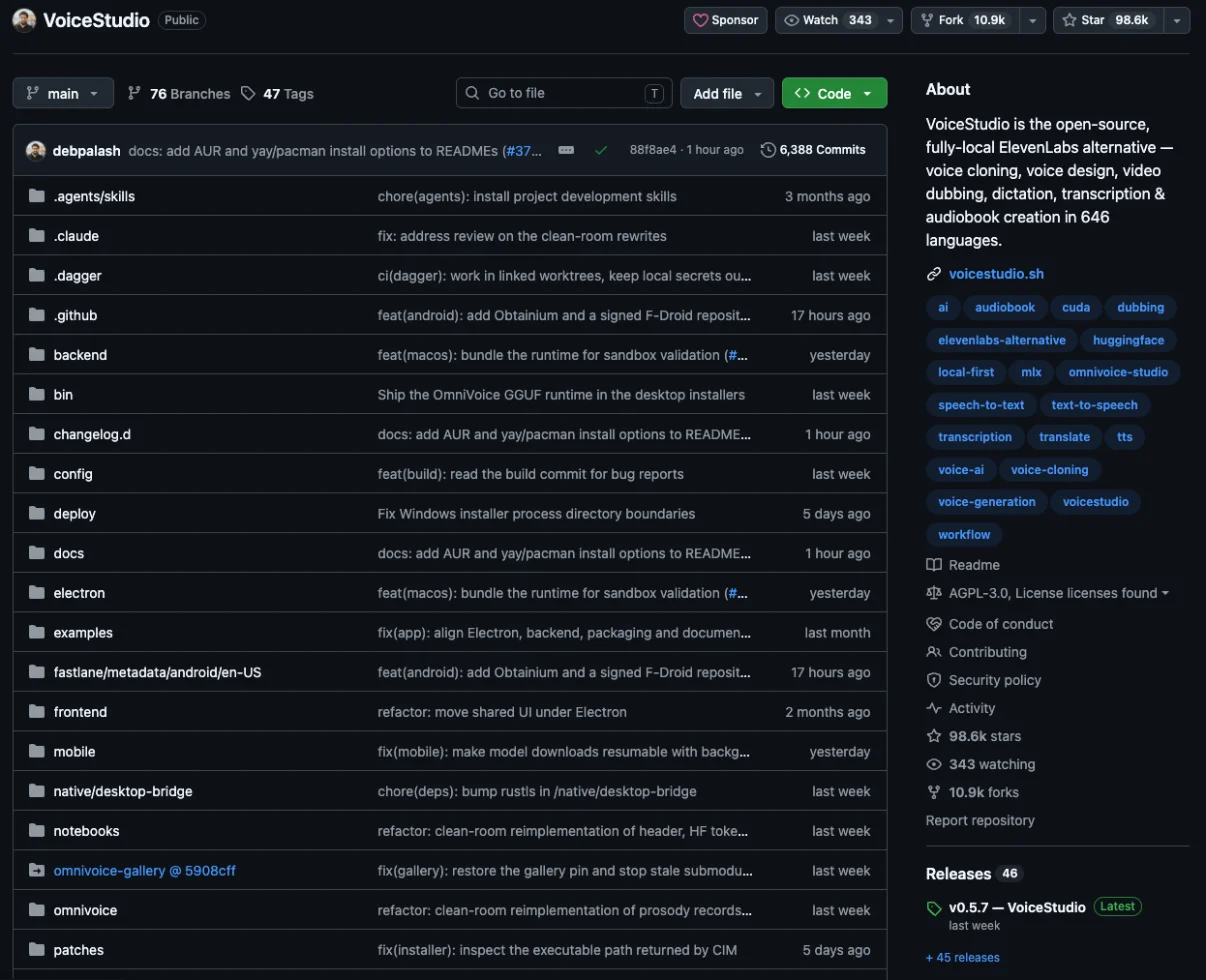
This free, open-source desktop app clones voices, dubs videos and transcribes speech in 646 languages without uploading your audio anywhere. VoiceStudio bundles the main jobs people use ElevenLabs for into a single program that you download from GitHub and run on your own computer. Running locally means the recordings you feed it and the speech it produces are processed on that computer rather than on a vendor's servers.
The project describes itself as free and states that there is no paid cloud service behind it. You do not create an account to use the core features.
"AI voice studio. On your device." / "VoiceStudio is free and has no paid cloud behind it." — from the READMEView official source →
Voice cloning, dubbing and transcription in one app
The README lists seven feature groups, from cloning a voice off a clean recording to batch-producing audiobooks and exposing a local API and MCP server. Here is what each group covers.
| Feature group | What it does |
|---|---|
| Voice cloning | Speaks your text in the voice from a clean reference recording |
| Video dubbing | Translates a video and re-voices it with timing that follows the original speech |
| Voice design | Builds a new voice from a written description |
| Local models | Lets you choose engines and download only the models you need |
| Dictate and transcribe | A floating dictation widget plus on-device transcription |
| Narrate and batch | Stories, audiobooks and queued jobs |
| Connect and automate | A local API, an MCP server, reusable recipes and watch folders |
MCP (Model Context Protocol) is a common way for AI agents to call outside tools, so an agent such as an AI coding assistant can ask VoiceStudio to generate speech on the same computer. The local API gives scripts and other apps the same access.
"Turn a clean reference recording into speech in a familiar voice." / "Local API, MCP, reusable recipes and watch folders" — from the README feature listView official source →
OmniVoice, the default speech model
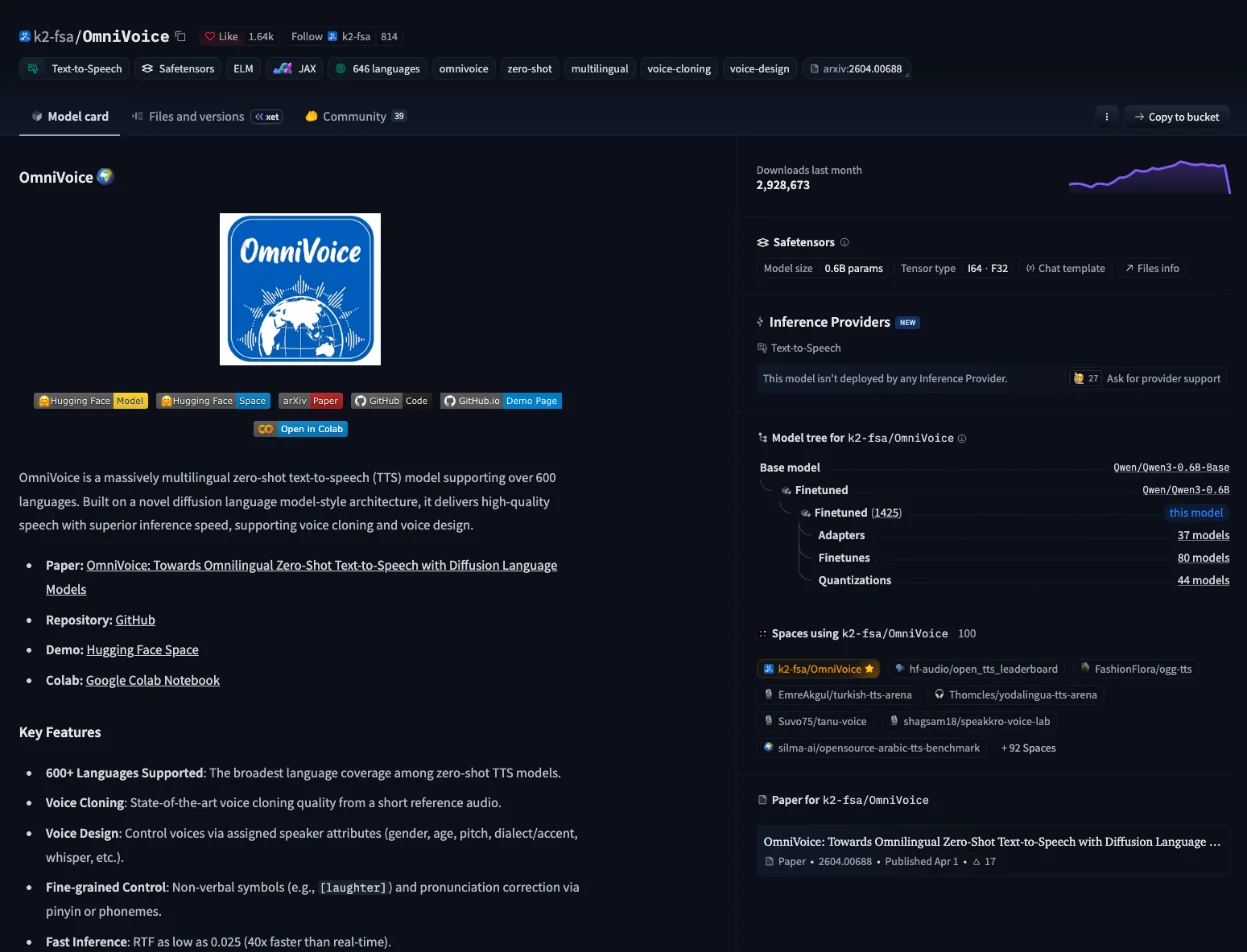
Out of the box VoiceStudio speaks through k2-fsa's OmniVoice, a zero-shot model that covers over 600 languages and can run up to 40 times faster than real time. A model, or engine, is the AI that actually turns text into audio, and VoiceStudio lets you swap OmniVoice for dozens of other engines in its Model Manager. Zero-shot means OmniVoice can copy a voice from a short reference clip without being retrained on that speaker.
OmniVoice handles both voice cloning and voice design. Its speed is measured as a real-time factor (RTF), the processing time divided by the length of the audio, and the model card puts the best case at 0.025.
The repository was created on April 9, 2026, under the earlier name OmniVoice-Studio, and the old URL now redirects to debpalash/VoiceStudio. On November 2, 2026, it had 98,478 GitHub stars, and the latest stable release, v0.5.7, shipped on October 26, 2026. Palash Debnath created the project, and Yupcha Softwares Private Limited maintains it.
"OmniVoice is a massively multilingual zero-shot text-to-speech (TTS) model supporting over 600 languages." / "Fast Inference: RTF as low as 0.025 (40x faster than real-time)." — from the model cardView official source →
How VoiceStudio compares with ElevenLabs
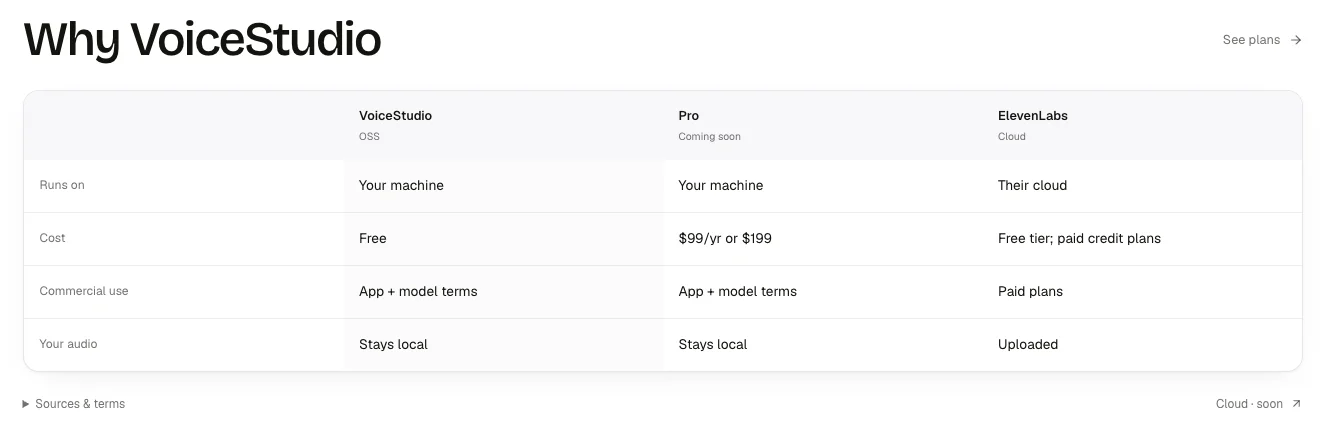
ElevenLabs processes your audio in its cloud on a free tier or paid credits, while VoiceStudio needs no account, costs nothing and keeps every recording on your computer. ElevenLabs is a hosted voice AI service, so your reference clips and scripts travel to its servers before any speech comes back. VoiceStudio's site says it needs neither an account nor a cloud service.
The app goes online only when you ask it to check for updates or download a model. That makes it a practical option for internal meeting recordings or narration scripts for products that have not been announced yet, where sending the audio to a third party is not acceptable.
"No account, no cloud. It only goes online when you ask it to: checking for updates or downloading a model." — from the FAQView official source →
Where it runs, what it costs and where your audio goes
The official comparison table, checked on October 4, 2026, puts VoiceStudio on your computer at no cost with audio kept local, and ElevenLabs in its own cloud with uploads and paid plans for commercial use. The “VoiceStudio and ElevenLabs compared on voicestudio.sh” table below follows the rows on that site.
VoiceStudio and ElevenLabs compared on voicestudio.sh
| VoiceStudio (open source) | ElevenLabs (cloud) | |
|---|---|---|
| Runs on | Your computer | ElevenLabs' cloud |
| Cost | Free | Free tier and paid credit plans |
| Commercial use | Depends on app and model terms | Paid plans |
| Your audio | Stays on your computer | Uploaded |
The commercial-use row is the one to read twice. A free app does not make every voice it produces free to monetize, because each model carries its own license, and the default one is non-commercial.
"Sourced from public pages, checked 4 Oct 2026" / "OSS and Pro users must follow the selected model's terms; buying Pro does not override them." — from the comparison table notesView official source →
Who VoiceStudio Pro is for
Priced at $99 a year or $199, the closed-source build adds a commercial license for teams that embed the app without AGPL obligations, so individuals can skip it. The open-source app is licensed under AGPL-3.0, which requires anyone who modifies it and offers it to users over a network to share the modified source code.
Companies that want to build VoiceStudio into a closed product buy the commercial license to avoid that obligation, and Pro also adds extra features. Commercial use under AGPL-3.0 itself is free, so a solo creator running the app on a laptop does not need Pro. As of November 2, 2026, the comparison table labels Pro "Coming soon".
"Pro and Lifetime are a separate, closed-source build with a paid Commercial License and extra features, for teams that need commercial terms." — from the FAQView official source →
System requirements: no GPU needed
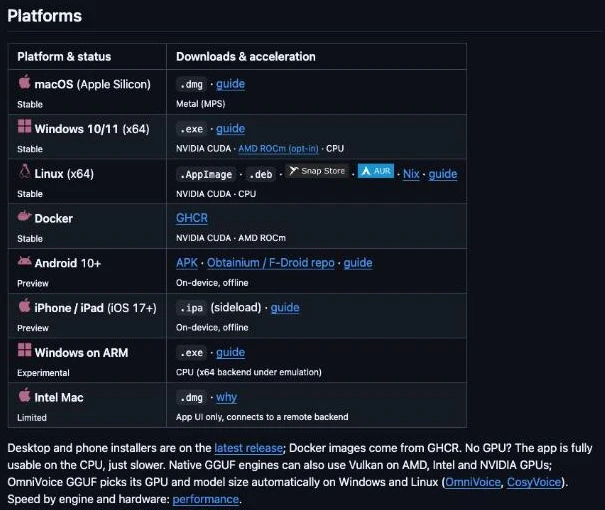
VoiceStudio runs on Windows, Linux and Apple Silicon Macs with about 8 GB of RAM and works on the CPU alone, though Intel Macs can only show the interface. A GPU speeds up generation but is not required, so an ordinary laptop is enough to try it.
"No GPU? The app is fully usable on the CPU, just slower." — from the README Platforms sectionView official source →
Supported platforms
Desktop builds for macOS on Apple Silicon, Windows 10 and 11, Linux and Docker are marked Stable, while the Android and iPhone or iPad apps are still in Preview. The full list from the README looks like this.
| Platform | Status |
|---|---|
| macOS (Apple Silicon) | Stable |
| Windows 10/11 (x64) | Stable |
| Linux (x64) | Stable |
| Docker | Stable |
| Android 10+ | Preview |
| iPhone and iPad (iOS 17+) | Preview |
| Windows on ARM | Experimental |
| Intel Mac | App UI only, connects to a remote backend |
Apple Silicon means any Mac with an M-series chip. On Windows on ARM the app runs as an experimental build.
"App UI only, connects to a remote backend" — from the README Platforms table (Intel Mac row)View official source →
Mac requirements and the Intel limitation
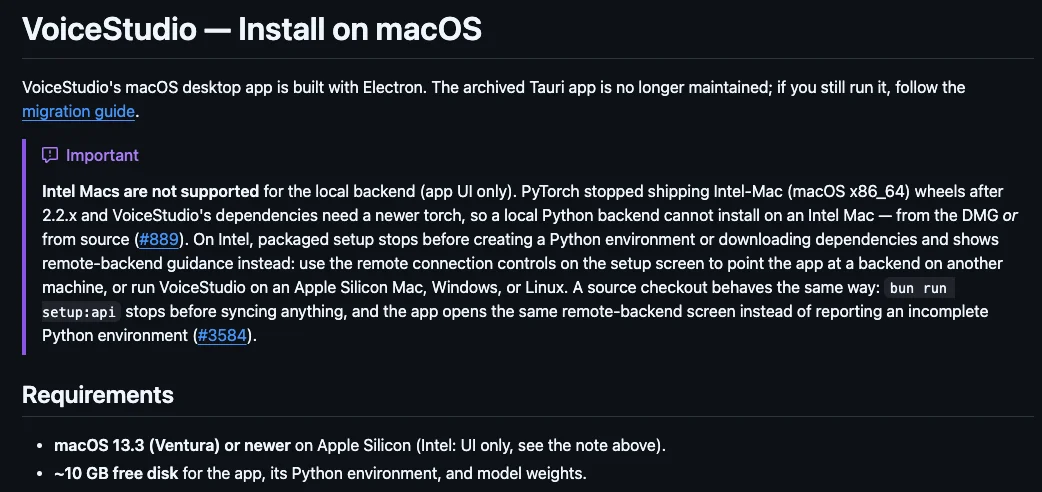
On a Mac you need Apple Silicon, macOS 13.3 or later and roughly 10 GB of free disk space, because Intel Macs cannot run the local backend. The 10 GB covers the app, its Python environment and the model weights, the learned parameters the model loads to produce speech.
GPU acceleration through Apple's Metal Performance Shaders (MPS) switches on automatically on Apple Silicon. If you only have an Intel Mac, plan to run VoiceStudio on a Windows or Linux computer instead.
"Intel Macs are not supported for the local backend (app UI only)." / "~10 GB free disk for the app, its Python environment, and model weights." — from the macOS guideView official source →
How to install VoiceStudio and clone your first voice
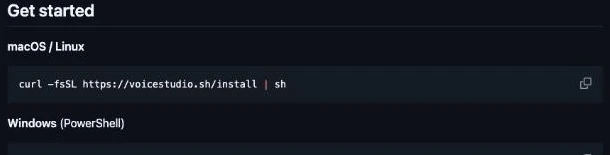
One terminal command or a downloaded package gets the app running, and the first result needs only a saved voice, a line of text and one click. If you would rather not open a terminal, desktop and phone installers are available from the latest GitHub release.
"Desktop and phone installers are on the latest release" — from the README Platforms sectionView official source →
Install with one command or an installer
Paste the official one-liner into Terminal on macOS and Linux or PowerShell on Windows, and the app prepares Python, FFmpeg and the model weights itself on first launch. Use the command that matches your system.
On macOS and Linux, run this command in Terminal. It downloads and runs the official install script.
curl -fsSL https://voicestudio.sh/install | sh
On Windows, run this command in PowerShell. It runs the PowerShell version of the same script.
irm https://voicestudio.sh/install.ps1 | iex
Either way, the first launch takes longer than later ones. Before it opens, the app sets up its own Python environment, FFmpeg (the audio and video conversion tool) and the model weights.
"Python, FFmpeg, and model weights are bootstrapped by the app itself on first launch" — from the macOS guideView official source →
Fix the "VoiceStudio is damaged" error on macOS
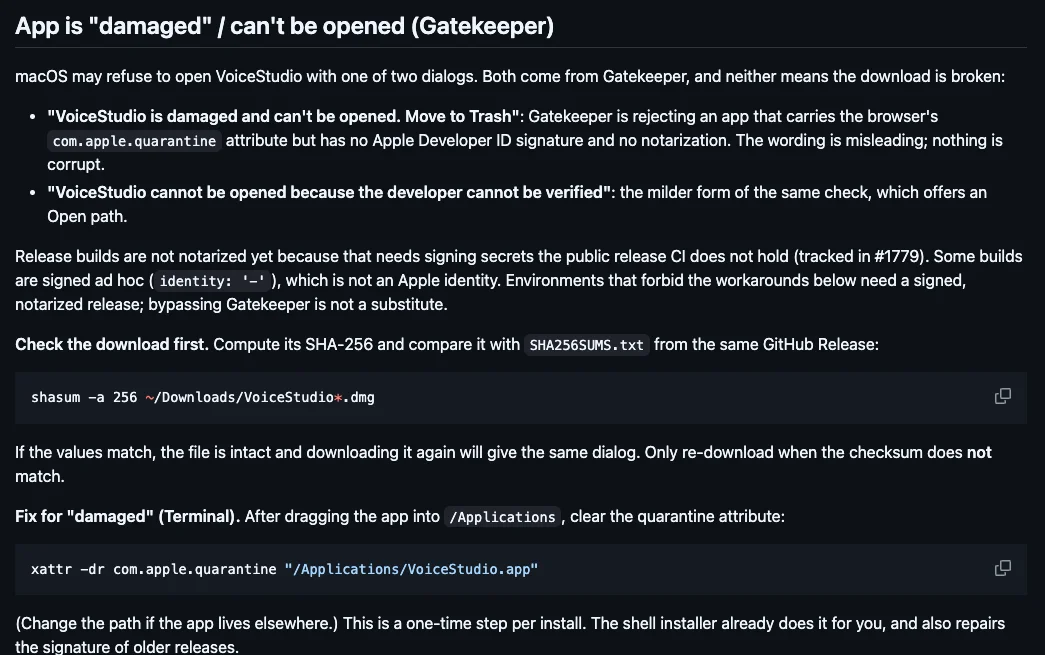
The message appears because release builds are not yet notarized by Apple, so verify the SHA-256 checksum and then clear the quarantine attribute to open the app. Notarization is Apple's automated check of apps distributed outside the App Store, and macOS Gatekeeper blocks downloaded apps that lack it with a misleading "damaged" warning. First, run this command in Terminal and compare the SHA-256 checksum it prints with the value in SHA256SUMS.txt from the same GitHub release.
shasum -a 256 ~/Downloads/VoiceStudio*.dmg
If the two values match, the file is intact. Clear the quarantine attribute with the next command.
xattr -dr com.apple.quarantine "/Applications/VoiceStudio.app"
You only need to do this once per install. If you installed with the one-line command, the shell installer has already done it for you.
"Release builds are not notarized yet" / "This is a one-time step per install. The shell installer already does it for you" — from the App is "damaged" sectionView official source →
Clone a voice from a short reference clip
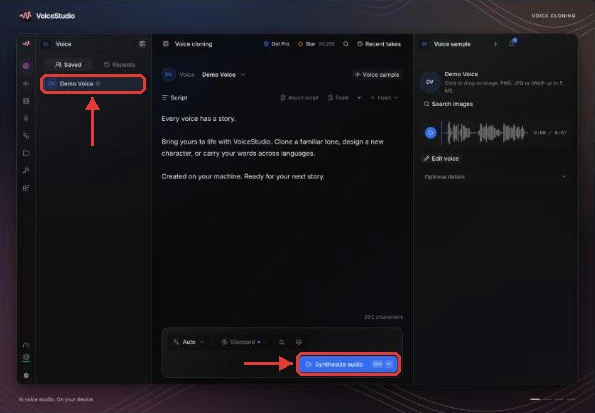
Open Voice cloning, pick a voice or add a clean reference recording, then type your text and generate; the app asks before it downloads any model. The steps look like this.
- Open the Voice cloning workspace.
- Pick a saved voice from the list on the left, or add a clean reference recording of one speaker.
- Type the script and click Synthesize audio.
The README asks for a clean recording. OmniVoice then clones the voice from that short sample without a separate training step.
"pick a voice or add a clean reference recording, type your text and generate. The app asks before it downloads any model." — from the README Get started sectionView official source →
Commercial use and voice consent
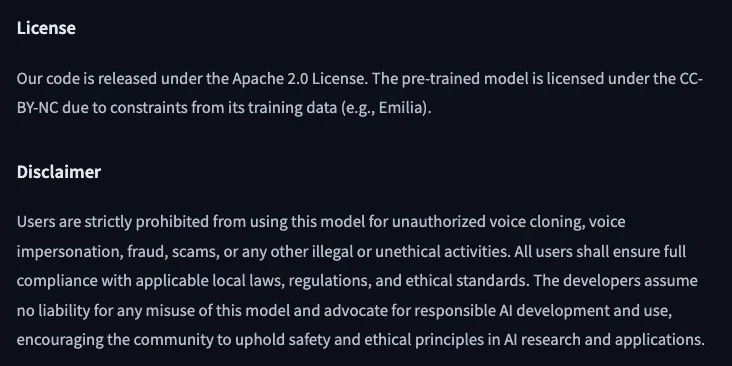
The AGPL app itself may be used in business, but publishing generated speech depends on each model's license and on permission from the person whose voice you clone. A license is the set of conditions under which you may use software or data, and VoiceStudio has separate ones for the app and for every model it can load.
"The pre-trained model is licensed under the CC-BY-NC due to constraints from its training data (e.g., Emilia)." — from the License sectionView official source →
The app allows commercial use, the default model does not
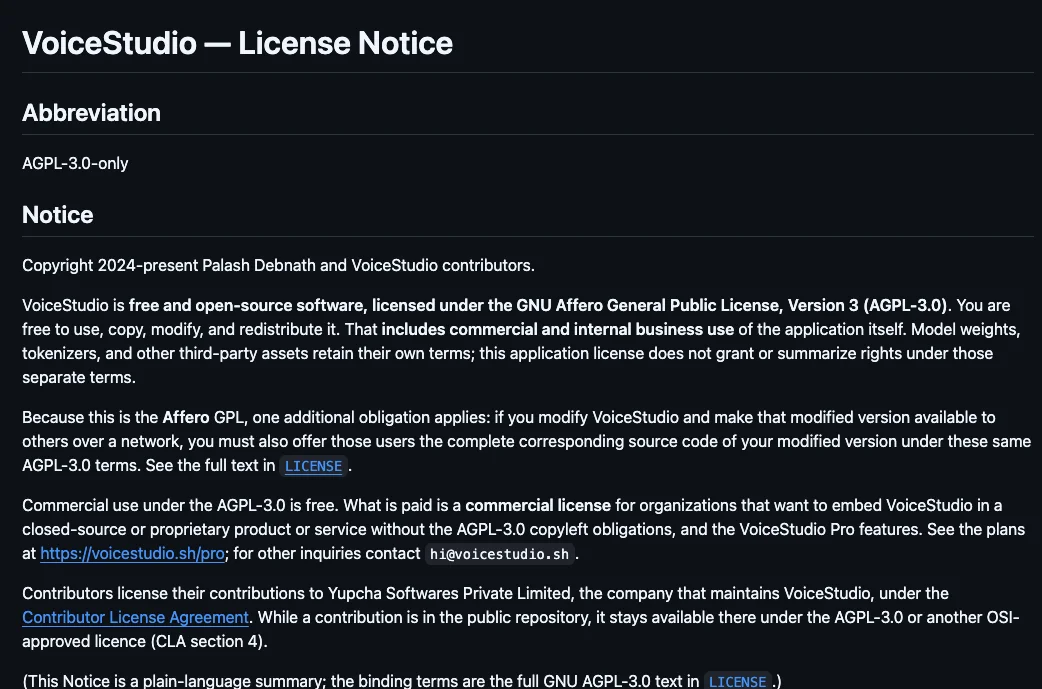
OmniVoice's pretrained weights are licensed CC-BY-NC, so anything you plan to monetize needs a model whose terms allow commercial use, and buying Pro does not change that. The AGPL-3.0 license covers the app, including commercial and internal business use. Model weights, voices and generated output each have their own licenses, which the Model Manager shows for every model.
OmniVoice's code is Apache 2.0, but the trained weights carry CC-BY-NC because of restrictions in training data such as the Emilia dataset. CC-BY-NC allows use with attribution for non-commercial purposes only, so ads, client voiceovers and monetized videos made with the default model fall outside it. For that work, switch to a model whose license permits commercial use and follow its terms.
"A commercial license for VoiceStudio-owned code does not replace any of those terms." — from the Scope sectionView official source →
Get permission before cloning someone's voice
The README, the official site and the OmniVoice model card all limit cloning to voices you have permission to use and rule out impersonation and fraud. The model card goes further and tells users to follow local laws and ethical standards.
Before cloning anyone else's voice, tell them how the audio will be used and get their agreement, even for a colleague's voice in an internal video. Keeping that agreement in an email or a signed note gives you a record if questions come up later.
"Users are strictly prohibited from using this model for unauthorized voice cloning, voice impersonation, fraud, scams, or any other illegal or unethical activities." — from the DisclaimerView official source →
Summary: try it free, check model terms before you publish
ElevenLabs sells commercial rights as part of a paid plan, whereas VoiceStudio removes the upload and the bill but leaves the license check to you. That trade-off shapes how to use it: keep sensitive recordings on your own computer and experiment freely, then pick a commercially licensed model in the Model Manager before anything goes public.
For a personal test or an internal draft, the default OmniVoice setup is enough. For a monetized video or client work, the model's license and the speaker's consent decide whether you can publish, not the app.
FAQ
- Is VoiceStudio free?
- Yes. The desktop app is open source under AGPL-3.0 and costs nothing, including for commercial use of the app itself. The paid Pro build is only for teams that need a commercial license to embed it in closed products.
- Does VoiceStudio need a GPU?
- No. Every feature works on the CPU, only more slowly, and about 8 GB of RAM is enough to start. A GPU, or Apple Silicon on a Mac, makes generation faster.
- Can I use VoiceStudio voices in monetized YouTube videos?
- Not with the default OmniVoice model. Its pretrained weights are licensed CC-BY-NC, which rules out commercial use such as monetized videos. Pick a model in the Model Manager whose license allows commercial use, and get the speaker's permission before you clone their voice.
Related articles
 Claude Fable 5.2: 20% price cut, up to 30% fasterAnthropic released Claude Fable 5.2 on November 9, 2026. API prices fall 20% to $8/$40 per million tokens, and output is up to 30% faster than Fable 5.1.
 PayPay security and passkeys in 10 Japan pay appsPayPay security compared with 9 other Japanese payment apps: passkeys, extra checks to send or pay, and fraud compensation deadlines.
 AI fact check: only 40% of cited stats hold upAI fact check: Trakkr traced 1,285 stats cited by ChatGPT, Perplexity, Gemini, Claude and AI Overviews. Only 40% led to a matching study. How to check one.
 Akamai: online scams double and overtake phishingAkamai's fraud report says online scams doubled to about 6.4 million and passed phishing in Q1 2026, while phishing sites now last 22 days instead of 48.