Social media image sizes change with the network and the type of post, and a photo outside the accepted shape gets cropped, shrunk or enlarged. Instagram, Meta, X and YouTube each publish numbers in their own help pages: Instagram feed photos are 1080 pixels wide between 1.91:1 and 3:4, Reels and Stories are vertical at 9:16, and YouTube thumbnails are 3840 × 2160. X publishes only a 5 MB limit.
Social media image sizes depend on platform and post type
Each network accepts its own shapes, and a photo outside them gets cropped, shrunk or enlarged. Pixels count the width and the height, so 1080 × 1440 means 1080 pixels across and 1440 down.
The aspect ratio compares width with height: 1.91:1 is a wide landscape shape and 9:16 is a tall vertical one. A range such as 1.91:1 to 3:4 covers every shape between those two, so a 1:1 square sits inside it.
The “Image sizes stated on each help page” table holds what each help page states for social media image dimensions, and a cell reads "Not stated" where a page gives no number. Sizes that no help page gives are left out of the rows rather than filled in from other sites.
Image sizes stated on each help page
| Platform and post type | Aspect ratio | Pixels |
|---|---|---|
| Instagram feed post | 1.91:1 to 3:4 | 1080 wide (566–1440 tall) |
| Instagram Reel | 1.91:1 to 9:16 | 720 minimum |
| Instagram Reel cover | 1:1.55 | 420 × 654 |
| Instagram Stories image | 9:16, or 4:5 to 1.91:1 | Not stated |
| Facebook Stories image | 9:16 to 1.91:1 | Not stated |
| X post photo | Not stated | Not stated (5 MB max) |
| YouTube video thumbnail | 16:9 | 3840 × 2160 recommended, 640 minimum width |
| YouTube Shorts thumbnail | 9:16 | 2160 × 3840 recommended, 640 minimum height |
Profile pictures and headers are covered separately in Profile picture size by platform: official specs. TikTok, LINE and Facebook feed posts are left out because no official page with a recommended post image size was found.
Instagram post size: 1080 px wide, between 1.91:1 and 3:4
Instagram keeps a photo at its original resolution as long as the shape falls in a supported range, from wide landscape to tall portrait. A photo that is 320 to 1080 pixels wide qualifies when its ratio is between 1.91:1 and 3:4. Instagram's help page recommends uploading a photo at least 1080 pixels wide with a ratio inside that range.
The “Instagram range at 1080 pixels wide” table converts the ends of the range and two common shapes into pixels at a width of 1080. Each row stays inside the range, so any of them keeps its original resolution.
Instagram range at 1080 pixels wide
| Shape | Aspect ratio | Pixels |
|---|---|---|
| Landscape | 1.91:1 | 1080 × 566 |
| Square | 1:1 | 1080 × 1080 |
| Portrait | 4:5 | 1080 × 1350 |
| Tallest portrait | 3:4 | 1080 × 1440 |
Photos outside 1.91:1 to 3:4 are cropped to fit
Instagram crops a photo with an unsupported shape until it fits a supported one. To choose what stays in the frame, crop the photo to a supported shape such as 3:4 or 4:5 before posting.
Wider photos are sized down to 1080 px, narrow ones enlarged
A larger file adds no width beyond the 1080-pixel cap, because Instagram sizes a high-resolution photo down. A photo at a lower resolution is enlarged to a width of 320 pixels.
"When you share a photo that has a width between 320 and 1080 pixels, we keep that photo at its original resolution as long as the photo's aspect ratio is between 1.91:1 and 3:4 (a width of 1080 pixels with a height between 566 and 1440 pixels). If the aspect ratio of your photo isn't supported, it will be cropped to fit a supported ratio." / "If you share a photo at a lower resolution, we enlarge it to a width of 320 pixels. If you share a photo at a higher resolution, we size it down to a width of 1080 pixels." — from Instagram Help CenterView official source →
Instagram Reel size and Story size: 9:16 or 4:5 fits both
The two formats overlap only in tall shapes, because one accepts a continuous range and the other a short list. Instagram accepts a Reel with an aspect ratio from 1.91:1 to 9:16, a frame rate of at least 30 FPS and a resolution of at least 720 pixels. Meta's Business Help Center lists Instagram Stories images at 9:16, or 4:5 to 1.91:1, with a file limit of 30 MB.
The Instagram Stories list skips shapes between 4:5 and 9:16, such as 2:3. A vertical image made at 9:16 sits on both lists, and 4:5 is accepted for Stories and falls inside the Reel range.
The Reels cover is 420 × 654 px and can't be edited later
Instagram recommends a Reel cover photo of 420 × 654 pixels, a 1:1.55 ratio. The cover can't be edited after upload, so the crop has to be settled before the Reel goes live.
"You can upload a reel with an aspect ratio between 1.91:1 and 9:16." / "Reels should have a minimum frame rate of 30 FPS (frames per second) and minimum resolution of 720 pixels." / "The recommended size for cover photos is 420px by 654px (or 1:1.55 ratio). Right now, you can't edit your cover photo after you've uploaded it." — from Instagram Help CenterView official source →
"In this article, you'll learn about the different specifications needed to create content for Instagram Stories and Facebook Stories from your Page." / "Aspect ratio 9:16 and 4:5 to 1.91:1 9:16 to 1.91:1" / "File size 30MB max 30MB max" — from Meta Business Help CenterView official source →
X (Twitter) image size: no recommended size, only 5 MB
X's Help Center lists limits on files and photo counts, and leaves out any pixel dimensions or ratio. Photos can be up to 5 MB, and a single post holds one to four photos. Sizes labeled for X or Twitter on other sites therefore don't come from X.
X accepts GIF, JPEG and PNG files, and animated GIFs can be up to 5 MB on mobile and 15 MB on web. X scales each photo automatically for display in the expanded post and in the gallery. For a photo over 5 MB, Reduce image file size without losing quality shows how to cut the file size while keeping the pixel dimensions.
"You can select 1-4 photos to Post at once." / "Photos can be up to 5MB; animated GIFs can be up to 5MB on mobile, and up to 15MB on web." / "We accept GIF, JPEG, and PNG files." / "Your photo will be automatically scaled for display in your expanded X and in your gallery." — from X Help CenterView official source →
YouTube thumbnail size: 3840 × 2160 px for videos
YouTube asks for the largest file available, because the thumbnail doubles as the preview in the embedded player. For videos the recommended resolution is 3840 × 2160 pixels at 16:9, with a minimum width of 640 pixels. The file limit is 2 MB for video thumbnails on mobile and 50 MB on desktop.
Shorts thumbnails use 9:16 and are added from a computer
For Shorts, YouTube recommends 2160 × 3840 pixels at 9:16, with a minimum height of 640 pixels. Custom Shorts thumbnails can currently be added only in YouTube Studio on a computer, and the account must be verified to use that feature.
"Your custom thumbnail image should be as large as possible. It will be used as the preview image in the embedded player." / "Have a resolution of 3840 x 2160 pixels for videos and 2160 x 3840 for Shorts, with a minimum width of 640 pixels for videos and a minimum height of 640 pixels for Shorts." / "Mobile: 2 MB for video thumbnails or 10 MB for podcasts." / "Desktop: 50MB for video, Shorts, and podcast thumbnails." / "For videos, try to upload a thumbnail with an aspect ratio of 16:9." / "Custom thumbnails for Shorts are currently only available to add in YouTube Studio on a computer. Your account must be verified to use this feature." — from YouTube HelpView official source →
Resize images for social media with the tool's presets
The sakuttoAI resizer runs in the browser, so photos stay on the device while a ready-made size covers each network. To fit a photo to the sizes in the “Resizer presets for Instagram, YouTube and X” table, add it, pick a preset and download the result. Images are processed on the device and aren't uploaded to a server, and several images get the same settings and download as one ZIP.
- Add your images (several images get the same settings and download as one ZIP)
- Open the Presets tab and pick a platform under SNS
- Choose a fit mode
- Click Start resize and download the result
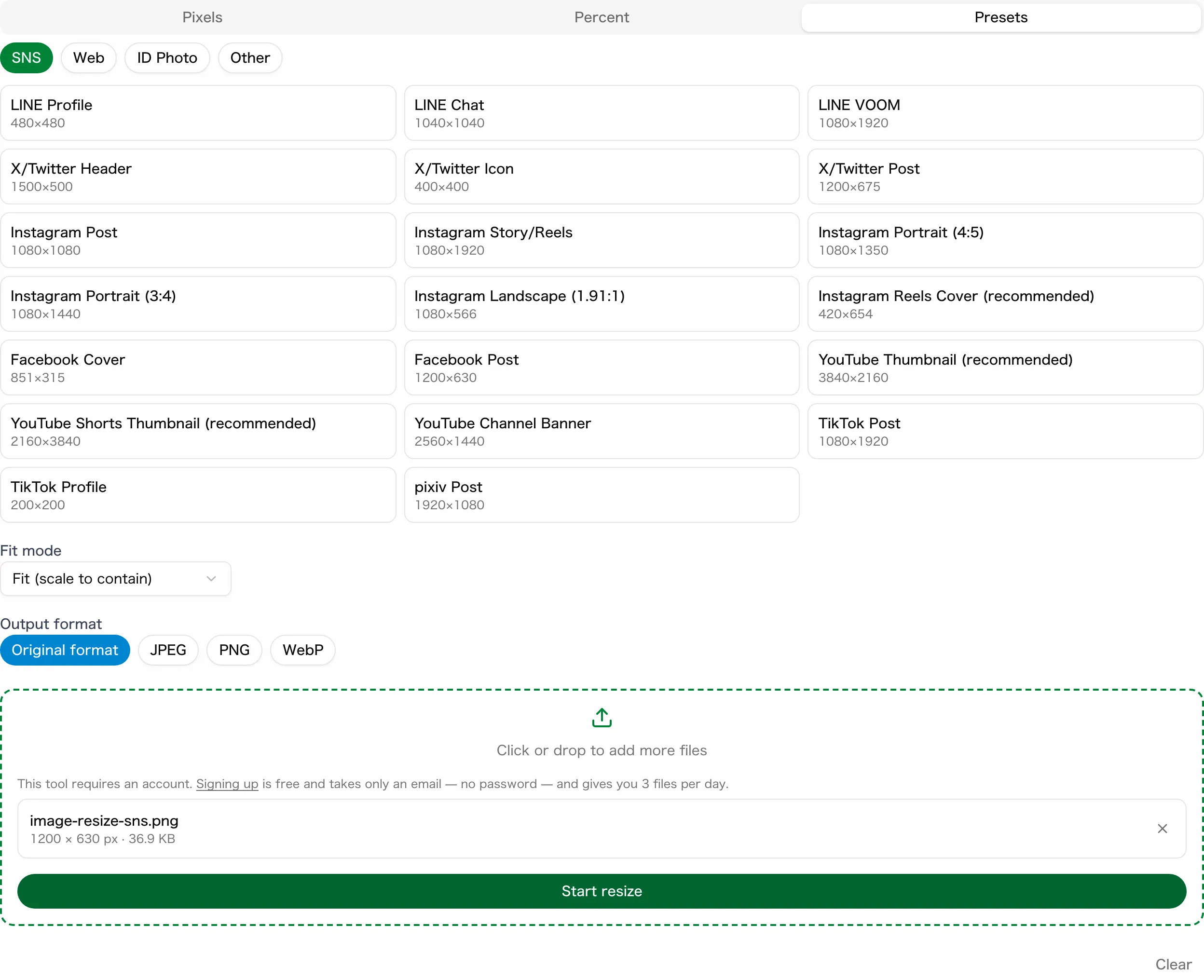
The presets for Instagram, YouTube and X include the sizes in the “Resizer presets for Instagram, YouTube and X” table. The three labeled "(recommended)" follow the sizes Instagram and YouTube recommend.
Resizer presets for Instagram, YouTube and X
| Preset | Pixels |
|---|---|
| Instagram Post | 1080 × 1080 |
| Instagram Portrait (4:5) | 1080 × 1350 |
| Instagram Portrait (3:4) | 1080 × 1440 |
| Instagram Landscape (1.91:1) | 1080 × 566 |
| Instagram Story/Reels | 1080 × 1920 |
| Instagram Reels Cover (recommended) | 420 × 654 |
| YouTube Thumbnail (recommended) | 3840 × 2160 |
| YouTube Shorts Thumbnail (recommended) | 2160 × 3840 |
| X/Twitter Post | 1200 × 675 |
The four Instagram post presets all fall inside Instagram's feed range, with Instagram Portrait (3:4) and Instagram Landscape (1.91:1) at its two ends. Instagram Story/Reels is 9:16, which fits both Reels and Stories. X/Twitter Post is a 16:9 preset of the tool, because X states no size.
With the default Fit (scale to contain), the image keeps its proportions inside the box, so a photo with a different ratio comes out smaller than the preset. To get the exact box size, choose Cover (crop overflow) to trim the overflow, or Pad (fill with background) to fill the gap with a background color.
Enter sizes the presets lack in Pixels mode, with Cover
A size such as 1080 × 1200 falls inside Instagram's feed range but has no preset. Enter sizes like this in Pixels mode.
- Open Pixels and click the lock button (Aspect ratio locked) to unlock it
- Type 1080 for the width and 1200 for the height
- Choose Cover (crop overflow) as the fit mode and click Start resize
With the lock still on and one image loaded, typing a height rewrites the width to match the original image's aspect ratio. For resizing in general, see How to resize an image on Windows, Mac and phones.
Summary: size each image to the numbers platforms publish
Every figure in the “Image sizes stated on each help page” table comes from a help page, and X is the one network that states no dimensions at all. Instagram feed photos are 1080 pixels wide between 1.91:1 and 3:4, and a 9:16 vertical image works for both Reels and Stories. YouTube recommends 3840 × 2160 pixels for video thumbnails, with a minimum width of 640 pixels.
X publishes only a 5 MB limit and up to four photos per post. The sakuttoAI resizer fits a photo to any of these sizes with a preset, or with Pixels mode for a size without one.
FAQ
- What is the best image size for an Instagram post?
- Use a photo at least 1080 pixels wide with an aspect ratio between 1.91:1 and 3:4. Instagram keeps photos in that range at their original resolution, so a portrait can be as tall as 1080 × 1440 pixels.
- Should an Instagram portrait post be 4:5 or 3:4?
- Either works. The supported range runs from 1.91:1 to 3:4, so 3:4 (1080 × 1440 pixels) is the tallest shape Instagram keeps at full resolution, and 4:5 (1080 × 1350 pixels) sits inside the range.
- What image size does X recommend for posts?
- X's Help Center doesn't give a recommended pixel size or aspect ratio. It lists limits instead: photos up to 5 MB, one to four photos per post, and GIF, JPEG or PNG files.
- Is 1280 × 720 still the right YouTube thumbnail size?
- It clears the 640-pixel minimum width, but YouTube now recommends 3840 × 2160 pixels for video thumbnails. The thumbnail is also the preview image in the embedded player, so YouTube asks for the largest image you can make.
- Can I use a landscape photo in Instagram Stories?
- Yes, as wide as 1.91:1. Meta's specifications list Instagram Stories images as 9:16 and 4:5 to 1.91:1, so shapes between 4:5 and 9:16, such as 2:3, fall outside the list.
Related articles
 Social media video length: TikTok, Instagram, XSocial media video length limits for X, Instagram reels and stories, TikTok, YouTube Shorts, Facebook, Threads and LinkedIn, plus how to trim a long video.
 Social media character limits: X, YouTube and moreSee official social media character limits for X (Twitter) and YouTube, how X counts characters, and how to check Instagram, Facebook, TikTok, LinkedIn.
 Profile picture size by platform: official specsProfile picture size for Facebook, LinkedIn and YouTube from each help center, plus cover and banner sizes and what to upload for Instagram and TikTok.
 Meta's Style Sketch builds outfits from InstagramMeta's free Style Sketch app builds a closet from your Instagram photos and suggests outfits. It is out only in Indonesia, Singapore and Thailand, not the US.