Four wine inventory apps handle sharing differently
The four apps differ on three practical points: how the other person gets in, what that person can do once inside, and what the feature costs. The table puts those side by side, and each app then gets its own short section.
How four wine inventory apps handle sharing
| App | Access the other person gets | Cost |
|---|---|---|
| Shelvin | QR invite; authorized users share inventory | Premium column; $6.99 for one month |
| InVintory | Collaborator at an access level you adjust | Free plan |
| CellarTracker | Complete control, including deleting | Site and app free; whether sharing needs the paid subscription is undisclosed |
| Vinotag | Household access to manage the cellar | No price stated for sharing |
The Shelvin price is the App Store listing for its Premium Plan. CellarTracker's support articles do not say whether sharing is part of the paid subscription, and Vinotag's site gives no price for sharing. For a wider comparison of wine inventory apps on shelf locations, pricing and scanning, see "Wine Inventory Apps: 5 Cellar Trackers Compared".
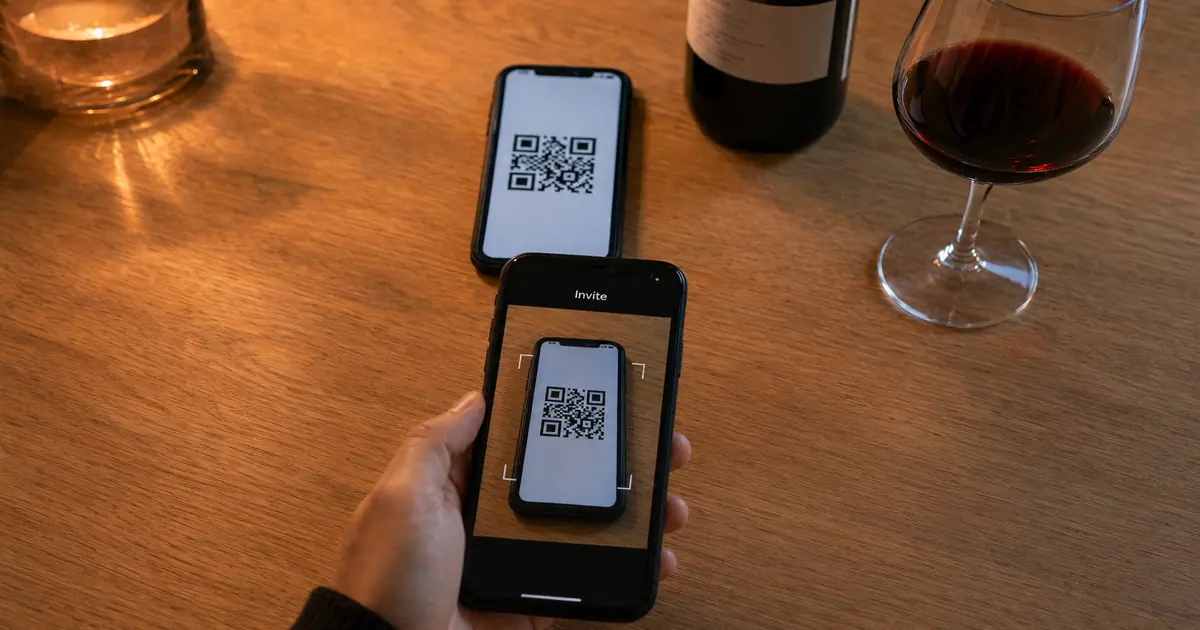
Shelvin invites by QR code and shares with authorized users
To bring someone into Shelvin, you show them a dedicated QR code, and they register through it to get the cellar information. The US App Store listing says inventory is shared between authorized users and names families and restaurant staff as a good fit.
Shelvin's team sharing is in the Premium column of its pricing table, so check the plan before you invite staff. The US App Store lists the Premium Plan at $6.99 for one month. Shelvin (App Store)
QR Code Invitation: Simply present a dedicated QR code to the desired user to easily register and share cellar information. / Permission Management: Inventory information can be shared between authorized users, making it ideal for use among families and restaurant staff. — From the "Smooth Sharing and Invitation" section of the listingView official source →
InVintory's free plan adds collaborators with access levels
InVintory lets you add collaborators or family members and adjust the access level for each of them. The pricing page puts that option in the Free plan column.
You can bring a partner into InVintory without paying, and you set the access level yourself. The pricing page does not describe what each level lets a person see or change, so check the app before you rely on a specific limit. Premium is $149.99 a year.
Add collaborators or family members and adjust access level / Premium is $149.99 a year. — From the Free plan features and the pricing FAQView official source →
CellarTracker gives the person you add full control
CellarTracker's account sharing lets you give specific users complete control of your cellar. That includes adding, editing and deleting bottles and tasting notes. The support article gives one example: a storage facility that manages your wine can help with the bottles in its care.
What you hand over is not a view-only link: the other person can delete bottles and tasting notes as well as add and edit them. You set sharing up on the full desktop website, and the person you add then switches between the accounts they can reach. While they are in your cellar, social integration and sharing settings are not available to them.
The transaction log records which user account made a change, although the support article says there are no detailed audit logs. The site and app are free, with a paid subscription for extra features, and neither support article says whether sharing is part of that subscription.
with account sharing, you can allow specific users to have complete control over your cellar, including the ability to add, edit and delete bottles and tasting notes. / Additionally, while CellarTracker does not maintain detailed audit logs, we do track the actual user account that made a change in the transaction log . — From the opening of the article and the Notes sectionView official source →
CellarTracker is a free site/app with paid subscription to access additional features. — From the opening of the articleView official source →
Vinotag opens cellar management to your household
Vinotag has a share function that gives other members of your household or close circle access to the management and contents of your cellar. The site also shows the cellar as a graphic view on your phone, with the precise location of each bottle.
Vinotag's sharing is aimed at the people you live with or know well. The site gives no price for sharing itself. It does say that new accounts include 50 free scans and that a Premium option adds more.
Share the management of your cellar with a "share" function to allow access to the management, and contents of your cellar to other members of your household or close circle. / 50 free scans when you sign up. Discover the Premium option to acquire new scans. — From the sharing feature and the scan descriptionView official source →
Who you share with decides which app fits
Sharing a cellar with a partner and sharing stock with a restaurant team look alike, but the details that matter are different. At home the question is how easily the other person joins and what that person may change; at a restaurant it is whether every staff member sees the same stock during service.
Which app fits each kind of sharing
Partners and families avoid buying the same bottle twice
A shared cellar can keep two people from buying the same wine. Shelvin's listing gives that exact use for families and partners: share which wines you can open tonight so nobody buys a duplicate or opens a bottle by accident.
For a couple, the choice comes down to how you want to add the other person and how much you want them to change. Shelvin adds a partner by QR code, InVintory lets you adjust the access level on its Free plan, and Vinotag opens the cellar to your whole household.
For Family and Partners: Share which wines you can open tonight to prevent duplicate purchases or accidental consumption. — From the use cases in the listingView official source →
For restaurant staff, Shelvin shares stock in real time
Shelvin's site says that the whole family or all store staff can share inventory in real time, including what is in the back room and what has already been opened. Shelvin's listing and site both point to staff sharing, and the site places team sharing in the Premium column.
If you need to know who changed a bottle, CellarTracker's transaction log records which account made each change. For how to count and organize a restaurant's wine stock, see "Bar Inventory for Wine: Records, Vintages, Sharing".
Pick an app by who you share with and what they can change
For a partner or family, Shelvin adds people by QR code, InVintory adds collaborators with an access level you adjust, and Vinotag opens the cellar to your household. If you want someone to run the whole cellar for you, CellarTracker gives that person complete control. For restaurant staff, Shelvin's listing names staff and its site puts team sharing in the Premium column.
Match the app to the person: choose by how they join and by how much they should be allowed to change. Only two costs are public: Shelvin's Premium Plan is listed at $6.99 for one month, and InVintory's Free plan includes collaborators. CellarTracker and Vinotag have not published what sharing costs.
If you want to stop buying duplicates at home, Shelvin's listing names that use for families and partners. Shelvin (App Store)
FAQ
- Can I share a wine inventory app with my partner for free?
- Yes, in InVintory. Its Free plan lists the option to add collaborators or family members and adjust the access level. Premium, at $149.99 a year, is a separate plan.
- Can someone I share my CellarTracker cellar with delete bottles?
- Yes. CellarTracker's account sharing gives that person complete control of your cellar. They can delete bottles and tasting notes as well as add and edit them.
- How do I invite someone to my Shelvin cellar?
- Show them your dedicated QR code. They register through it and get the cellar information. Shelvin's site lists team sharing in the Premium column of its pricing table, and the US App Store lists the Premium Plan at $6.99 for one month.
- Can I see who changed a bottle in a shared cellar?
- In CellarTracker, partly. Its transaction log records which user account made a change. The support article adds that CellarTracker keeps no detailed audit logs.
Related articles
 Bar Inventory for Wine: Records, Vintages, SharingBar inventory for wine: TTB wants a log of what you receive or every invoice. See what the IRS asks, why each vintage needs a line and how staff share a list.
 Wine Inventory Apps: 5 Cellar Trackers ComparedFive wine inventory apps compared on shelf-level location, label scanning, free tiers and US prices: Shelvin, InVintory, CellarTracker, Oeni and Vivino.
 Build Apps With AI: Testing a Wine Tracker PromptCan you build apps with AI? We gave Claude Sonnet 5 one prompt for a wine cellar tracker. The first file ran unedited, but at phone width words broke apart.
 Wine Cellar Temperature: One Number, Held SteadySet your wine cellar temperature to 12°C (54°F) for every wine and hold it. Full-bodied reds at 18°C and dry whites at 8°C are for serving, not storage.