
A QR code for fundraising at a school fair ends up doing three separate jobs: sending people from a flyer to your page, getting ticket holders through the door, and taking money at a craft booth. The first two you can make yourself in a few minutes with a free generator.
The third one you can't. A booth payment code has to come from PayPal or Venmo, and each service has a rule about what kind of transaction a sale is allowed to be. Getting that rule wrong is expensive: printing a volunteer's personal code for a booth is against both services' terms, and Venmo says it may be unable to recover funds lost that way.
QR code for fundraising: three jobs at a school fair
A QR code carries text, and for a fair that text is nearly always a URL. The square itself doesn't care whether it leads to a schedule or to a payment screen — that depends on what you put in it, and on who is allowed to issue it.
| Job | What goes in the code | Who makes the code |
|---|---|---|
| Flyer or poster | A link to the fair page, schedule or signup form | You, with a free generator |
| Entry at the door | A pre-filled Google Form link, one per family | You, with a free generator |
| Booth payments | A PayPal or Venmo payment code | PayPal or Venmo, inside their app |
The split in the last column is the one worth remembering. A generator turns any text you give it into a code, so it can make the first two. It can't make the third, because a payment code has to be tied to the account that receives the money.
That's also why the money side of a fair takes the most planning. You can make and remake the flyer and door codes whenever you like, while the booth codes depend on which service the fundraiser has an account with and on what that service allows a school group to do with it.
Put a short page or form link in the QR code on your flyer
On a flyer or poster, the code replaces a URL nobody wants to type. Point it at whatever a reader needs next: the fair page, the schedule, a map of the grounds, or a volunteer signup form.
Keep the link short. DENSO WAVE, which invented the format, puts it plainly: more data means more modules, and more modules mean the code takes up more of the flyer. A Google Form gives you a short link of its own once it's published — check the box next to "Shorten URL" when you copy it.
Write in plain text next to the code what opens when someone scans it. "Scan for the fair schedule" costs you one line and saves a reader the gamble. How small the printed square can get before phones start struggling is covered in QR code minimum size: how small can it be?.
"commencing with Version 1 (21 × 21 modules) up to Version 40 (177 × 177 modules)." / "In other words, as the amount of data increases, more modules are required to comprise QR Code, resulting in larger QR Code symbols." — from QRcode.comView official source →
"You can copy a short link once you publish the form:" / "Click the box next to “Shorten URL.”" — from Google Docs Editors HelpView official source →
A printed test copy to scan before the flyers go out
Print one flyer, scan it with your own phone, and check that the page you expected actually opens. A code that works on screen can still fail on paper, usually because it came out too small or lost its white margin to a background image. If yours won't scan, QR code not scanning? Count the quiet zone first goes through the usual causes.
Check-in at the door with pre-filled Google Form links
Google Forms handles entry without any ticketing service. Build a form with the fields you want at the door — family name, number of guests, whatever the office needs afterward — and publish it, because responders can't reach an unpublished form even with the link.
Then open More in the top right, select Pre-fill form, type one family's details into the fields, and click Get link. Copy the link from the top and turn it into a QR code. Repeat per family, and each household arrives holding a code that already knows who they are.
At the door, a volunteer scans the code on the guest's phone or printout, the form opens with the details filled in, and they tap Submit. Nothing to look up, nothing to spell out.
One thing a plain form won't do is stop the same code from being used twice, because the link can simply be opened again. If a single-use ticket matters to you, that's a job for a ticketing service rather than for Google Forms.
"When you publish a form, responders can access it. If the form is unpublished, responders with the link can’t access it." / "You can send respondents a form with some fields already filled in." / "Fill in any answer fields you want to pre-populate." / "To send the pre-populated form to respondents, copy and send the link at the top." — from Google Docs Editors HelpView official source →
A response sheet shows who has checked in
Send the answers somewhere the office can keep an eye on them. In the form, click Responses, then Summary, then More, then Select destination for responses, and either create a new spreadsheet or pick an existing one. Google Sheets automatically puts the incoming rows into a table.
The Summary tab lists the people who have responded, so anyone with the sheet open can see the arrivals building up during the afternoon without standing at the gate. Share it with the office and with whoever is running the door, and both ends of the fair are reading the same list.
"If you store your responses in a spreadsheet, Google Sheets automatically puts your data in a table." / "In the “Summary” tab, you can find the list of people who responded to your form." — from Google Docs Editors HelpView official source →
PayPal booth sales go through goods and services payments
Selling cupcakes or handmade crafts at a booth is a sale, and PayPal treats sales differently from splitting a lunch bill. Personal payments are for gifts, shared expenses and the like; buying an item or a service means choosing "Paying for an item or service", and on that type of payment the seller pays a small fee.
The user agreement puts an obligation on the receiving side too. If you take payments for goods or services, or donations, you have to pay the applicable fees and you must not ask a buyer to send the money as a personal transaction. PayPal states the consequence outright: do that, and it may remove your account's ability to accept friends and family payments at all.
So the answer to "can't we just have parents send it as friends and family to skip the fee?" is no, and the price of trying is the account the fundraiser is running on. Treat the goods and services fee as a cost of the fair, the same way you treat cups and napkins, and the question stops coming up.
"If you use your PayPal account to receive payments for the sale of goods or services or to receive donations, you must:" / "Pay any applicable fees for receiving the funds." / "Not ask your buyer to send you money as a personal transaction (often referred to as using the \"Send Money to a Friend or Family Member\" feature). If you do so, PayPal may remove your PayPal account's ability to accept payments from friends or family members." — from the PayPal User AgreementView official source →
"You can use personal payments when you send money as a gift, split a lunch bill, pay your share of living expenses, or something similar." / "Choose “Paying for an item or service” when buying goods or services." / "When you make this type of payment, the seller pays a small fee to receive your money." — from PayPal HelpView official source →
Print a PayPal Seller QR code for the booth table
PayPal's own QR code is the clean way to lock in the right payment type before anyone taps anything. It's free to create and share. Put it where buyers can see it, and the sender scans it in the PayPal app and completes the payment there.
The Seller QR code is the variant for sales, fees apply to it, and the United States is one of the countries where PayPal offers it. Stand it on the table where the line can see it, and tell buyers to scan and pay there rather than look you up by name and send money over. A volunteer holding the code on a phone screen works as well as a printed card, as long as everyone on the booth is showing the same one.
"QR code payments allow you to get paid with PayPal just by displaying your QR code for senders to scan using the PayPal app. It's free to create and share a QR code." / "Seller QR code*" / "Ask the sender to scan your code and complete the payment." — from PayPal HelpView official source →
Venmo for fundraising: a business profile or purchase tags
Venmo draws the same line, and draws it more tightly. There are exactly two ways to accept payment for goods and services: apply for a business profile, or have the sender tag the payment to a personal profile as a purchase. Anything outside those two isn't authorized, and Venmo says funds lost to non-approved purchase activity may not be recoverable.
The purchase tag is the sender's action, not yours. When a buyer tags a payment as a purchase, Venmo tells you the sender has flagged it as payment for an item or service. That works for the odd sale, but Venmo points regular sellers at business profiles instead, and a fair with a dozen booths taking money all afternoon is much closer to regular selling.
Plan for refunds before the day. Refunding a purchase-tagged payment means sending the buyer a new one, and Venmo does not return the fee the sender's purchase tag triggered, so the fundraiser absorbs it.
"The only way to accept payments for goods and services on Venmo is to be explicitly authorized to accept Venmo for purchases. This can be achieved by applying for a business profile or by having the sender tag a payment to a personal profile as a purchase." / "Please note that we may be unable to recover funds or merchandise lost as a result of non-approved purchase activity" — from Venmo HelpView official source →
"If the sender tags a payment as a purchase when sending money to your personal profile, we’ll notify you that they did so. This means that the sender let us know they’re paying you for an item or service" / "For payments intentionally tagged as purchases by the sender, Venmo will not return the fee amount if you need to issue a refund." / "You can refund a buyer by making a new payment to them." — from Venmo HelpView official source →
Donations don't belong on a volunteer's personal Venmo
This is the shortcut that gets suggested every year, and Venmo's answer is no: personal profiles should not be used to receive funds for user-created donation campaigns or non-profits. Charity profiles cover that case, and they belong to organizations that have confirmed their charity status on PayPal.
There's a practical reason on top of the rule. Donations landing in one parent's personal account become that parent's to track, refund and explain, which is a lot to ask of someone who volunteered to run a cake booth.
Make the flyer and check-in QR codes with a free generator
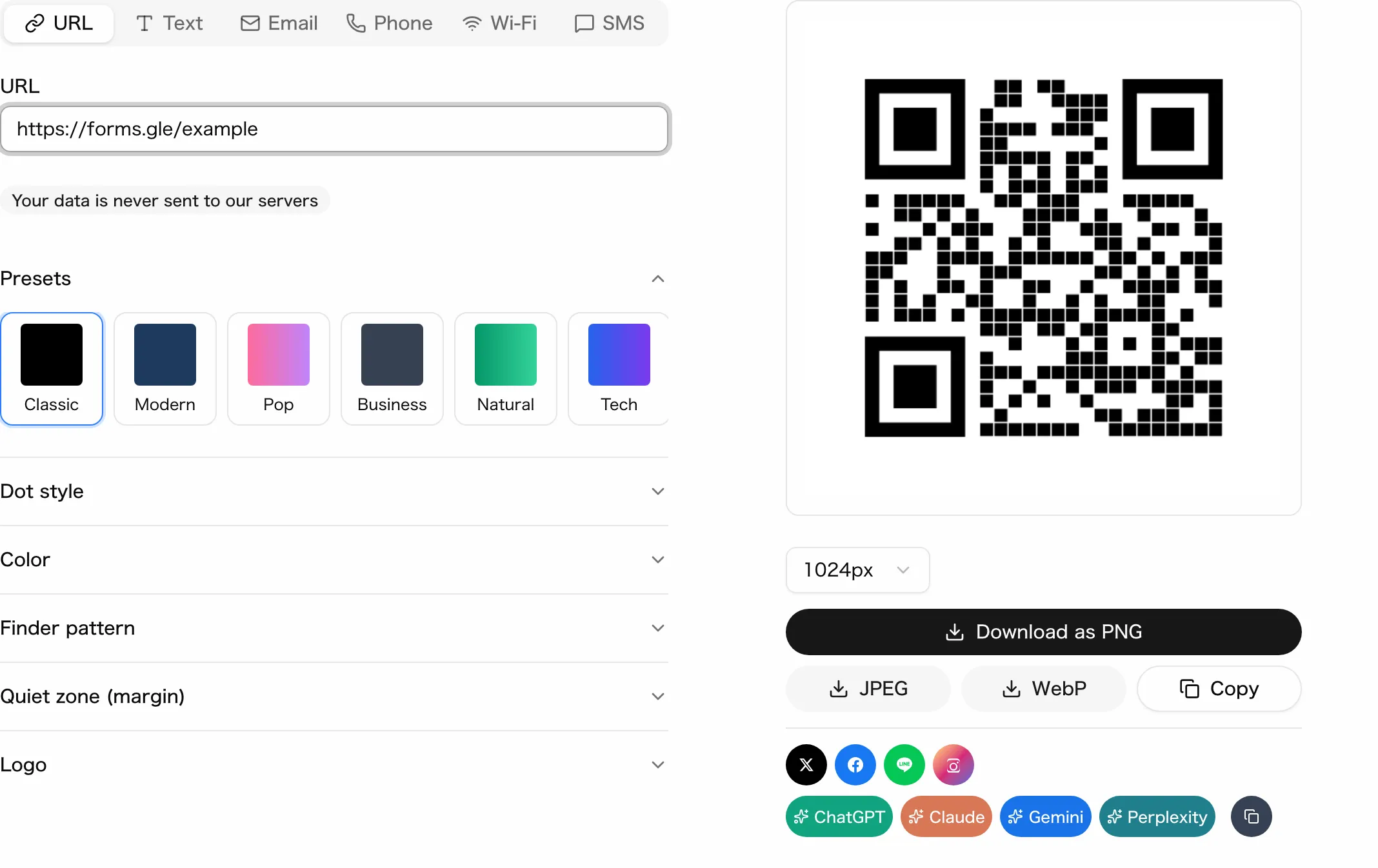
The flyer link and the pre-filled form links are ordinary URLs, so any generator will turn them into codes. Ours is free and has no limit on how many codes you make. Your data is never sent to our servers, which matters when the codes carry families' names.
Paste or type a URL into the URL tab and the code appears right away. Five other input types are there if you need them: text, email, phone, Wi-Fi and SMS. For a fair, the URL tab is the one you'll use for both the flyer code and the door codes.
Pick a size from 256, 512, 1024 or 2048 pixels; 1024 is the default and is enough for print. Save the image as PNG, JPEG or WebP, or copy it straight to the clipboard. Make the door codes in one sitting, name each file after the family it belongs to, and hand them out as a batch.
Summary
- A QR code for fundraising does three jobs at a fair: flyer links, door check-in, and booth payments. You can make the first two; the third has to come from the payment service.
- On flyers, use a short link and say in plain text what opens. Print one and scan it before the rest go out.
- At the door, pre-filled Google Form links give each family their own code, and a linked sheet shows who has arrived.
- On PayPal, take booth sales as goods and services. Asking buyers for friends and family payments can cost the account its ability to receive them.
- On Venmo, sales need a business profile or a purchase tag from the sender, and donations do not belong on a volunteer's personal profile.
FAQ
- Can a school fair booth take friends and family payments on PayPal?
- No. PayPal's user agreement says a seller must not ask buyers to send money as a personal transaction, and PayPal may remove the account's ability to accept friends and family payments. Take booth sales as goods and services.
- Can we sell food at a school fair through a personal Venmo account?
- Only if each buyer tags the payment as a purchase. Otherwise Venmo says goods and services need a business profile, and funds lost to non-approved purchases may not be recoverable.
- Can a QR code for donations point to a volunteer's personal Venmo?
- It shouldn't. Venmo says personal profiles are not for donation campaigns or non-profits. Charity profiles are for organizations that have confirmed their charity status on PayPal.
- Can I check in school fair guests with a free Google Form QR code?
- Yes. Make a pre-filled link for each family in Google Forms, turn each link into a QR code with a free generator, and have volunteers scan it and submit the form at the door.
- Why use a short link in a flyer QR code?
- More data needs more modules, which makes the code bigger. A short link, such as the one Google Forms gives you after publishing, keeps a flyer code small.
Related articles
 Custom QR code design: color, logo, and shape tipsCustom QR code design with brand colors, a logo, and a dot shape, without breaking the scan. Covers contrast, logo size, error correction, and print size.
 QR Code Flyer Size and Placement: The 10:1 RuleQR code flyer size and placement: size the code with the 10:1 scan-distance rule, keep the four-module quiet zone clear, and add a short call to action.
 What is a dynamic QR code? Static vs dynamicA dynamic QR code stores a short link the provider forwards, so you can edit where it goes after printing. If the service ends, the code won't open your page.
 Do QR codes expire? How to make one that won'tDo QR codes expire? A QR code never does, but a dynamic code stops when its provider turns off forwarding. Find the cause, fix it, and make a code that lasts.