
Columns a wine inventory spreadsheet or template needs first
Fix the columns before entering any bottle. A new row costs nothing, but a column added in month three has to be filled in by hand for every bottle already listed. The column set is also the template: copy the same header row into a new file and the new sheet starts with the same columns, though the dropdown lists and color rules have to be set up again.
The columns to create
Start your wine inventory list with five columns
These five columns answer three questions: what is in the cellar, how many bottles, and where. Give producer and wine name separate columns so either one can be sorted, and give vintage its own column so two years of the same wine never merge into one row. Quantity holds the bottles on hand today, not the total ever bought.
Location records where the bottle physically sits, for example the wine fridge, the basement rack or a closet shelf. With one fridge it looks redundant. It starts to matter once a second storage spot appears, and it is cheap to have from day one.
Split the drinking window into drink-from and drink-by
A drinking window is the range of years in which a wine is expected to taste its best. One "drink by" date shows only when it is too late. Two columns, the first good year and the last, show both when to start and when to stop waiting.
The ready-to-drink color rule compares both years with the current year. "When to Drink Wine: Drinking Window and Aging" explains where those years come from.
For bottles kept in a rack, the location column can hold a slot code. A code such as 2-05 for shelf 2, position 5 works once the household agrees on where counting starts.
Excel data validation keeps type and grape spelled the same
Data validation limits what a cell accepts. A free-text grape column ends up holding Cabernet Sauvignon, Cab Sauv and Cab Sauvignon, and a filter treats each as a different wine. A validation list turns the cell into a dropdown that offers only approved values.
Select the column, choose Data Validation on the Data tab, and set Allow to List. Type the values into the Source box with commas between them, for example Red,White,Rosé,Sparkling.
Keep the In-cell dropdown box checked. Otherwise the arrow does not show up.
In the Source box, type your list values, separated by commas.
Make sure that the In-cell dropdown check box is selected. Otherwise, you won't see the drop-down arrow next to the cell. — From the steps for creating a listView official source →
Build the wine inventory Excel sheet as a table
The wine inventory sheet takes four steps once the columns are set. Decide what one row stands for, convert the range to a table, add the color rule, then number the slots from the real shelves.
Build order
- Decide whether one row is one bottle or one wine
- Type the header row and convert the range to a table
- Add a conditional formatting rule for ready-to-drink rows
- Number the slots to match where bottles actually sit
Use one row per bottle if you track shelf slots
Make this choice before the first entry. A sheet that mixes single-bottle rows with wine-plus-quantity rows gives totals that no longer match the cellar.
One row per bottle or per wine
When bottles of one wine can sit on different shelves, give each bottle its own row. For everyday wines where only the count matters, one row per wine saves typing. You can also keep two sheets, one per bottle for the cellar and one per wine for everyday bottles.
An Excel table filters every column and fills formulas down
An Excel table is a range that Excel treats as one managed list. Type the header row and a few bottles, select the range, and convert it to a table.
Each header then shows a filter button, so listing only reds or only the basement rack is a single filter away. A formula typed into one cell of a column is copied to every other cell in that column.
Excel calls this a calculated column. Use it for anything derived from other cells, such as years left in the window.
By entering a formula in one cell in a table column, you can create a calculated column in which that formula is instantly applied to all other cells in that table column.
Every table column has filtering enabled in the header row so that you can filter or sort your table data quickly. — From the list of elements of an Excel table, under Header rowView official source →
Conditional formatting in Excel colors ready-to-drink rows
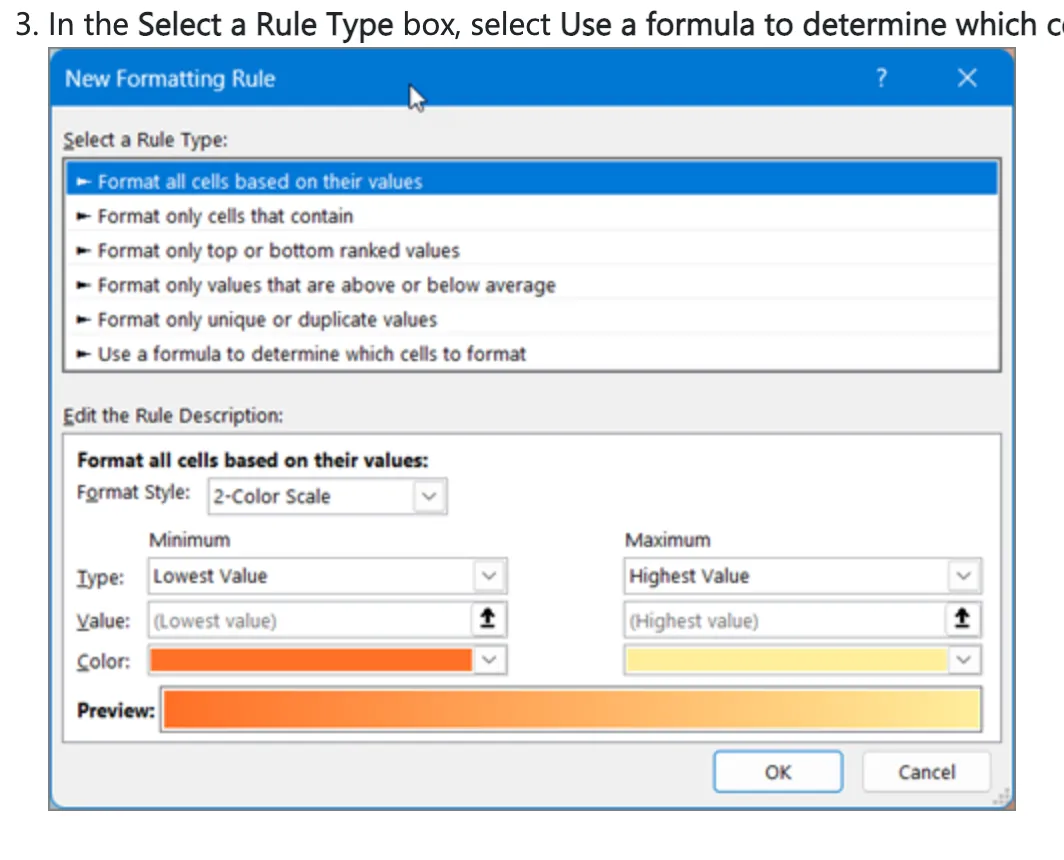
Conditional formatting changes how a cell looks when a condition is true. Open Home, then Conditional Formatting, then New Rule, and choose the rule type that uses a formula to decide which cells to format.
Suppose drink-from is in column G and drink-by is in column H. Select the data rows of the table, starting at row 2 so the header stays outside the selection.
Enter =AND($G2<=YEAR(TODAY()), $H2>=YEAR(TODAY())), choose Format, and pick a fill color. The 2 in the formula is the first selected row, so a sheet whose data starts lower needs both references changed to that row.
Every row whose window includes the current year takes that color. A second rule, =$H2<YEAR(TODAY()), marks bottles whose drink-by year has passed.
The bottles it marks are the ones to open first. The formula reads the year from today's date, so the colors update on their own in January.
In the Select a Rule Type box, select Use a formula to determine which cells to format.
Select Format . In the Format Cells box, select Fill . Pick a color and select OK . — From the steps for applying color with a formula ruleView official source →
Capacity assumes Bordeaux bottles, so number the real slots
Base slot numbers on bottles actually loaded, not on the capacity printed on a cabinet's spec sheet. EuroCave, for one, states that its listed capacities are calculated for Bordeaux bottles, so a shelf holding other bottle shapes can fit a different count.
Load the shelves, note how many bottles each really takes, and number the slots from that count. Slot numbers taken from loaded shelves stay valid, and adding rows later does not force a renumbering.
*the capacities given are calculated based on Bordeaux bottle sizes. — From the answer on how many bottles to storeView official source →
Where a wine inventory Excel file breaks
Size rarely ends a wine spreadsheet. It falls behind in three places: editing the file each time a bottle comes or goes, sharing it with a second person, and keeping the location column true to the shelves. This is the practical side of wine inventory management in a plain file.
Where the file breaks
One sheet holds 1,048,576 rows, far more than a cellar needs
A worksheet holds 1,048,576 rows by 16,384 columns, and one cell takes up to 32,767 characters. A row per bottle with long tasting notes stays far under those limits.
The weak point is the habit of opening the file after every bottle. A bottle opened at dinner can easily go unrecorded that night. After a few days the unrecorded bottles add up, and the list no longer matches the rack.
Total number of rows and columns on a worksheet 1,048,576 rows by 16,384 columns
Total number of characters that a cell can contain 32,767 characters — From the worksheet and workbook specifications tableView official source →
Co-authoring needs Microsoft 365 and OneDrive or SharePoint
Two people can edit one workbook at the same time only under Microsoft's conditions. The Windows desktop app requires a Microsoft 365 subscription and a file saved as .xlsx, .xlsm or .xlsb.
The workbook must be stored on OneDrive, OneDrive for Business or a SharePoint Online library. A SharePoint On-Premises site, one that Microsoft does not host, does not support it.
A workbook saved on one laptop and emailed to a partner is not stored on OneDrive or SharePoint, so the two copies start to diverge the day it is sent. In a household where anyone may open a bottle, a list only one person can update soon goes stale. "Bar Inventory for Wine: Records, Vintages, Sharing" covers the same problem for a bar team that shares one list.
You need to use Excel Workbooks in .xlsx, .xlsm, or .xlsb file format.
This feature is only available if you have a Microsoft 365 subscription./Note that SharePoint On-Premises sites (sites that are not hosted by Microsoft) do not support co-authoring. — From the notes on the Windows desktop tab and step 1 of the same tabView official source →
The location column does not move when a bottle does
A slot code in a spreadsheet is text that someone typed. Move a bottle to another shelf and the row keeps showing the old slot. Nothing in the file signals that the sheet and the shelf have drifted apart.
A handful of wrong slots is enough to send someone through several racks for one bottle. If locations stay in Excel, edit the row on the same day the bottle moves.
When a wine inventory app beats the spreadsheet
Neither tool wins everywhere. A spreadsheet fits one person who wants control over columns and totals.
A wine inventory app fits a household that wants to log a bottle at the moment it is opened and see the shelves. An app that draws the racks is often called a wine cellar app.
Spreadsheet or app
Google Sheets holds up to 10 million cells per file
When sharing is the only problem, moving the same table to Google Sheets can solve it. A Google Sheets file holds up to 10 million cells or 18,278 columns.
A wine list with a dozen or so columns stays far under that, even for a large private collection. The same column list carries over unchanged.
Shelvin logs the shelf row and tier, plus what you drank
When location is the question asked most, an app that draws the cellar works better than a text column. Shelvin registers several cellars and records which wine sits on which shelf, by row and tier. It also keeps a log of wines you rated, whether opened from the cellar or enjoyed at a restaurant, with tasting notes and dish pairings.
The app has a free tier. Label scanning is limited to 2 scans a week for free users and 50 scans a month for Premium users, and the listing shows a price of $6.99. "Wine Inventory Apps: 5 Cellar Trackers Compared" sets it beside the other apps in this category.
Beautifully record and rate wines you've enjoyed—whether opened from your cellar or savored at a restaurant—complete with tasting notes and dish pairings.
Cellar Registration and Allocation Recording: Register multiple cellars and visually record which wines are located on which shelf (row/tier)./(Note: Free users can scan up to 2 times/week; Premium users can scan up to 50 times/month)./Price: $6.99 (USD) — From the graphical cellar management feature, the label scanning feature and the subscription sectionView official source →
Summary: five columns in Excel, an app for shelf slots
A wine inventory Excel file starts from five columns: producer, wine, vintage, quantity and location. Add the drink-from and drink-by years, put dropdown lists on type and grape, and convert the range to a table. One formula-based color rule then shades every bottle that is ready this year.
Row count is not the problem. The file falls behind when updates wait, when a second person needs to edit, and when bottles move without the location text following.
One person with a steady routine can stay in Excel. A household that wants to log bottles as they are opened and see the shelves will find an app easier to keep current.
For that second case, Shelvin (App Store) records the row and tier of each bottle. You can use its free tier alongside the spreadsheet you already have.
FAQ
- What columns does a wine inventory spreadsheet need?
- Start with five: producer, wine, vintage, quantity and location. Add a drink-from year and a drink-by year next, so a formula can tell which bottles are ready. Price, store and notes can wait until you have a question that needs them.
- How do I keep wine types and grapes spelled the same?
- Put a data validation list on those columns. List the allowed values in the Source box with a comma between each, and the cell shows a dropdown instead of accepting whatever is typed. A filter will no longer split one grape into three spellings.
- Can two people edit the same wine list at once?
- Yes, if the workbook is set up for co-authoring. In the Windows desktop app, that means a Microsoft 365 subscription, a file in .xlsx, .xlsm or .xlsb format, and a copy saved to OneDrive, OneDrive for Business or a SharePoint Online library. A file emailed back and forth is a set of copies, not a shared list.
- Is there a size limit if I move the list to Google Sheets?
- Google Sheets allows up to 10 million cells or 18,278 columns per file. A wine list with a dozen or so columns stays far below that, even for a large private collection.
- Can Excel track which shelf a bottle is on?
- It can hold a shelf and slot number as text, but the value does not change when a bottle moves. You have to edit the row every time you rearrange the cellar. If that is the part you care about most, an app that draws the cellar and records the row and tier is the better fit.
Related articles
 Build Apps With AI: Testing a Wine Tracker PromptCan you build apps with AI? We gave Claude Sonnet 5 one prompt for a wine cellar tracker. The first file ran unedited, but at phone width words broke apart.
 Bar Inventory for Wine: Records, Vintages, SharingBar inventory for wine: TTB wants a log of what you receive or every invoice. See what the IRS asks, why each vintage needs a line and how staff share a list.
 How to Store Wine at Home, Unopened and OpenedHow to store wine: keep it at a steady 10–14°C (50–57°F) with humidity near 70%, lay corked bottles flat, and finish opened wine in 2 days to a week.
 CellarTracker: Languages, Pricing, Free TierCellarTracker app explained: four ways to add bottles, English as its only listed language, what the free tier covers, and subscription costs on site vs iOS.